
-
×InformationNeed Windows 11 help?Check documents on compatibility, FAQs, upgrade information and available fixes.
Windows 11 Support Center. -
-
×InformationNeed Windows 11 help?Check documents on compatibility, FAQs, upgrade information and available fixes.
Windows 11 Support Center. -
- HP Community
- Printers
- Printing Errors or Lights & Stuck Print Jobs
- Re: Turn Off Instant Ink

Create an account on the HP Community to personalize your profile and ask a question
Your account also allows you to connect with HP support faster, access a personal dashboard to manage all of your devices in one place, view warranty information, case status and more.
Check some of the most frequent questions about Instant Ink: HP INSTANT INK, HP+ PLANS: INK AND TONER.
Check out our Black or Color Ink Not Printing, Other Print Quality Issues info about: Print quality and Cartridge Issues.

It has been a while since anyone has replied. Simply ask a new question if you would like to start the discussion again.

12-13-2018
01:46 PM
- last edited on
12-13-2018
01:53 PM
by
 rick-s
 HP Recommended
I have an 8620 that did use instant ink but now has my own ink in it. It asks on every print to connect up for the instant ink status. The instant ink was cancelled and I have called support twice and reset the printer and reconnected to the internet. All to no avail. The printer works ok with the exception of the messages with every print effort. Is there no way to end this curse?
7 REPLIES 7


12-15-2018 08:38 AM
HP Recommended
Hey there! @Ranger_43, Thanks for stopping by the HP Support Forums!
I understand you have cancelled the instant ink subscription but you keep getting a message to use instant ink cartridges.
Don't worry I'll try to help you out.
Did you make any changes to your printer?
Do you see any blinking lights on your printer?
Excellent description and a great diagnosis done. It is greatly appreciated.
If you are using even a single instant ink cartridge on your printer. You will keep getting the error message.
Also, You can cancel enrollment in HP Instant Ink at any time without penalty. Before you cancel the service, read the following information carefully:
-
HP Instant Ink cartridges do not work after the end of your current billing period, and you are required to return them to HP. To continue printing after your billing cycle ends, make sure you have standard replacement ink cartridges ready to use in your printer.
If you do not have the postage-paid envelope provided by HP, go to Recycling HP Instant Ink Cartridges to order an envelope.*
-
There is no pro-rated reimbursement for the remainder of your billing period.
-
Your service continues until the end of your current billing period.
-
If there are any charges for additional printing, your credit card is charged. Depending on when you cancel, the charge might appear the following month.
Sign in to your HP Instant Ink account to cancel your HP Instant Ink service.
-
Go to hpinstantink.com/signin (the HP Connected website) to sign in to your HP Instant Ink account, if you are not signed in already.
Your HP Instant Ink account page opens.
-
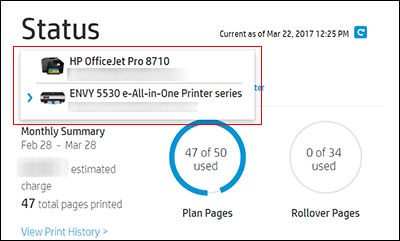
In the Status area of your HP Instant Ink account page, a printer drop-down menu is available when there are multiple printers enrolled. Click the drop-down menu, and then select the printer you want to cancel.
-
Check the Print History or the ePrint address of the printer to confirm you have selected the correct printer.
-
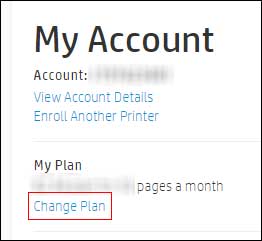
In the My Account area, click Change Plan.
-
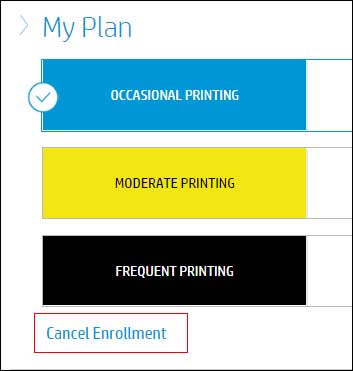
Click Cancel Enrollment.
-
Click Next, and then Cancel Enrollment to confirm your cancellation request.
You receive an email confirmation of the cancellation. The cancellation finalizes at the end of the current billing cycle when the final charge processes successfully.
Refer this article to know more information about cancelling instant ink subscription. Click Here
If you still have issues after trying out the steps. Please share few details through a private message about the instant ink account details. So I can check the acount details and help you with your issue.
Instant ink account number-
Instant ink email address-
Serial number-
Hope this answers your query!
Take Care! 🙂
Please click “Accept as Solution” if you feel my post solved your issue, it will help others find the solution.
Click the “Kudos, Thumbs Up" on the bottom right to say “Thanks” for helping!
Please click “Accept as Solution” if you feel my post solved your issue, it will help others find the solution.
Click the “Kudos, Thumbs Up" on the bottom right to say “Thanks” for helping!
A4Apollo
I am an HP Employee
12-23-2018
06:17 PM
- last edited on
12-24-2018
07:06 AM
by
kevin-t
HP Recommended
Still have the same problem. I have my own cartridges installed. No blinking lights and the printer communicatesfine via WiFi to my computer which is on line to the internet. It also prints fine with the exception of the bothersome instant ink messages which must be responded to on every print. As noted earlier, this all started when it appeared the printer could not communicate with the network even though it communicates fine via WiFi to my computer which is on the wifi router tied to the internet. When I look at my instant ink account it shows not active but shows that I have instant ink cartridges installed. When I attempt to print, I get the message about instant ink that I have to respond to before I can print. Very frustrating.
Instant ink account number- [Personal Information Removed]
Instant ink email address-
Serial number- [edited]

12-24-2018 07:35 AM
HP Recommended
It looks like you were interacting with @A4Apollo, but he is out for the day & I'll be glad to help you out,
I'm the Jeet_Singh & I'm at your service.
After reviewing the account, I see that your Instant ink program was cancelled on 12/08/2018, upon which you will no longer be able to use the Instant ink cartridges.
If you do still have your instant ink cartridges inserted, you could try removing them and replacing them with normal cartridges to see if that helps.
If the issue persists, I would suggest here is to turn off web services and then restart the printer and then start using regular Ink cartridges, which should definitely help in resolving this issue.
Here's the steps for Turning of Web services on HP printer.
As mentioned you could go ahead and restart the printer and make sure that the printer is connected directly to the wall outlet and not to the surge protector.
Remove all the ink cartridges and then try to perform a hard reset on the printer.
With the printer turned on, disconnect the power cord from the rear of the printer and also unplug the power cord from the wall outlet.
Remove USB cable, if present.
Wait for 2-3 minutes, press and hold the power button on your printer for about 30 seconds to remove any additional charge.
Now plug back the power cable straight to a wall outlet without any surge protector or an extension cord and then plug back the power cord to the printer.
Turn on the printer and wait till warm-up period finishes and the printer is idle.
Now insert the ink cartridges and then try to print a test page and check if it works.
Keep me posted,
If the information I've provided was helpful,
give us some reinforcement by clicking the solution and kudos buttons,
that'll help us and others see that we've got the answers!
Good Luck.
Jeet_Singh
I am an HP Employee
12-24-2018 11:02 AM
HP Recommended
No improvement. Even did the reset that requires resetting language, country and time. Still comes up with the instant ink message. The instant ink cartridges were mailed back several weeks ago. Big mistake getting involved with instant ink. Last contact with HP tech support told me I had to do a port setting for web services to get through my router. Have no ideal about that as there was no port setting involved when instant ink was started.
12-24-2018 02:31 PM
HP Recommended
Thank you for replying,
As I understand you have tried the steps suggested and still having the issue. Don't worry we're here to help you.
Just wanted to check if you have tried to disable web services on the printer.
If you have tried it and still having the issue. I'm sending you a private message with the information required to get this issue sorted.
Please check the mailbox icon at the top-right corner of this screen.
Please check your Private message icon on the upper right corner of your HP Forums profile,
Next, to your profile Name, you should see a little blue envelope, please click on it.
I hope this helps resolve this issue completely,
Regards,
Jeet_Singh
I am an HP Employee

09-09-2019 07:02 PM
HP Recommended
I have the same problem and currently the printer prints out blank pages, so talk about a piece of junk I've had for not even 2 years.
I love how the technicians don't even read the poster's information because I too do not have any instant ink cartridges. I have HP63 XL ink cartridges installed, to which neither lasted more than like 40 pages before giving me problems. The color didn't print the magenta and the black prints greenish unless I put settings to black ink only.
Anyway, in troubleshooting this blank printing issue, it keeps trying to connect to Instant Ink, then asks me to agree and then to retry on EVERY SINGLE troubleshooting attempt. I have also completely uninstalled my printer, reset all the software (uninstalled it all) and reinstalled the software from the website and set up printer to use USB instead of Wifi and I still get the message to reconnect to instant ink every single print job that I want to do.
I'm sorry I bought this printer, especially since I can't use it.

09-12-2019 10:20 AM
HP Recommended
@AllieApplesauce, Welcome to HP Support Community!
Try these steps to re-enable the web-services -
Step 1 Remove the Web-Services -
1. From the top of the screen, touch or swipe down the tab to open the Dashboard, touch ( HP ePrint ), and then touch (Web Services Settings).
2. Touch Remove Web Services.
Reboot the devices.
Try printing.
Hope this helps! Keep me posted.
Please click “Accept as Solution” if you feel my post solved your issue, it will help others find the solution. Click the “Kudos/Thumbs Up" on the bottom right to say “Thanks” for helping!
TEJ1602
I am an HP Employee

Be alert for scammers posting fake support phone numbers and/or email addresses on the community.
If you think you have received a fake HP Support message, please report it to us by clicking on "Flag Post".
† The opinions expressed above are the personal opinions of the authors, not of HP. By using this site, you accept the Terms of Use and Rules of Participation.


Didn't find what you were looking for?
Ask the community
† The opinions expressed above are the personal opinions of the authors, not of HP. By using this site, you accept the <a href="https://www8.hp.com/us/en/terms-of-use.html" class="udrlinesmall">Terms of Use</a> and <a href="/t5/custom/page/page-id/hp.rulespage" class="udrlinesmall"> Rules of Participation</a>.