• ×
    Information
    Need Windows 11 help?
    Check documents on compatibility, FAQs, upgrade information and available fixes.
    Windows 11 Support Center.
  • post a message
  • ×
    Information
    Need Windows 11 help?
    Check documents on compatibility, FAQs, upgrade information and available fixes.
    Windows 11 Support Center.
  • post a message
Guidelines
Seize the moment! nominate yourself or a tech enthusiast you admire & join the HP Community Experts!
Check some of the most frequent questions about Instant Ink: HP INSTANT INK, HP+ PLANS: INK AND TONER.


Check out our Black or Color Ink Not Printing, Other Print Quality Issues info about: Print quality and Cartridge Issues.
HP Recommended

i have an office jet 7610 and i am getting an error " missing or failed printhead" " the print head appears to be missing, not detected, or incorrectly installed" 

1 REPLY 1
HP Recommended

Hi @bobalex,


Welcome to the HP Support Community. 


I'd be happy to help you! 


I understand that you are facing issues with ink system failure error.


Step 1: Check the ink cartridges for leaks

Replace any ink cartridges that leak.

  CAUTION:

Do not use leaking ink cartridges.

  • To find your cartridge number and to purchase ink or toner supplies, go to HP Store or a local retailer. Make sure you are using the correct genuine HP ink or toner supplies for your printer. HP cannot guarantee the quality or reliability of non-HP cartridges or refilled HP cartridges. To check the authenticity of your cartridges, go to the HP anti-counterfeit webpage (in English).
  • If you have a defective cartridge or printhead, it might be under warranty. To check the warranty on your ink or toner supplies, go to Printer and Page Yield Overview, and then review the limited warranty information for your supplies.
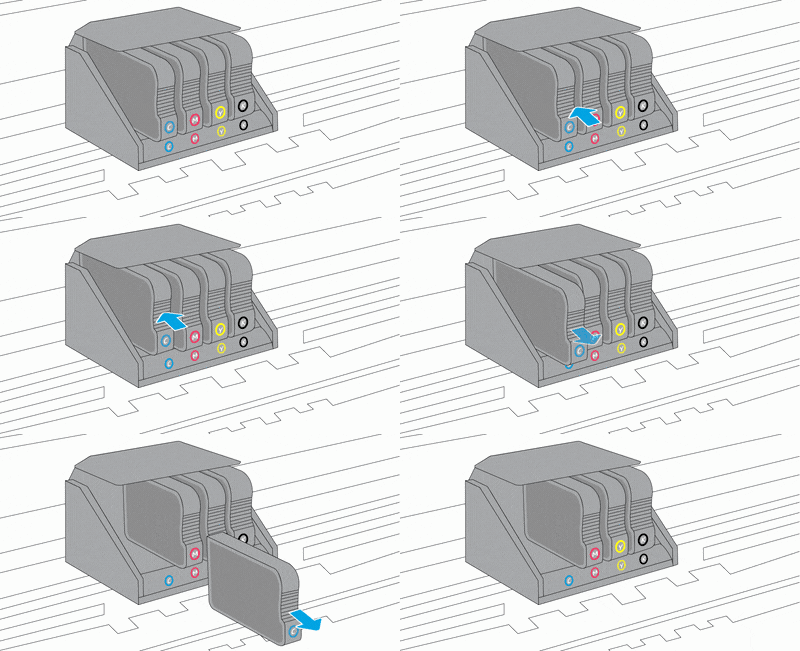
  • Open the door to access to the ink cartridges.
  • Wait until the carriage stops moving before you continue.
  • Remove an ink cartridge, and then inspect the ink cartridge for leaking ink.

Removing an ink cartridge

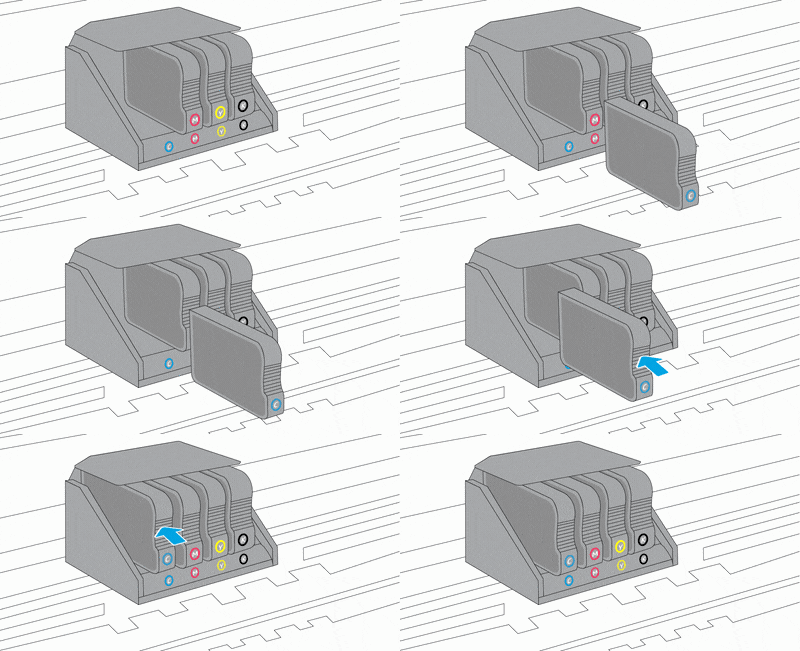
  • If the ink cartridge leaks, replace the ink cartridge. If the ink cartridge is not leaking, insert the ink cartridge into its slot.

Inserting an ink cartridge.

  • Repeat these steps for the other three ink cartridges.
  • Close the ink cartridge access door.
  • If the error message persists, continue to the next step.

Step 2: Reset the printer

  1. Resetting the printer might clear the error message.
  2. With the printer turned on, disconnect the power cord from the printer.
  3. Unplug the power cord from the power source.
  4. Wait 60 seconds.
  5. Reconnect the power cord to a wall outlet and to the printer.
  1. NOTE:
  2. HP recommends plugging the printer directly into a wall outlet.

If the error message persists, continue to the next step. Click here


Hope this helps! Keep me posted for further assistance.
Please click “Accepted Solution” if you feel my post solved your issue, it will help others find the solution. Click the “Kudos/Thumbs Up" on the bottom right to say “Thanks” for helping!

Nal_NR-
HP Community Moderator


† The opinions expressed above are the personal opinions of the authors, not of HP. By using this site, you accept the <a href="https://www8.hp.com/us/en/terms-of-use.html" class="udrlinesmall">Terms of Use</a> and <a href="/t5/custom/page/page-id/hp.rulespage" class="udrlinesmall"> Rules of Participation</a>.