
-
×InformationNeed Windows 11 help?Check documents on compatibility, FAQs, upgrade information and available fixes.
Windows 11 Support Center. -
-
×InformationNeed Windows 11 help?Check documents on compatibility, FAQs, upgrade information and available fixes.
Windows 11 Support Center. -
- HP Community
- Printers
- Scanning, Faxing, and Copying
- Re: Change destinationfolder for scanningresult...

Create an account on the HP Community to personalize your profile and ask a question
Your account also allows you to connect with HP support faster, access a personal dashboard to manage all of your devices in one place, view warranty information, case status and more.
Common problems HP Solution Center not working : Adobe Flash Player Error and Unable to scan
We would like to share some of the most frequently asked questions about HP Solution Center not working : Adobe Flash Player Error and Unable to Scan.

It has been a while since anyone has replied. Simply ask a new question if you would like to start the discussion again.

12-12-2018 08:57 AM
 HP Recommended
Product: DeskJet 2620
Operating System: Microsoft Windows 10 (64-bit)
The destinationfolder for the scanningresult of the Deskjet 2620 is default This PC>Documents. Where do I change the destination to default This PC>Documents>My scannings?
/hans peter
Solved! Go to Solution.
1 ACCEPTED SOLUTION
Accepted Solutions


12-12-2018 10:00 AM - edited 12-12-2018 10:23 AM
HP Recommended
How-to document:
Section: How do I change the default folder scans save to?
Excerpted:
Use the Destination setting in HP Scan to set the Save To Folder location on your computer.
- Search Windows for HP, and then select your printer.HP Printer Assistant opens.
- Click Scan, and then click Scan a Document or Photo.HP Scan opens.
- Select a shortcut, and then click Advanced Settings or More.
- Click Destination, and then click Browse.
- Select the folder in the Browse for Folder window, and then click OK.
- Click OK or the Save icon
 in the shortcut.
 - Repeat these steps for each scan shortcut.
If you are using the HP Scan Extended software (or if your Scan software resembles the example):
Open the Software
Select Save as JPEG (or one of your previously saved custom shortcuts)
Select / Adjust the settings on the main menu
Click More >
Select Destination
Adjust settings
Click < Less to return to Main Menu
Click Scan
Example - HP Scan Extended > Select / Adjust Destination
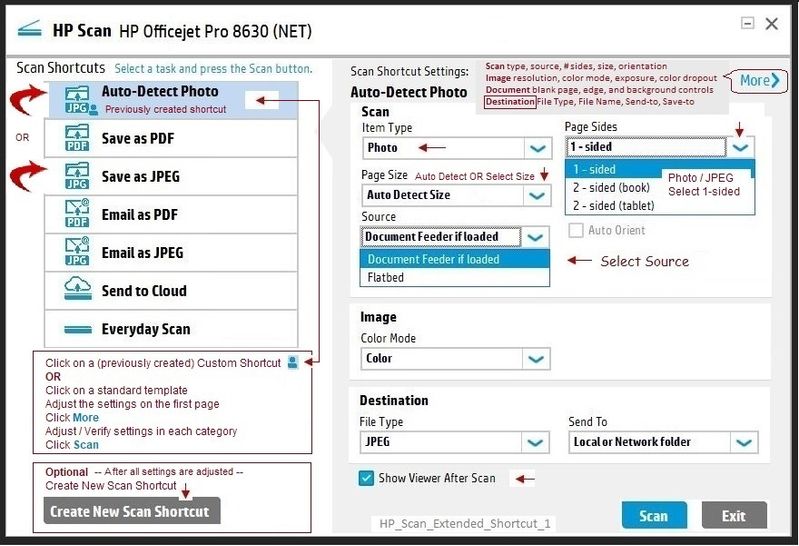
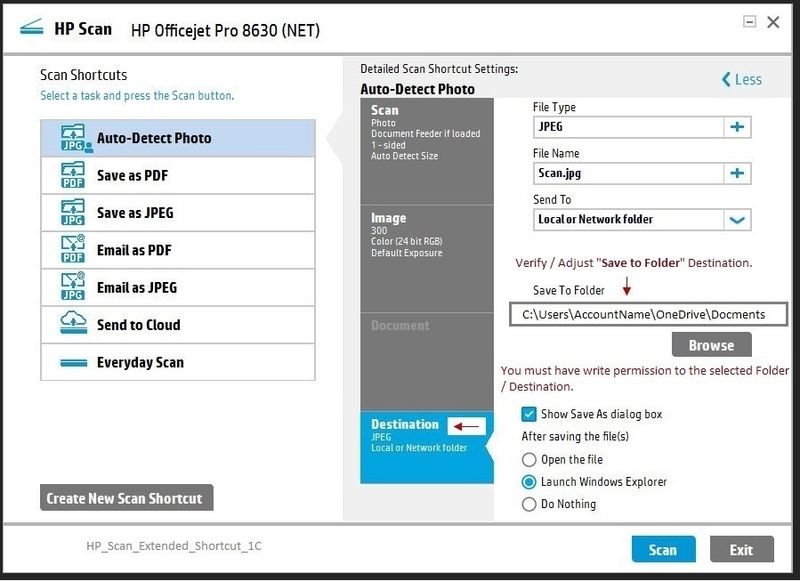
Reference and Resources – Places to find help and learn about your Printer
Printer Homepage – “Things that are your printer”
Drivers / Software / Firmware Updates, Videos, Bulletins/Notices, How-to, Troubleshooting, User Guides, Product Information, more
HP DeskJet 2620 All-in-One Printer
HP Scan Extended – Exceptional free HP scan program: HP Scan Extended features include (and are not limited to): Single, Multiple scans, Image and PDF scans, Page Size choices include Auto-Detect (extracts image / document boundary). Download, save, and install to use.
NOTES
- HPSE is an older subset of the printer software; features are very similar to scan software included in 2015 or newer Full Feature Software packages.
- If you have the newer version of the scan software inside your Full Feature Software, use that: Printer Assistant shortcut icon on Desktop (named for printer) > Scan a document or image (wording varies).
- Although the HPSE program works as a separate program, HPSE is dependent on the infrastructure provided by the printer software. The Full Feature Software for your printer should be installed before installing HPSE.
NAPS2 -- Not another PDF Scanner – free program scans PDF files and image(s) as .jpeg or PDF file(s). Includes OCR. Download, save, and install to use.
Thank you for participating in the HP Community Forum.
We are a world community of HP enthusiasts dedicated to supporting HP technology.
Click Thumbs Up on a post to say Thank You!
Answered? Click post "Accept as Solution" to help others find it.
Dragon-Fur

3 REPLIES 3
12-12-2018 10:00 AM - edited 12-12-2018 10:23 AM
HP Recommended
How-to document:
Section: How do I change the default folder scans save to?
Excerpted:
Use the Destination setting in HP Scan to set the Save To Folder location on your computer.
- Search Windows for HP, and then select your printer.HP Printer Assistant opens.
- Click Scan, and then click Scan a Document or Photo.HP Scan opens.
- Select a shortcut, and then click Advanced Settings or More.
- Click Destination, and then click Browse.
- Select the folder in the Browse for Folder window, and then click OK.
- Click OK or the Save icon in the shortcut.
- Repeat these steps for each scan shortcut.
If you are using the HP Scan Extended software (or if your Scan software resembles the example):
Open the Software
Select Save as JPEG (or one of your previously saved custom shortcuts)
Select / Adjust the settings on the main menu
Click More >
Select Destination
Adjust settings
Click < Less to return to Main Menu
Click Scan
Example - HP Scan Extended > Select / Adjust Destination
Reference and Resources – Places to find help and learn about your Printer
Printer Homepage – “Things that are your printer”
Drivers / Software / Firmware Updates, Videos, Bulletins/Notices, How-to, Troubleshooting, User Guides, Product Information, more
HP DeskJet 2620 All-in-One Printer
HP Scan Extended – Exceptional free HP scan program: HP Scan Extended features include (and are not limited to): Single, Multiple scans, Image and PDF scans, Page Size choices include Auto-Detect (extracts image / document boundary). Download, save, and install to use.
NOTES
- HPSE is an older subset of the printer software; features are very similar to scan software included in 2015 or newer Full Feature Software packages.
- If you have the newer version of the scan software inside your Full Feature Software, use that: Printer Assistant shortcut icon on Desktop (named for printer) > Scan a document or image (wording varies).
- Although the HPSE program works as a separate program, HPSE is dependent on the infrastructure provided by the printer software. The Full Feature Software for your printer should be installed before installing HPSE.
NAPS2 -- Not another PDF Scanner – free program scans PDF files and image(s) as .jpeg or PDF file(s). Includes OCR. Download, save, and install to use.
Thank you for participating in the HP Community Forum.
We are a world community of HP enthusiasts dedicated to supporting HP technology.
Click Thumbs Up on a post to say Thank You!
Answered? Click post "Accept as Solution" to help others find it.
Dragon-Fur
12-12-2018 02:55 PM
HP Recommended
My earlier answer disappeared, so I try it once more.
Thank you, Dragon Fur!
I had come so far
6. Click OK or the Save icon in the shortcut
but did not see the save icon. Thanks also for the tip:
Printer Homepage – “Things that are your printer”
Drivers / Software / Firmware Updates, Videos, Bulletins/Notices, How-to, Troubleshooting, User Guides, Product Information, more
HP DeskJet 2620 All-in-One Printer
Kind regards
/hans peter
12-12-2018 03:08 PM
HP Recommended
You are welcome.
Some budget printers may not provide the ability to create a custom shortcut with your custom settings. These printers are stuck with "just" the standard templates (shortcuts) for various job types. Meh.
At the least, you should be able to change the destination folder, even if you have to adjust the folder settings every time.
If you download and install the HPSE, I believe it should provide "change destination" folder in spite of any shortcomings in the main printer software. The HPSE also provides the cool "Auto Detect" page size option. Smiling.
Thank you for participating in the HP Community Forum.
We are a world community of HP enthusiasts dedicated to supporting HP technology.
Dragon-Fur

Be alert for scammers posting fake support phone numbers and/or email addresses on the community.
If you think you have received a fake HP Support message, please report it to us by clicking on "Flag Post".
† The opinions expressed above are the personal opinions of the authors, not of HP. By using this site, you accept the Terms of Use and Rules of Participation.


Didn't find what you were looking for?
Ask the community
† The opinions expressed above are the personal opinions of the authors, not of HP. By using this site, you accept the <a href="https://www8.hp.com/us/en/terms-of-use.html" class="udrlinesmall">Terms of Use</a> and <a href="/t5/custom/page/page-id/hp.rulespage" class="udrlinesmall"> Rules of Participation</a>.