
-
×InformationNeed Windows 11 help?Check documents on compatibility, FAQs, upgrade information and available fixes.
Windows 11 Support Center. -
-
×InformationNeed Windows 11 help?Check documents on compatibility, FAQs, upgrade information and available fixes.
Windows 11 Support Center. -
- HP Community
- Printers
- Scanning, Faxing, and Copying
- Re: Delete Sender profiles on 8710 printer

Create an account on the HP Community to personalize your profile and ask a question
Your account also allows you to connect with HP support faster, access a personal dashboard to manage all of your devices in one place, view warranty information, case status and more.
Common problems HP Solution Center not working : Adobe Flash Player Error and Unable to scan
We would like to share some of the most frequently asked questions about HP Solution Center not working : Adobe Flash Player Error and Unable to Scan.

It has been a while since anyone has replied. Simply ask a new question if you would like to start the discussion again.

03-19-2021 09:20 AM
 HP Recommended
Product: Hp office jet printer all in one 8710
Trying to delete sender profile from control panel. Where is this located. scan to mail is suggesting that username and password do not match. Help
Solved! Go to Solution.
1 ACCEPTED SOLUTION
Accepted Solutions


03-19-2021 10:12 AM
HP Recommended
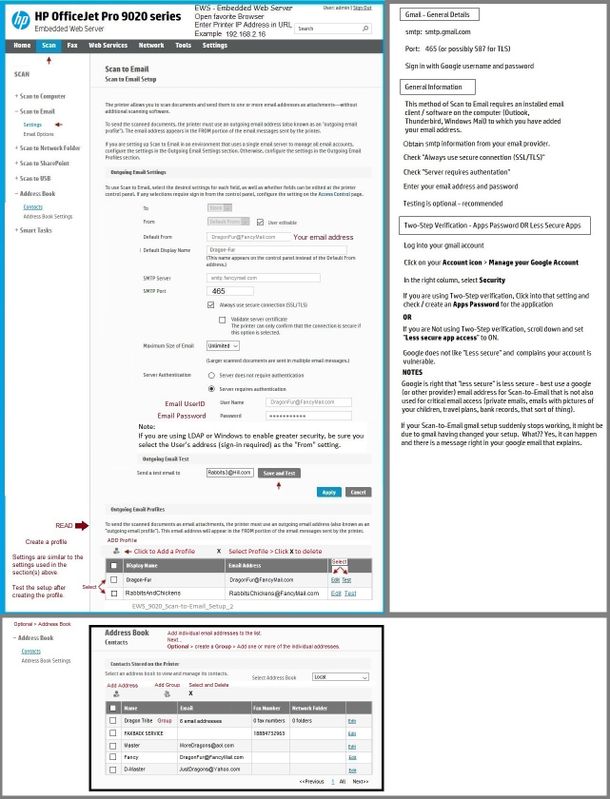
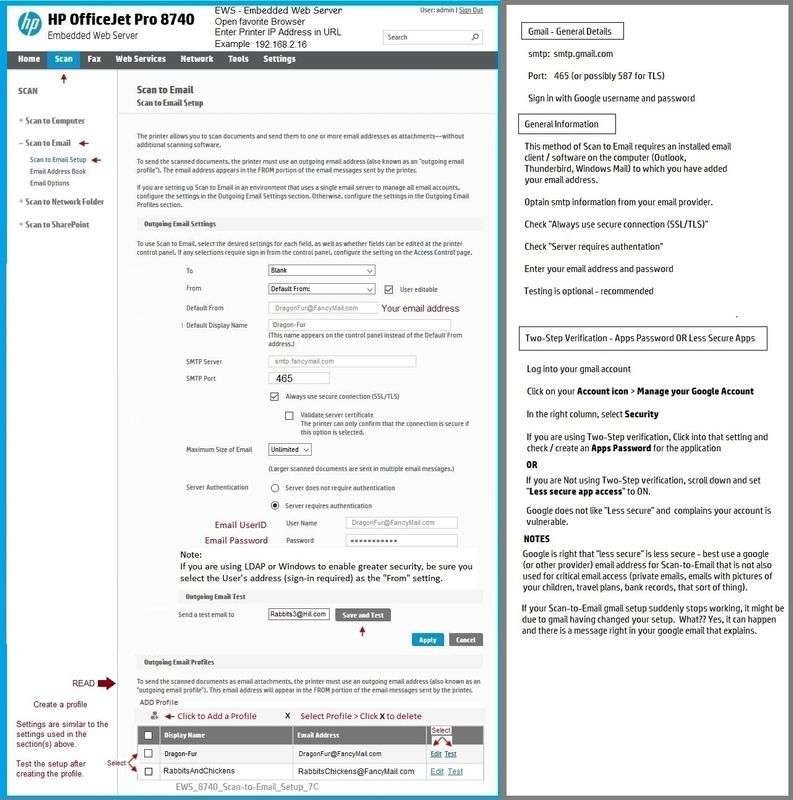
See the example again (first post).
Yes, if you changed your email address, you will need to set up Scan to Email again and change the email address within the initial setup.
Note the explanation about using 2-step verification and the need for an apps password.
If your email provided allows the "Less secure" option, see the note about that option possibly being switched off by the email provider (at least one of the providers does not like less secure and might switch it off while you are not looking).
What else?
Not sure - the setup follows certain rules - in so much that I am aware, the setup for this older printer should not have changed.
That said,
Example 2 - EWS - Scan to Email - OfficeJet Pro 9025
Thank you for participating in the HP Community.
The Community is a separate wing of the HP website - We are not an HP business group.
Our Community is comprised of volunteers - people who own and use HP devices.
Click Thumbs Up to say Thank You.
Question Resolved / Answered, Click "Accept as Solution"
Dragon-Fur
8 REPLIES 8
03-19-2021 09:36 AM
HP Recommended
====================================================================
Welcome to the HP Community.
Be Aware:
Do not respond to individuals who post phone numbers or email addresses.
Do not respond to individuals who ask you to provide private information in a public Post.
These people might be scammers trying to steal your information / money.
====================================================================
The 8710 is the "little brother" in the 8700 series.
If your printer supports the Digital Send option,
Use the Embedded Web Server (EWS) to configure / test / add / delete profile(s) and setup.
Open your favorite browser > type / enter Printer IP address into URL / Address bar
Tab Scan > Scan to Email > Settings / Scan to Email Setup
Example
Printer Home Page - References and Resources – Learn about your Printer - Solve Problems
“Things that are your printer”
NOTE: Content depends on device type and Operating System
Categories: Alerts, Access to the Print and Scan Doctor (Windows), Warranty Check, HP Drivers / Software / Firmware Updates, How-to Videos, Bulletins/Notices, Lots of How-to Documents, Troubleshooting, Manuals > User Guides, Product Information (Specifications)
HP OfficeJet Pro 8710 All-in-One Printer series
Thank you for participating in the HP Community.
The Community is a separate wing of the HP website - We are not an HP business group.
Our Community is comprised of volunteers - people who own and use HP devices.
Click Thumbs Up to say Thank You.
Question Resolved / Answered, Click "Accept as Solution"
Dragon-Fur
03-19-2021 09:50 AM
HP Recommended
The primary setup is explained in the User Guide
Starting on Page 13
EWS is the method to edit / change / update the profiles.
It is easier than it looks.
How to open EWS is explained in the guide starting on page 106.
Thank you for participating in the HP Community.
The Community is a separate wing of the HP website - We are not an HP business group.
Our Community is comprised of volunteers - people who own and use HP devices.
Click Thumbs Up to say Thank You.
Question Resolved / Answered, Click "Accept as Solution"
Dragon-Fur
03-19-2021 09:58 AM
HP Recommended
You are so helpful. Yes I looked through the manual already. And I went to the scan to wizard and I keep getting an error both on the control panel and from my browser. Email (STMP) server requires user authentication make sure smtp username and password are specified. I did change my email password which I am assuming is the issue. I just don't know how to fix it.
03-19-2021 10:12 AM
HP Recommended
See the example again (first post).
Yes, if you changed your email address, you will need to set up Scan to Email again and change the email address within the initial setup.
Note the explanation about using 2-step verification and the need for an apps password.
If your email provided allows the "Less secure" option, see the note about that option possibly being switched off by the email provider (at least one of the providers does not like less secure and might switch it off while you are not looking).
What else?
Not sure - the setup follows certain rules - in so much that I am aware, the setup for this older printer should not have changed.
That said,
Example 2 - EWS - Scan to Email - OfficeJet Pro 9025
Thank you for participating in the HP Community.
The Community is a separate wing of the HP website - We are not an HP business group.
Our Community is comprised of volunteers - people who own and use HP devices.
Click Thumbs Up to say Thank You.
Question Resolved / Answered, Click "Accept as Solution"
Dragon-Fur
03-19-2021 10:55 AM
HP Recommended
You are welcome.
Yes, when all else fails, start over.
Smiling.
Stay Safe.
Better 2021 for everyone!
Thank you for participating in the HP Community.
The Community is a separate wing of the HP website - We are not an HP business group.
Our Community is comprised of volunteers - people who own and use HP devices.
Click Thumbs Up to say Thank You.
Question Resolved / Answered, Click "Accept as Solution"
Dragon-Fur

Be alert for scammers posting fake support phone numbers and/or email addresses on the community.
If you think you have received a fake HP Support message, please report it to us by clicking on "Flag Post".
† The opinions expressed above are the personal opinions of the authors, not of HP. By using this site, you accept the Terms of Use and Rules of Participation.


Didn't find what you were looking for?
Ask the community
† The opinions expressed above are the personal opinions of the authors, not of HP. By using this site, you accept the <a href="https://www8.hp.com/us/en/terms-of-use.html" class="udrlinesmall">Terms of Use</a> and <a href="/t5/custom/page/page-id/hp.rulespage" class="udrlinesmall"> Rules of Participation</a>.