• ×
    Information
    Need Windows 11 help?
    Check documents on compatibility, FAQs, upgrade information and available fixes.
    Windows 11 Support Center.
  • post a message
  • ×
    Information
    Need Windows 11 help?
    Check documents on compatibility, FAQs, upgrade information and available fixes.
    Windows 11 Support Center.
  • post a message
Guidelines
Is your HP DeskJet 3830 series scanner not working? Here is the solution Click here to view the instructions!
Common problems HP Solution Center not working : Adobe Flash Player Error and Unable to scan
We would like to share some of the most frequently asked questions about HP Solution Center not working : Adobe Flash Player Error and Unable to Scan.
HP Recommended
HP4650 All in One
Microsoft Windows 10 (64-bit)

Is there a way to scan 2 sided documents using the HP Smart app that will automatically collate the pages?  I currently have to scan the doc using the ADF, add to the scan (flipping over the doc to scan the back sides), and then manually organize the pages into sequential order.  Screenshot below showing the available options when I select Scan.


In reading through the forum, I found instructions about changing the page sides or using the HP Scan software.  But I do not see any options for page sides in the HP Smart app and I cannot find a download for HP Scan.  


HP Scan.JPG

1 REPLY 1
HP Recommended

@elster2020 


Category Software and Drivers:

Software and drivers for HP OfficeJet 4650 All-in-One Printer series 


The Full Feature Software is now available in sub-category Software-Utility

HP OfficeJet 4650 series Print and Scan Driver and Accessories 

After the software is installed, Restart the computer and log in.


The Full Feature Software includes HP Scan


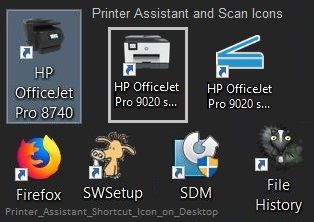
Example - Blue Scan shortcut icon on Desktop

Printer_Assistant_Shortcut_Icon_on_DesktopPrinter_Assistant_Shortcut_Icon_on_Desktop


References / Resources


 Printer Specifications for HP DeskJet 4530, 4670, ENVY 4510, 4520, OfficeJet 4650 Printers


How to Scan (Windows)


Printer  Home Page - References and Resources – Learn about your Printer  - Solve Problems

 “Things that are your printer”

NOTE:  Content depends on device type and Operating System

Categories:  Alerts, Access to the Print and Scan Doctor (Windows), Warranty Check, HP Drivers / Software / Firmware Updates, How-to Videos, Bulletins/Notices, Lots of How-to Documents, Troubleshooting, User Guides / Manuals, Product Information (Specifications), more

When the website support page opens, Select (as available) a Category > Topic > Subtopic

HP OfficeJet 4650 All-in-One Printer series 


Thank you for participating in our HP Community.

We are a volunteer community workforce dedicated to supporting HP technology

Click Thumbs Up to say Thank You for the help.

If the answer helped resolve your issue, Click "Accept as Solution" .


Dragon-Fur

† The opinions expressed above are the personal opinions of the authors, not of HP. By using this site, you accept the <a href="https://www8.hp.com/us/en/terms-of-use.html" class="udrlinesmall">Terms of Use</a> and <a href="/t5/custom/page/page-id/hp.rulespage" class="udrlinesmall"> Rules of Participation</a>.