• ×
    Information
    Need Windows 11 help?
    Check documents on compatibility, FAQs, upgrade information and available fixes.
    Windows 11 Support Center.
  • post a message
  • ×
    Information
    Need Windows 11 help?
    Check documents on compatibility, FAQs, upgrade information and available fixes.
    Windows 11 Support Center.
  • post a message
Guidelines
Join the HP Community Solve‑a‑thon | Help Others & Share Your Solutions | Live on Zoom | 2:30 PM to 2:30 AM IST | Every Wednesday Click here to know more
Common problems HP Solution Center not working : Adobe Flash Player Error and Unable to scan
We would like to share some of the most frequently asked questions about HP Solution Center not working : Adobe Flash Player Error and Unable to Scan.
HP Recommended
HP 8025
macOS 10.13 High Sierra

I keep getting this error message  "error occurred while communicating with scanner ( -9923)"   I have a brand new HP printer and it wont scan, I have downloaded HP Smart nothing Help please???? thank you

1 REPLY 1
HP Recommended

@CottageCelia, Welcome to HP Support Community!


I see that you have issues with scanning, let us try to isolate and resolve the issue. To be able to assist you better, I would like to know the following:


Are you able to make photocopies on the printer?

Are you able to print from the computer to the printer?


If yes, follow the steps below-


Wake the printer from sleep/idle mode before you perform a scan function.


Ensure that the Mac is up to date with its software. If you are unsure you may use the link below to update Mac software:

Update software on Mac 


Update the printer firmware

Download available firmware updates from the HP website

With the printer on and connected to the computer, go to HP Customer Support - Software and Driver Downloads, and then identify your printer. Look for and install any available firmware updates. Refer to the document HP Printers - Updating or Upgrading Printer Firmware


Update HP Easy Scan

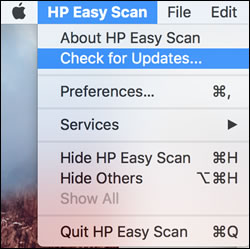
Open HP Easy Scan. On the upper bar, click HP Easy Scan, click Check for Updates, and then install any available updates.

Checking for updates in HP Easy Scan


Also, refer to the document HP Printers - How to Scan (Mac) to learn about alternate scanning methods.


Hope this helps! Keep me posted. 


Please click “Accepted Solution” if you feel my post solved your issue, it will help others find the solution. Click the “Kudos/Thumbs Up" on the bottom right to say “Thanks” for helping!

TEJ1602
I am an HP Employee

† The opinions expressed above are the personal opinions of the authors, not of HP. By using this site, you accept the <a href="https://www8.hp.com/us/en/terms-of-use.html" class="udrlinesmall">Terms of Use</a> and <a href="/t5/custom/page/page-id/hp.rulespage" class="udrlinesmall"> Rules of Participation</a>.