-
×InformationNeed Windows 11 help?Check documents on compatibility, FAQs, upgrade information and available fixes.
Windows 11 Support Center. -

-
×InformationNeed Windows 11 help?Check documents on compatibility, FAQs, upgrade information and available fixes.
Windows 11 Support Center. -
- HP Community
- Printers
- Scanning, Faxing, and Copying
- Print Apps have been turned off

Create an account on the HP Community to personalize your profile and ask a question
09-16-2020 08:36 AM
When I click on Apps on the home page, I get an error that says, "Print apps has been turned off. To turn it on again, use the printer's embedded web server (EWS). How do I turn it back on? I need to scan documents to my Google Drive! Help!!!
Solved! Go to Solution.
Accepted Solutions
09-16-2020 09:20 AM
Welcome to the HP Community Forum.
Have you tried using the Embedded Web Server (EWS) to switch on the Print Apps??
This is the method - has it failed?
Example
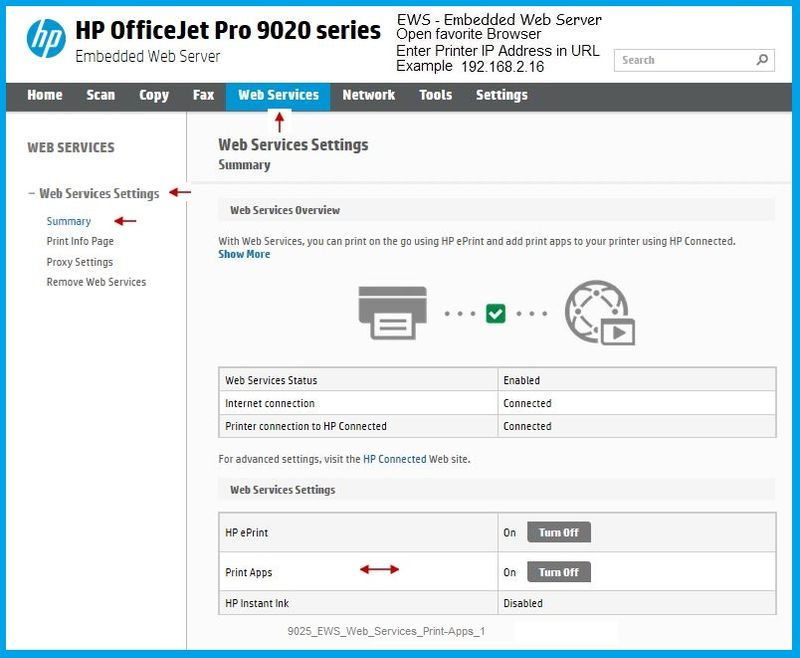
Open your favorite browser > type / enter Printer IP address into URL / Address bar
Tab Web Services > Web Services Settings > Summary
9025_EWS_Web_Services_Print-Apps_1
Printer Home Page - References and Resources – Learn about your Printer - Solve Problems
“Things that are your printer”
NOTE: Content depends on device type and Operating System
Categories: Alerts, Access to the Print and Scan Doctor (Windows), Warranty Check, HP Drivers / Software / Firmware Updates, How-to Videos, Bulletins/Notices, Lots of How-to Documents, Troubleshooting, User Guides / Manuals, Product Information (Specifications), more
When the website support page opens, Select (as available) a Category > Topic > Subtopic
HP OfficeJet Pro 9010 All-in-One Printer series
Thank you for participating in our HP Community.
We are a world community of volunteers dedicated to supporting HP technology
Click Thumbs Up to say Thank You.
Answered? Click "Accept as Solution" .
09-16-2020 09:20 AM
Welcome to the HP Community Forum.
Have you tried using the Embedded Web Server (EWS) to switch on the Print Apps??
This is the method - has it failed?
Example
Open your favorite browser > type / enter Printer IP address into URL / Address bar
Tab Web Services > Web Services Settings > Summary
9025_EWS_Web_Services_Print-Apps_1
Printer Home Page - References and Resources – Learn about your Printer - Solve Problems
“Things that are your printer”
NOTE: Content depends on device type and Operating System
Categories: Alerts, Access to the Print and Scan Doctor (Windows), Warranty Check, HP Drivers / Software / Firmware Updates, How-to Videos, Bulletins/Notices, Lots of How-to Documents, Troubleshooting, User Guides / Manuals, Product Information (Specifications), more
When the website support page opens, Select (as available) a Category > Topic > Subtopic
HP OfficeJet Pro 9010 All-in-One Printer series
Thank you for participating in our HP Community.
We are a world community of volunteers dedicated to supporting HP technology
Click Thumbs Up to say Thank You.
Answered? Click "Accept as Solution" .
09-16-2020 09:59 AM
You are welcome.
No worries, you are not the first one to have missed the "details" on how EWS works. Smiling.
Stay Safe.
Thank you for participating in our HP Community.
We are a world community of volunteers dedicated to supporting HP technology
Click Thumbs Up to say Thank You.
Answered? Click "Accept as Solution" .