• ×
    Information
    Need Windows 11 help?
    Check documents on compatibility, FAQs, upgrade information and available fixes.
    Windows 11 Support Center.
  • post a message
  • ×
    Information
    Need Windows 11 help?
    Check documents on compatibility, FAQs, upgrade information and available fixes.
    Windows 11 Support Center.
  • post a message
Guidelines
Is your HP DeskJet 3830 series scanner not working? Here is the solution Click here to view the instructions!
Common problems HP Solution Center not working : Adobe Flash Player Error and Unable to scan
We would like to share some of the most frequently asked questions about HP Solution Center not working : Adobe Flash Player Error and Unable to Scan.
HP Recommended
HP Office jet 7612
macOS 10.14 Mojave

The printer had been working quite normally and suddenly stopped doing anything except print configuration page and similar.

The first error message said scanner not working. Then it said could not scan, fax or copy. On investigation it said wireless communication disabled. Cannot get a connection with the computer with either wireless or USB connection. The internet connection is via a wireless router to the telephone line.


Thank you. Nigel13

3 REPLIES 3
HP Recommended

@Nigel13


Please ensure that the printer and Mac has the latest updates


Printer Firmware: https://support.hp.com/in-en/document/c02919168


Mac update: https://support.apple.com/en-us/HT201541


Since the printer is not working through USB as well, please disable all Security Software and Firewall on your Mac and check


Next remove and re-add the printer using Airprint


1.) Click the Apple menu, click System Preferences, and then click Print & Scan or Printers & Scanners.
2.) Check if your printer name displays in the Printers list, If your printer is listed, click the printer name, click the minus sign to delete the printer.

3.) If you see multiple printer queues for the same printer, remove all extra printers by selecting them one at a time, and then clicking the minus button  at the bottom of the list.

4.) Click the plus sign , click Add Printer or Scanner, click the printer name.
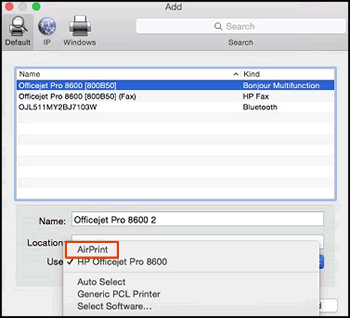
5.) Click the Use or Print Using menu, select AirPrint or Secure AirPrint in the pop-up menu. Then click Add.

Select AirPrint from the Use menu


6.) Try to print or scanning


Have a wonderful day 😊


If the information I've provided was helpful, give us some reinforcement by clicking the "Solution Accepted" on this Post and it will also help other community members with similar issue.

KrazyToad
I Am An HP Employee

HP Recommended

This did not work. Printing from the computer via a USB works but the scanner does not. How do I find out if the scanner bulb is still working or has blown?

HP Recommended

@Nigel13


Are you able to make photocopies using the scanner bed?


Lift the scanner lid and press the Copy button. Check if the scanner bulb goes all the way across the scanner bed


Are you able to scan from the ADF?


Keep me posted

KrazyToad
I Am An HP Employee

† The opinions expressed above are the personal opinions of the authors, not of HP. By using this site, you accept the <a href="https://www8.hp.com/us/en/terms-of-use.html" class="udrlinesmall">Terms of Use</a> and <a href="/t5/custom/page/page-id/hp.rulespage" class="udrlinesmall"> Rules of Participation</a>.


