• ×
    Information
    Need Windows 11 help?
    Check documents on compatibility, FAQs, upgrade information and available fixes.
    Windows 11 Support Center.
  • post a message
  • ×
    Information
    Need Windows 11 help?
    Check documents on compatibility, FAQs, upgrade information and available fixes.
    Windows 11 Support Center.
  • post a message
Guidelines
Join the HP Community Solve‑a‑thon | Help Others & Share Your Solutions | Live on Zoom | 2:30 PM to 2:30 AM IST | Every Wednesday Click here to know more
Common problems HP Solution Center not working : Adobe Flash Player Error and Unable to scan
We would like to share some of the most frequently asked questions about HP Solution Center not working : Adobe Flash Player Error and Unable to Scan.
HP Recommended
HP Officejet Pro 8600
macOS 10.15 Catalina

I am trying to setup scan to email on my gmail account but keep receiving a message that reads "Authentication required

Click "OK" to go back."


I have tried all of the suggestions on the forum, i.e.


- ensuring that 2-step verification is off

- allowing access from "Less secure" apps in the gmail settings


But I still get this error.  Can someone assist?

1 REPLY 1
HP Recommended

Hi @Jeff-Toronto

Welcome to the HP Support Community. I'd be happy to assist you.


When adding your email account to the scan to email feature on the printer control panel, the email server blocks access to your email account and one of the following error messages might display:

  • Gmail requires an additional security step. Please check your email security settings online.

  • The email or password that was entered is not working. Please try again.

  • The SMTP server uses an authentication method that is not supported. Try a different server.

  • Authentication failure SMTP: SMTP server does not support authentication.

  • Cannot resolve the SMTP server. Check the SMTP and DNS server settings with your system administrator or Internet Service Provider.

Some email account service providers, such as Google or Yahoo, block access by third-party apps for security reasons. To allow the scan to email feature access to your email account, go to your email account service provider for detailed steps.

NOTE: If you turned on two-step authentication, you must create an application password for the scan to email feature to access to your email account. See your email account provider for more information.

To setup scan to email, follow these steps:


  1. Confirm the following requirements for the scan to email feature. If you do not meet these requirements, you can manually attach the file to an email message by saving the scan to a folder on the computer.

    • Scan to email works best when a local email client, such as Apple Mail, is installed and set up on the computer.

    • Web-based email accounts (Gmail, Yahoo Mail, Hotmail) must be configured through your local email client to scan to them. Check your local email support site for additional information.

  2. Start the scan.

    • Printers with touchscreen or LCD menu control panels: From the Scan menu on the printer, select your computer name, and then select Email as PDF or Email as JPEG A new email message automatically opens on the computer.

      Some Web-enabled HP printers have a Scan to Email app in the Apps menu that sends emails from the printer using your printer's ePrint email address.

    • Printers with buttons only or printers without scan to email menu options: Continue to the next step to start the scan from the computer.

  3. Open Finder , click Go in the top menu bar, click Applications, and then double-click Image Capture.
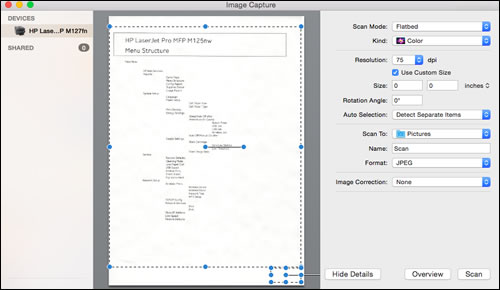
     Apple Image Capture

  4. Click your printer name in the Devices or Shared list, and then click Show Details at the bottom of the screen, if necessary.

    After the preview of the scan displays, change the following settings:

    • Scan Mode: Select the scanning bed or automatic document feeder.

    • Scan to: Select Mail.

    • Name: Type a name for the scan file.

    • Format: Select the file type for the scan. When you select the PDF or TIFF format, the Combine into single document feature is available to save multiple page documents or multiple images into a single file.

  5. Click Scan.

    A new email message automatically opens with the scan attached.

Hope this helps! Keep me posted. 


Please click “Accept as Solution” if you feel my post solved your issue, it will help others find the solution.

Click the “Kudos, Thumbs Up" on the bottom right to say “Thanks” for helping!

Have a great day! 

KUMAR0307
I am an HP Employee

† The opinions expressed above are the personal opinions of the authors, not of HP. By using this site, you accept the <a href="https://www8.hp.com/us/en/terms-of-use.html" class="udrlinesmall">Terms of Use</a> and <a href="/t5/custom/page/page-id/hp.rulespage" class="udrlinesmall"> Rules of Participation</a>.


