• ×
    Information
    Need Windows 11 help?
    Check documents on compatibility, FAQs, upgrade information and available fixes.
    Windows 11 Support Center.
  • post a message
  • ×
    Information
    Need Windows 11 help?
    Check documents on compatibility, FAQs, upgrade information and available fixes.
    Windows 11 Support Center.
  • post a message
Guidelines
Seize the moment! nominate yourself or a tech enthusiast you admire & join the HP Community Experts!
Common problems HP Solution Center not working : Adobe Flash Player Error and Unable to scan
We would like to share some of the most frequently asked questions about HP Solution Center not working : Adobe Flash Player Error and Unable to Scan.
HP Recommended
HP Office jet 3830

I print a lot of patterns for bag making and quilting.  When I want to reduce or enlarge a pattern by two inches, how do I know what percentage in the scale option to use.  Is there a chart which show how they equate?

1 ACCEPTED SOLUTION

Accepted Solutions
HP Recommended

@dorphers 


  • Use the Math.com 3-way Percent Calculator to calculate the percentage of the larger side (width or height) to obtain the percentage of 100 % when printed on your selected paper and at your desired size


Example

Need longest side to be 10 inches

Current size (at 100%) is 8 inches

Calculate (second row in calculator)

10 is what percentage of 8?

Answer: 125%


Scan in the content

If possible, select the standard scan size of the current item (8.5 X 11)

Save as PDF file

Open in Adobe Reader DC 

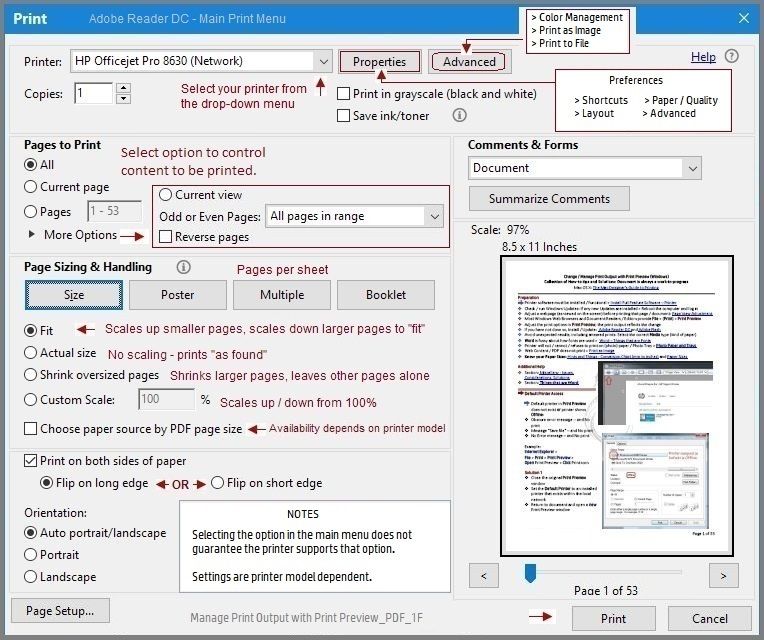
Print at Size Custom Scale 125%


Manage Print Output with Print Preview_PDF_1FManage Print Output with Print Preview_PDF_1F


Thank you for participating in the HP Community.

The Community is a separate wing of the HP website - We are not an HP business group.

Our Community is comprised of volunteers - people who own and use HP devices.

Click Thumbs Up to say Thank You.

Question Resolved / Answered, Click "Accept as Solution"

Dragon-Fur

View solution in original post

1 REPLY 1
HP Recommended

@dorphers 


  • Use the Math.com 3-way Percent Calculator to calculate the percentage of the larger side (width or height) to obtain the percentage of 100 % when printed on your selected paper and at your desired size


Example

Need longest side to be 10 inches

Current size (at 100%) is 8 inches

Calculate (second row in calculator)

10 is what percentage of 8?

Answer: 125%


Scan in the content

If possible, select the standard scan size of the current item (8.5 X 11)

Save as PDF file

Open in Adobe Reader DC 

Print at Size Custom Scale 125%


Manage Print Output with Print Preview_PDF_1FManage Print Output with Print Preview_PDF_1F


Thank you for participating in the HP Community.

The Community is a separate wing of the HP website - We are not an HP business group.

Our Community is comprised of volunteers - people who own and use HP devices.

Click Thumbs Up to say Thank You.

Question Resolved / Answered, Click "Accept as Solution"

Dragon-Fur

† The opinions expressed above are the personal opinions of the authors, not of HP. By using this site, you accept the <a href="https://www8.hp.com/us/en/terms-of-use.html" class="udrlinesmall">Terms of Use</a> and <a href="/t5/custom/page/page-id/hp.rulespage" class="udrlinesmall"> Rules of Participation</a>.