• ×
    Information
    Need Windows 11 help?
    Check documents on compatibility, FAQs, upgrade information and available fixes.
    Windows 11 Support Center.
  • post a message
  • ×
    Information
    Need Windows 11 help?
    Check documents on compatibility, FAQs, upgrade information and available fixes.
    Windows 11 Support Center.
  • post a message
Guidelines
Seize the moment! nominate yourself or a tech enthusiast you admire & join the HP Community Experts!
Common problems HP Solution Center not working : Adobe Flash Player Error and Unable to scan
We would like to share some of the most frequently asked questions about HP Solution Center not working : Adobe Flash Player Error and Unable to Scan.
HP Recommended

The exact same problem that I have.  This also happened after the previous Big Sur update as well.  Then, there must have been a patch or a fix from HP as it then started to scan like it used to.
Another error message I get back is: Microsoft Window applications are not supported on macOS when I try to open the download Fix.  Is this a true statement and we must then go after Apple for this? Or, could it be that we must wait for another patch from HP to keep up with Apple?
if this is the case, I will need to buy a new printer-scanner and not an HP one to keep working.

Getting frustrated....

HP Recommended

Hi Kumar.  I am sorry, but for me, this is still not working.  I have tried to download this a few times now and to no avail.  Mac updated. HP Easy Scan does not solve any issue either.  

I have tried using the document feeder as well as the scanner glass.  Page is pulled through and it sounds as if it has scanned, then the error message as 'Naylor' (I apologize if I messed-up your name) initially reported that started off this thread.
I just cannot scan.  printing - no problem.

HP Recommended

Sorry - Naytan (not Nalor)

HP Recommended

@Ramaman1


Are you able to make copies on the printer using the glass and the document feeder? 

Did you try the Image Capture app to scan?

What error do you get while using the HP Easy Scan app? Did you download this app from the App Store?


If you have downloaded a .exe file for the printer, it will not work on Mac, because it is for Windows computers.

Mac uses .dmg files.


Keep me posted.

KUMAR0307
I am an HP Employee

HP Recommended

Hello Kumar

Thanks for your reply.
I have a LaserJet Pro MFP M127fw. Driver version 3.

Yes, copies are no problem at all. 
I can't see anywhere to use Image Capture though.  I have accessed Easy Smart (not Easy Scan, as I cannot find this) and it sends me to download HP Smart - which I already have and I cannot see anywhere to download any software updates.  I removed the printer and HP Smart and reinstalled once again. Negative results.
By the way, in HP Customer Support - Software and Driver Downloads, the latest Big Sur MacOS selection from HP online is Big Sur 11.2 (I have 11.4).  There must be a patch that HP can insert that can enable this.  It still says 'device cannot be reached'.
this printer-scanner-fax has been working wonderfully since I bought it a few years ago.  However, since this past winter, it has not been scanning - a short time in April it did, and then not again since.  It is almost as if Apple has an update in software, but does not communicate with HP afterwards.
I also clicked onto 'Contacts' with the hopes of reaching someone, and the response is: 'Referer heading is missing - no further info on this page.


HP Recommended

@Ramaman1


Easy Scan is different from Easy Start. As I have mentioned in my previous posts, the HP Easy Scan app is available in App Store.

Kindly download it from there and install it on your Mac and try scanning.


Image capture is a built-in app in Mac. To know how to scan using Image capture, click here.


Let me know how it goes.

KUMAR0307
I am an HP Employee

HP Recommended

Dear Kumar,


Thank you for your suggestions, but:


1) I downloaded and installed HP Easy Scan.

It shows the name on my printer in the scanner menu.

When I click on "Scan" it show an error message, saying that the scanner  is not available.


2) Image capture does not see any scanner.


As I said, I have a brand new mac with Big Sur.


Is there any way to get some concrete help to solve this problem?


HP Recommended

@Laozha


It seems like you are trying to scan from the printer screen using the 'scan to computer' option.


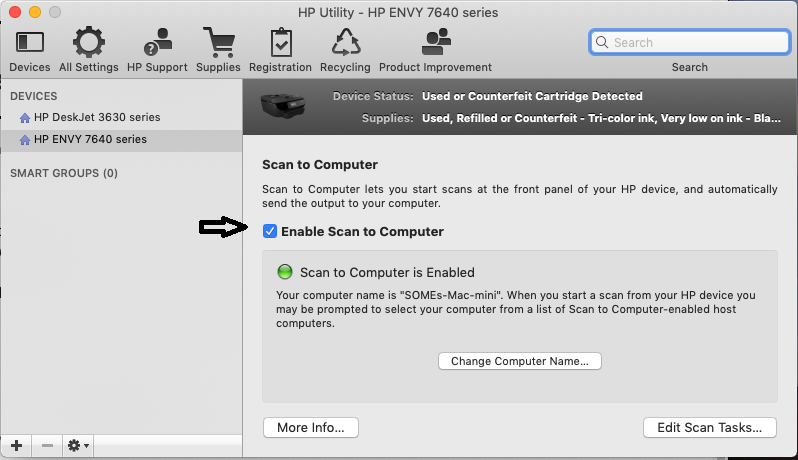
Scan to Computer is disabled on your Mac. Enabling Scan to computer using HP Utility may resolve the issue. Let's try these steps:

1.) On your Mac, click Finder, click Applications, click the Hewlett-Packard or HP folder, then double-click HP Utility. (If HP Utility is not available, download and install the printer essential software from here

2.) Under Scan Settings, click Scan to Computer, then make sure the Enable Scan to Computer check box is selected.

https://lithium-response-prod.s3.us-west-2.amazonaws.com/hpcsc.response.lithium.com/RESPONSEIMAGE/946f6e5f-68db-4b93-a3ad-831e2c463488.default.png


3.) Try to scan.


Let me know how it goes.

KUMAR0307
I am an HP Employee

HP Recommended

No worries, Ramaman1.


Time's up, HP. For anyone wanting to continue to use their purchased HP hardware that does not scan, please download VueScan which is available for both macOS and Windows. This piece of software has the ability to scan without the need for HP's drivers. I do not endorse their product in anyway aside from the fact that these people have made a living out of HP and other companies not supporting previously purchased products by their loyal customers. I am so sick of this.


† The opinions expressed above are the personal opinions of the authors, not of HP. By using this site, you accept the <a href="https://www8.hp.com/us/en/terms-of-use.html" class="udrlinesmall">Terms of Use</a> and <a href="/t5/custom/page/page-id/hp.rulespage" class="udrlinesmall"> Rules of Participation</a>.