• ×
    Information
    Need Windows 11 help?
    Check documents on compatibility, FAQs, upgrade information and available fixes.
    Windows 11 Support Center.
  • post a message
  • ×
    Information
    Need Windows 11 help?
    Check documents on compatibility, FAQs, upgrade information and available fixes.
    Windows 11 Support Center.
  • post a message
Guidelines
Join the HP Community Solve‑a‑thon | Help Others & Share Your Solutions | Live on Zoom | 2:30 PM to 2:30 AM IST | Every Wednesday Click here to know more
Common problems HP Solution Center not working : Adobe Flash Player Error and Unable to scan
We would like to share some of the most frequently asked questions about HP Solution Center not working : Adobe Flash Player Error and Unable to Scan.
HP Recommended
HP ENVY

MY PRINTER PRINT WELL FROM MY MAC BUT  WHEN I NEED TO SCAN DOC PRINTER CANT CONNECT TO MAC, JUST FINDING MY OTHER PC..IT USE TO BE OK BUT SUDDENLY SCANNER CANT CONNECT MY MAC. HOW TO RECONNECT TMY MAC FOR SCANING?

3 REPLIES 3
HP Recommended

@DZIUGAS


A warm welcome to HP Forums! This is a great place to get support, find answers and tips to your technical queries.

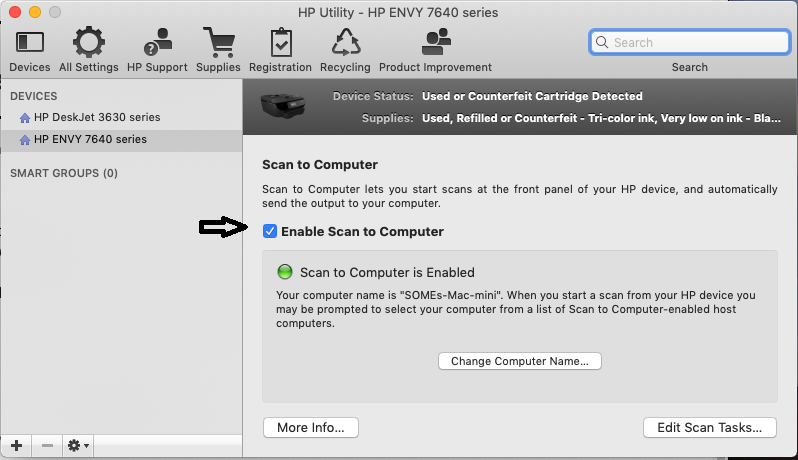
It sounds like Scan to Computer is disabled on your Mac. Enabling Scan to computer using HP Utility may resolve the issue. Let's try these steps:

1.) On your Mac, click Finder, click Applications, click the Hewlett-Packard or HP folder, then double-click HP Utility. (If HP Utility is not available, download and install the install the printer essential software from here

2.) Under Scan Settings, click Scan to Computer, then make sure the Enable Scan to Computer check box is selected.


3.) Try to scan.

Let me know how it goes!


If the information I've provided was helpful, give us some reinforcement by clicking the Accepted Solution and Kudos buttons, that'll help us and others see that we've got the answers!
Have a great day!

Senan6806


I am an HP Employee

HP Recommended

Thanks for the answer, but it didn't help me cos i have MAC and printer communicating problem but printer surprisingly woks well.

I attached screenshot

What I couldHP envy error screen.png do now?

HP Recommended

@DZIUGAS


Updating printer firmware, Mac OS and performing a network power cycle may resolve the issue. Let's try these steps:

Please use the links below to update the printer and Mac software:

Update printer firmware

Update software on Mac

Once you update the printer firmware and Mac software, use the steps below to perform a network power cycle:

1.) Turn off your Mac, Printer and Router.

2.) Unplug the power from the back of router, wait for 10 -15 seconds.

3.) Connect the power cable back to router, turn on the router first. Wait till the router to initialize.

4.) Turn on Printer and Mac, try to scan.

Keep me posted!

Senan6806


I am an HP Employee

† The opinions expressed above are the personal opinions of the authors, not of HP. By using this site, you accept the <a href="https://www8.hp.com/us/en/terms-of-use.html" class="udrlinesmall">Terms of Use</a> and <a href="/t5/custom/page/page-id/hp.rulespage" class="udrlinesmall"> Rules of Participation</a>.