• ×
    Information
    Need Windows 11 help?
    Check documents on compatibility, FAQs, upgrade information and available fixes.
    Windows 11 Support Center.
  • post a message
  • ×
    Information
    Need Windows 11 help?
    Check documents on compatibility, FAQs, upgrade information and available fixes.
    Windows 11 Support Center.
  • post a message
Guidelines
Is your HP DeskJet 3830 series scanner not working? Here is the solution Click here to view the instructions!
Common problems HP Solution Center not working : Adobe Flash Player Error and Unable to scan
We would like to share some of the most frequently asked questions about HP Solution Center not working : Adobe Flash Player Error and Unable to Scan.
HP Recommended
HP office jet pro 8025
macOS 10.14 Mojave

i am scanning to my apple mac book air from auto document feeder of the HP Office Jet Pro 8025.  pages ramdomly scan upside down  or  in  landscape lay out.  i watched the u tube  video on correcting this (for a different model scanner than  i  own) but i don't  have the command that was used  to fix.  thank you.  ps:  i don't know the  category of  printer i  own so am guessing inkjet printer.

2 REPLIES 2
HP Recommended

@basha210 


==============================================================

Welcome to the HP Community.

Reminder to those reading:

Do NOT respond to individuals who post phone numbers or email addresses.

These might be scammers trying to steal your information / money.

HP does not post phone numbers or email in Community messages.

==============================================================


I am guessing:

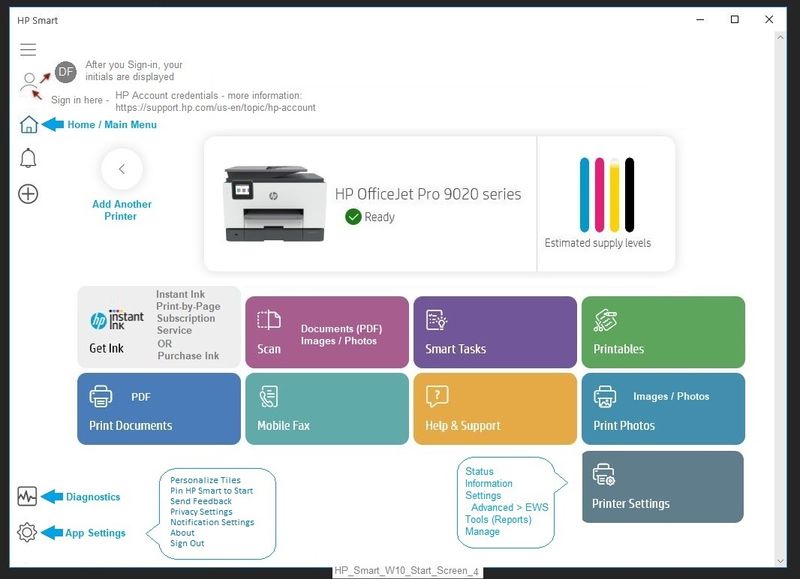
You are using HP Smart

In this instance, HP Smart for Mac behaves in the same way as it does in Windows.


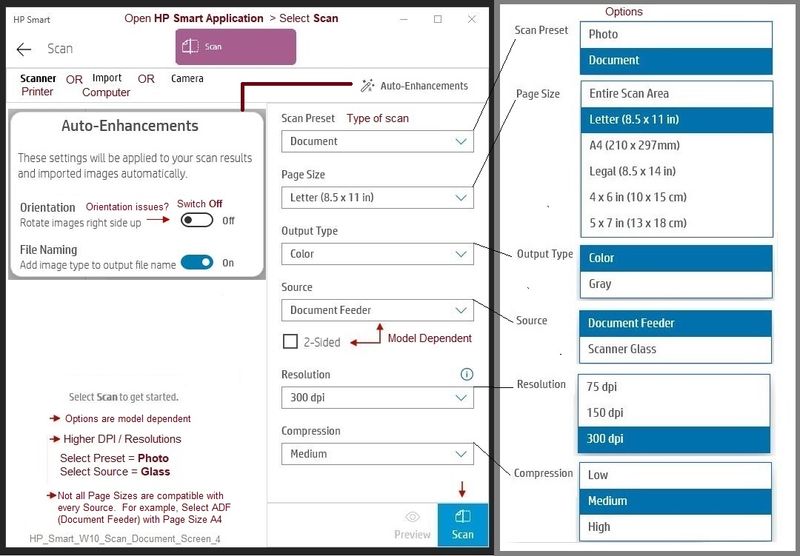
Assuming that is the case, something like / similar to the following will take care of the issue...


If you using Scan as opposed to printing,

If you are using HP Smart,

Switch off the Auto-Enhancements for Orientation.


Open HP Smart

Select to Scan

Click open Auto-Enhancements

Switch OFF Orientation


undefined


undefined


References / Resources


HP Smart for Mac

 HP Printers - Install and Use the HP Smart App (Mac)


Printer  Home Page - References and Resources – Learn about your Printer  - Solve Problems

 “Things that are your printer”

NOTE:  Content depends on device type and Operating System

Categories:  Alerts, Access to the Print and Scan Doctor (Windows), Warranty Check, HP Drivers / Software / Firmware Updates, How-to Videos, Bulletins/Notices, Lots of How-to Documents, Troubleshooting, Manuals > User Guides, Product Information (Specifications), more

When the website support page opens, Select (as available) a Category > Topic > Subtopic

HP OfficeJet Pro 8025 All-in-One Printer 


Thank you for participating in the HP Community.

The Community is a separate wing of the HP website - We are not a business group of HP..

Our Community is comprised of volunteers - people who own and use HP devices.

Click Thumbs Up to say Thank You.

Question Resolved / Answered, Click "Accept as Solution"

Dragon-Fur

HP Recommended

Thanks for the response. My orientation is already switched to "off" but the issue is still occurring. 

† The opinions expressed above are the personal opinions of the authors, not of HP. By using this site, you accept the <a href="https://www8.hp.com/us/en/terms-of-use.html" class="udrlinesmall">Terms of Use</a> and <a href="/t5/custom/page/page-id/hp.rulespage" class="udrlinesmall"> Rules of Participation</a>.