• ×
    Information
    Need Windows 11 help?
    Check documents on compatibility, FAQs, upgrade information and available fixes.
    Windows 11 Support Center.
  • post a message
  • ×
    Information
    Need Windows 11 help?
    Check documents on compatibility, FAQs, upgrade information and available fixes.
    Windows 11 Support Center.
  • post a message
Guidelines
Join the HP Community Solve‑a‑thon | Help Others & Share Your Solutions | Live on Zoom | 2:30 PM to 2:30 AM IST | Every Wednesday Click here to know more
Common problems HP Solution Center not working : Adobe Flash Player Error and Unable to scan
We would like to share some of the most frequently asked questions about HP Solution Center not working : Adobe Flash Player Error and Unable to Scan.
HP Recommended
HP Officejet 3831
iOS 12 - 12.0.1

Hello

I need to scan multiple pages of a book which are smaller than the A4. So I need to set the margins and have all the pages scanned the same. I cannot crop the pages later, when they are already scanned, cause it is too much toil and there are many pages. There is an option for this on the ipad app but not on the mac.

Can you help me?

3 REPLIES 3
HP Recommended

@francescoronca


A warm welcome to HP Forums! This is a great place to get support, find answers and tips to your technical queries.

I believe we can use HP Easy Scan Application to scan multiple items and then crop the scanned images. Let's try these steps:

1.) Open HP Easy Scan. If you don't have HP Easy Scan installed, you may download and install HP Easy Scan from here

2.) Please the document or book that you want to scan on the scanner bed and close the lid. Click Scan. Wait for the scan to complete.

3.) After scan is complete a pop up box will appear, on the box, click Scan Next Item.

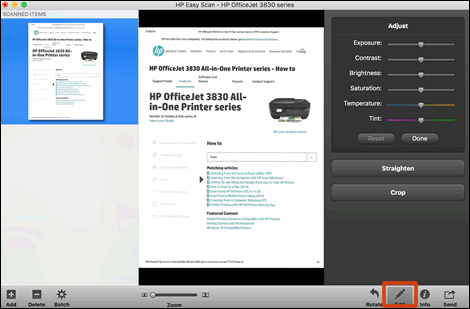
4.) Once all the pages are scanned, click Edit to crop the size of the scanned images. 

HP Easy Scan editing tools


You may also refer to this video.

Let me know how it goes!


If the information I've provided was helpful, give us some reinforcement by clicking the Accepted Solution and Kudos buttons, that'll help us and others see that we've got the answers!
Have a great day!


Senan6806


I am an HP Employee

HP Recommended

Thenk you Senan,

unfortunately my problem is more complex than croppin a coupla pages. I need to set my scanner so that it automatically crops ALL The pages I scan to specific measures. If I have to scan 50 pages I cannot possibly waste time, after scanning, croppiong every single page. What really gets me, is that I can do this swimmingly with the ipad app but not thru the mac app.


Thank you for your effort, but my problem stays unsolved.

HP Recommended

@francescoronca


HP Easy Scan have a 'Crop to' option, enabling that setting will crop all the the scanned images. However the crop settings are based on paper size. Here is how to enable the Crop to settings in HP Easy Scan:

1.) Open HP Easy Scan.

2.) Click Presets and select Edit Settings.


3.) Click Crop To and select the appropriate Paper Size.


Keep me posted!

Senan6806


I am an HP Employee

† The opinions expressed above are the personal opinions of the authors, not of HP. By using this site, you accept the <a href="https://www8.hp.com/us/en/terms-of-use.html" class="udrlinesmall">Terms of Use</a> and <a href="/t5/custom/page/page-id/hp.rulespage" class="udrlinesmall"> Rules of Participation</a>.