Webcam Not Working? Advanced Fixes for HP Notebooks! Click here to view the instructions!
Create an account on the HP Community to personalize your profile and ask a question
Your account also allows you to connect with HP support faster, access a personal dashboard to manage all of your devices in one place, view warranty information, case status and more.
We would like to share some of the most frequently asked questions about: Battery Reports, Hold a charge, Test and Calibrating Battery . Check out this link: Is your notebook plugged in and not charging?
I'm trying to update the firmware on my Thunderbolt 3 dock using SP91361.
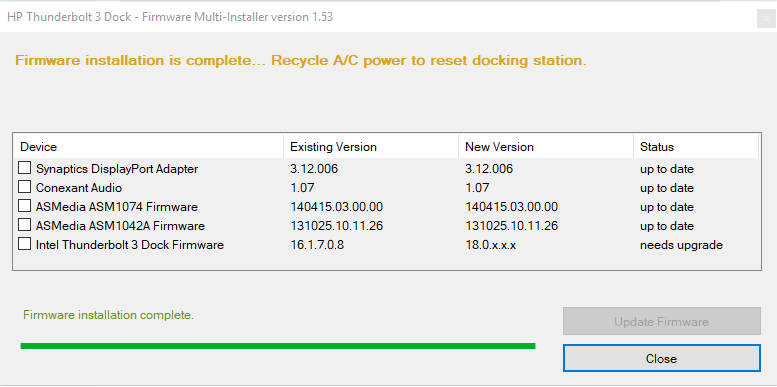
I apply the update as you can see from the following screenshot:
Then I shutdown windows (not disconnecting any power cable) and then power up again.. When I run the installer again, I still reports the old firmware version.
So did some digging in the update package and noticed that the following file:
So tried running this in a normal command prompt, changed to the C:\SWSETUP\SP91361\HPEliteT3DockFW\IntelT3Dock folder and ran ThunderboltUpdaterDevice.CMD.exe... something flashed up and then disappeared.. So tried running this in a administrator command prompt.. 🙂 Got some command line options. So ran again using the ThunderboltUpdaterDevice.CMD.exe -u it started updating the firmware 🙂
Then ran again using the ThunderboltUpdaterDevice.CMD.exe -d it confirmed that the firmware had been updated 🙂
Just thought somebody else might want to look at this..