-
×InformationNeed Windows 11 help?Check documents on compatibility, FAQs, upgrade information and available fixes.
Windows 11 Support Center.
-
×InformationNeed Windows 11 help?Check documents on compatibility, FAQs, upgrade information and available fixes.
Windows 11 Support Center.
- HP Community
- Notebooks
- Notebook Hardware and Upgrade Questions
- Who Me Too'd this topic

Create an account on the HP Community to personalize your profile and ask a question
Your account also allows you to connect with HP support faster, access a personal dashboard to manage all of your devices in one place, view warranty information, case status and more.
Common problems for Battery
We would like to share some of the most frequently asked questions about: Battery Reports, Hold a charge, Test and Calibrating Battery . Check out this link: Is your notebook plugged in and not charging?
01-20-2019 11:30 AM
Product: HP Spectre 13
Operating System: Microsoft Windows 10 (64-bit)
My 2 USB-C Thunderbolt ports seem to have died/stopped working. When plugging anything in and checking device manager nothing shows up. They are able to charge devices however like my phone. The non Thunderbolt USB-C port does work and when I plug devices into there they begin to show up.
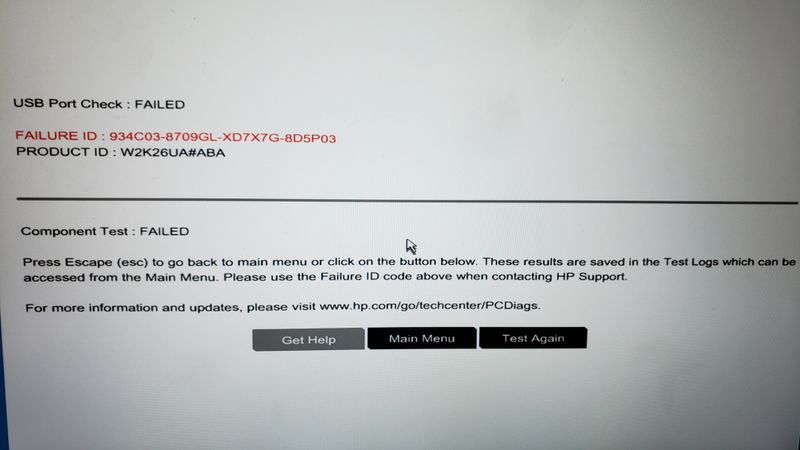
I went into the startup tools and was able to run a hardware test on both ports and received this error message:
USB PORT CHECK : FAILED
FAILURE ID : 934C03-8709GL-XD7X7G-8D5P03
PRODUCT ID: W2K26UA#ABA
Is there anything I can do to fix this issue?
Solved! Go to Solution.
Who Me Too'd this topic
† The opinions expressed above are the personal opinions of the authors, not of HP. By using this site, you accept the Terms of Use and Rules of Participation.
† The opinions expressed above are the personal opinions of the authors, not of HP. By using this site, you accept the <a href="https://www8.hp.com/us/en/terms-of-use.html" class="udrlinesmall">Terms of Use</a> and <a href="/t5/custom/page/page-id/hp.rulespage" class="udrlinesmall"> Rules of Participation</a>.