Here is the solution for the error: "Encryption Credentials have expired" when attempting to print or scan from Mac OS or iOS devices: Click here to view the troubleshooting steps!
Create an account on the HP Community to personalize your profile and ask a question
Your account also allows you to connect with HP support faster, access a personal dashboard to manage all of your devices in one place, view warranty information, case status and more.
I have a MFP 281cdw printer with Windows 10 Pro (1903 release). I decided to finally "update" everything related to the HP.
I uninstalled all existing HP software/drivers, and installed the full newest software release, which is 44.5.2693. All installed without a hitch. The printer is connected via NETWORK (wi-fi).
I then found out that there is a NEW firmware for the printer, dated: July 16, 2019. I checked the printer and I see that I currently have the 20190218 date-code. I then tried on 3 different occasions to use the built-in printer option to download and update the firmware. It would find this "new" version, and then it would get stuck at "Downloading", and would never actually install.
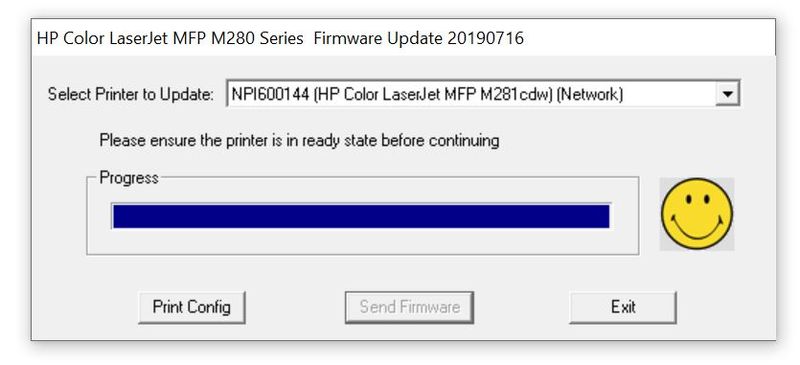
I then decided to use alternative option of downloading the firmware update and running it from my PC. Upon running it (using Administrator mode), I would select the correct drop down option, choose SEND FIRMWARE and then wait until completion. During the update, the printer display would change to "Printing Document". Upon the end of the "successful" firmware upgrade, the printer would auto-restart but then would display Fatal Code 200, and continue this auto-restart loop until I would manually turn it off and turn it back on. Upon doing so, I would still see the date-code being listed as 20190218. So, no update ever gets done. Please see below a screen shot that I do get a smiley face as if it updated, but I guess nothing actually gets done.
Please help me fix this issue. I still don't understand why the update from within the printer itself won't work. It auto-updated itself about 6 months ago with no problems, my internet works just fine and I have tried this on at least 3 different occasions now.