Webcam Not Working? Advanced Fixes for HP Notebooks! Click here to view the instructions!
Create an account on the HP Community to personalize your profile and ask a question
Your account also allows you to connect with HP support faster, access a personal dashboard to manage all of your devices in one place, view warranty information, case status and more.
We would like to share some of the most frequently asked questions about: Battery Reports, Hold a charge, Test and Calibrating Battery . Check out this link: Is your notebook plugged in and not charging?
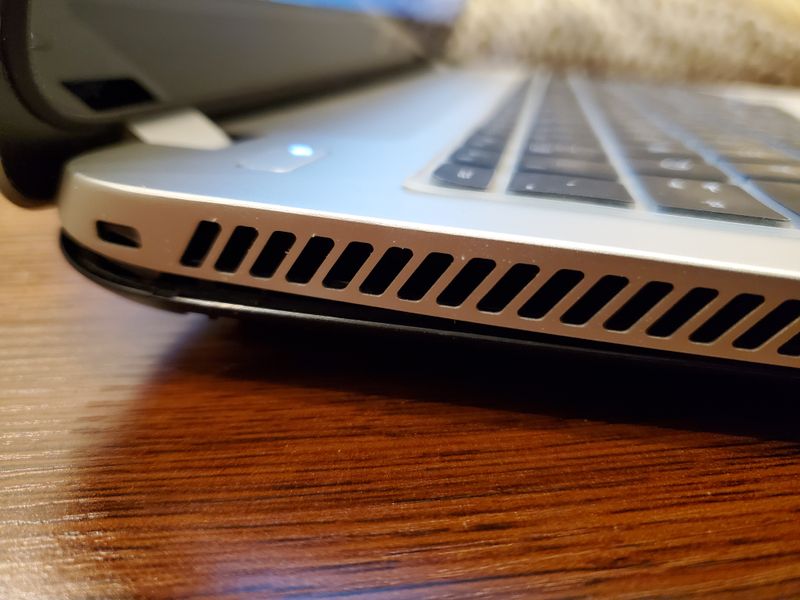
I'm writing with regards to my HP Envy TouchSmart 15 Notebook PC, model: 15-j003cl. I love my laptop but recently, I've been experiencing problems with the bottom of the case at the rear separating at the hinges and rear corners. I can hear cracking every time I lift open the screen, and you can hear little pieces of plastic rattling all inside the laptop. The screen cannot be held up steadily anymore as the hinges are no longer supported by the breaking case. The hinges themselves don't seem broken, just the plastic that's around the hinge areas. The two corner screws at the rear-bottom of the case no longer hold the case together. There is no threading at the back end, so the screws have nothing to screw into when I use a screwdriver. I can't seal the case. The bottom of the case in the rear on both the left and right side corners no longer sit flush and you can see the separation. I'm afraid the entire rear corners of the case will continue to separate and the hardware within will not be attached/connected correctly. I'm unable to find a HP contact email to send this inquiry. Anybody know how to help get HP support? My laptop is not under warranty, but I can't find a place to submit my inquiry. I included pictures below. Thank you!