
-
×InformationNeed Windows 11 help?Check documents on compatibility, FAQs, upgrade information and available fixes.
Windows 11 Support Center. -
-
×InformationNeed Windows 11 help?Check documents on compatibility, FAQs, upgrade information and available fixes.
Windows 11 Support Center. -
- HP Community
- Desktops
- Desktop Operating Systems and Recovery
- Re: After F11

Create an account on the HP Community to personalize your profile and ask a question
Your account also allows you to connect with HP support faster, access a personal dashboard to manage all of your devices in one place, view warranty information, case status and more.
Check out our WINDOWS 11 Support Center info about: OPTIMIZATION, KNOWN ISSUES, FAQs, VIDEOS AND MORE.

It has been a while since anyone has replied. Simply ask a new question if you would like to start the discussion again.

03-28-2021 12:36 AM - edited 03-28-2021 02:03 AM
 HP Recommended
Product: HP ENVY
Operating System: Microsoft Windows 10 (32-bit)
product Number: 3eg51ua#aba
model: 17-ae152nr
So my computer starting going really slow, I powered it off and back ok the HP screen started loading and I walked away to let it reboot.
came back 20 minutes later and the screen was black. Only the power key worked. I removed the mouse fob and power cord. Tried to reboot again and nothing.
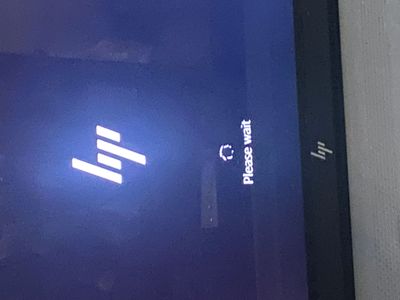
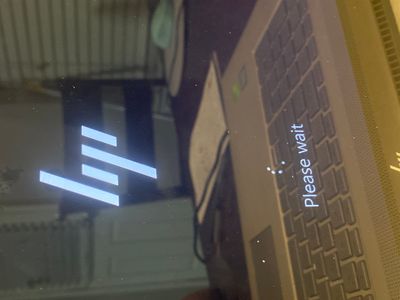
I then powered it back on and pressed F11 the HP logo appeared with “please wait” it’s been spinning for 6 hours. I’m so lost I don’t know what to do.
7 REPLIES 7

03-28-2021 01:12 AM
HP Recommended
Hello
this is a recorded response (macro))
we need the exact model of your computer, and the product number
To find it follow this
for a desktop computer
HP Desktop PCs - How Do I Find My Model Number or Product Number? | HP® Customer Support
and for a laptop:
HP Notebook PCs - How Do I Find My Product Name or Number? | HP® Customer Support
--------------------------------------------- Signature ---------------------------------------------
was this reply helpful , or just say thank you ? Click on the yes button
Please remember to mark the answers this can help other users

Desktop-Knowledge-Base
Windows 11 22h2 inside , user
------------------------------------------------------------------------------------------------------------
was this reply helpful , or just say thank you ? Click on the yes button
Please remember to mark the answers this can help other users
please click on the accept as solution button if message provided an answer to the problem

Desktop-Knowledge-Base
Windows 11 22h2 inside , user
------------------------------------------------------------------------------------------------------------
03-28-2021 02:02 AM
HP Recommended
Product number | 5EG51UA |
17-ae152nr Product Specifications
try full test
HP PCs - Testing for Hardware Failures | HP® Customer Support
give result here
--------------------------------------------- Signature ---------------------------------------------
was this reply helpful , or just say thank you ? Click on the yes button
Please remember to mark the answers this can help other users
Desktop-Knowledge-Base
Windows 11 22h2 inside , user
------------------------------------------------------------------------------------------------------------
was this reply helpful , or just say thank you ? Click on the yes button
Please remember to mark the answers this can help other users
please click on the accept as solution button if message provided an answer to the problem
Desktop-Knowledge-Base
Windows 11 22h2 inside , user
------------------------------------------------------------------------------------------------------------
03-28-2021 02:26 AM - edited 03-28-2021 02:27 AM
HP Recommended
Hello
the hard drive is defective
It can continue to operate for a certain time, but it can definitively break down, if it is not already the case!
If possible, save personal data
Try a full reinstall
Be careful even if it works, it may permanently break down, save the data regularly.
This may allow you to use the computer while you find a hard drive!
You can try to help yourself with this tutorial (sorry not fully translated)
que faire en cas d' erreur / échec dst du disque dur - HP Support Community - 7338574
Using the HP Cloud Recovery Tool (Windows 10, 7)
You can try several things in order to try to recover your data, I give some explanations here, but in French!
You can try a bootable cd / dvd type live cd (linux)
https://www.online-tech-tips.com/computer-tips/how-to-retrieve-windows-files-using-a-linux-live-cd/
you can try removing the hard drive, in order to connect it to another computer internally, or with a usb adapter!
https://www.muo.com/tag/connect-get-data-off-hard-drive/
If your disk is not completely out of order, this gives you a small chance
--------------------------------------------- Signature ---------------------------------------------
was this reply helpful , or just say thank you ? Click on the yes button
Please remember to mark the answers this can help other users
Desktop-Knowledge-Base
Windows 11 22h2 inside , user
------------------------------------------------------------------------------------------------------------
was this reply helpful , or just say thank you ? Click on the yes button
Please remember to mark the answers this can help other users
please click on the accept as solution button if message provided an answer to the problem
Desktop-Knowledge-Base
Windows 11 22h2 inside , user
------------------------------------------------------------------------------------------------------------

Be alert for scammers posting fake support phone numbers and/or email addresses on the community.
If you think you have received a fake HP Support message, please report it to us by clicking on "Flag Post".
† The opinions expressed above are the personal opinions of the authors, not of HP. By using this site, you accept the Terms of Use and Rules of Participation.


Didn't find what you were looking for?
Ask the community
† The opinions expressed above are the personal opinions of the authors, not of HP. By using this site, you accept the <a href="https://www8.hp.com/us/en/terms-of-use.html" class="udrlinesmall">Terms of Use</a> and <a href="/t5/custom/page/page-id/hp.rulespage" class="udrlinesmall"> Rules of Participation</a>.