
-
×InformationNeed Windows 11 help?Check documents on compatibility, FAQs, upgrade information and available fixes.
Windows 11 Support Center. -
-
×InformationNeed Windows 11 help?Check documents on compatibility, FAQs, upgrade information and available fixes.
Windows 11 Support Center. -
- HP Community
- Gaming
- Gaming Notebooks
- Re: Omen 17 is boot looping, freezes on omen logo

Create an account on the HP Community to personalize your profile and ask a question
Your account also allows you to connect with HP support faster, access a personal dashboard to manage all of your devices in one place, view warranty information, case status and more.

It has been a while since anyone has replied. Simply ask a new question if you would like to start the discussion again.


06-28-2022 11:29 PM
 HP Recommended
Hello @Newbie35
To help you I need to know the product number (p/n) of your notebook !
You will find this information on the back of your notebook printed in small alphanumeric letters.
The product number (p/n) is legally allowed information, just about the computer, no sensitive data.
It is allowed to post in public, no problem.
best regards
---
Dear Community Member, please click the button [ YES ] on "Was this reply helpful?" to say Thanks and
make it easier for other people to find this type of solution by marking the reply ▶️ [ Accept as Solution ] ◀️
Do this on the post I wrote that helped solve it.
Thank you very much
⌨️
06-28-2022 11:42 PM
HP Recommended
Hello @Newbie35
Here you got the most important document for your notebook:
Start at Page 29 Component replacement procedures
In your case: Service is required !
- The computer should be disassembled and checked.
- Thermal paste for CPU GPU and bridges should be renewed
- The function of the fan(s) must be checked
- General cleaning ...
- Check storage:
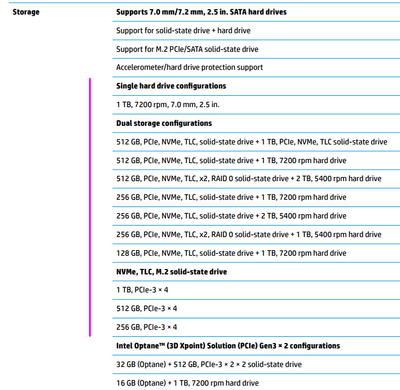
Please report your results
best regards
---
Dear Community Member, please click the button [ YES ] on "Was this reply helpful?" to say Thanks and
make it easier for other people to find this type of solution by marking the reply ▶️ [ Accept as Solution ] ◀️
Do this on the post I wrote that helped solve it.
Thank you very much
⌨️
06-29-2022 12:11 AM
HP Recommended
Hello @Newbie35
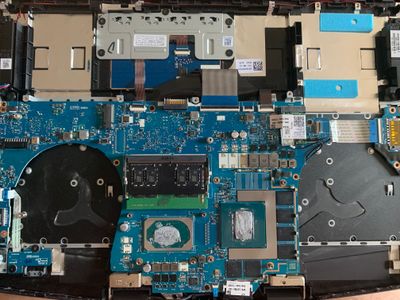
Always check the copper contacts and clean with isopropanol alcohol (or fingernail polish remover) if necessary.
- reinsert storage ( what do you have ? specification ? size ? picture please )
- reinsert RAM
best regards
---
Dear Community Member, please click the button [ YES ] on "Was this reply helpful?" to say Thanks and
make it easier for other people to find this type of solution by marking the reply ▶️ [ Accept as Solution ] ◀️
Do this on the post I wrote that helped solve it.
Thank you very much
⌨️
06-29-2022 12:24 AM
HP Recommended
Hello @Newbie35
- take out your m.2 drive. Do you have another notebook/computer to test the m.2 ?
best regards
---
Dear Community Member, please click the button [ YES ] on "Was this reply helpful?" to say Thanks and
make it easier for other people to find this type of solution by marking the reply ▶️ [ Accept as Solution ] ◀️
Do this on the post I wrote that helped solve it.
Thank you very much
⌨️

Be alert for scammers posting fake support phone numbers and/or email addresses on the community.
If you think you have received a fake HP Support message, please report it to us by clicking on "Flag Post".
† The opinions expressed above are the personal opinions of the authors, not of HP. By using this site, you accept the Terms of Use and Rules of Participation.


Didn't find what you were looking for?
Ask the community
† The opinions expressed above are the personal opinions of the authors, not of HP. By using this site, you accept the <a href="https://www8.hp.com/us/en/terms-of-use.html" class="udrlinesmall">Terms of Use</a> and <a href="/t5/custom/page/page-id/hp.rulespage" class="udrlinesmall"> Rules of Participation</a>.