• ×
    Information
    Need Windows 11 help?
    Check documents on compatibility, FAQs, upgrade information and available fixes.
    Windows 11 Support Center.
  • post a message
  • ×
    Information
    Need Windows 11 help?
    Check documents on compatibility, FAQs, upgrade information and available fixes.
    Windows 11 Support Center.
  • post a message
Guidelines
Webcam Not Working? Advanced Fixes for HP Notebooks! Click here to view the instructions!
Common problems for Battery
We would like to share some of the most frequently asked questions about: Battery Reports, Hold a charge, Test and Calibrating Battery . Check out this link: Is your notebook plugged in and not charging?
HP Recommended
HP Envy x360
Microsoft Windows 10 (32-bit)

HP Support Assistant keeps notifying me of an update for Intel WLAN driver. Try to update through the assistant and by direct download but it fails to install.

1 ACCEPTED SOLUTION

Accepted Solutions
HP Recommended

Greetings @geoff_s65


Welcome to HP Forums and Thanks for the post. 


I understand that you are unable to install the wireless adapter driver on your computer, is that right?

Kudos to you for trying to troubleshoot the issue on your own.

Not to worry, I will be glad to assist you. 

Have you checked the version of the driver installed on your computer?


Recommend you open device manager by doing a right-click on the Windows button. 

Expand network adapters and right-click on the wireless adapter listed in device manager and select properties. 

On the properties window that comes up click on the drivers tab and you will get to know the version of the driver installed on your computer. 

If the version installed on your computer is newer than the one you are trying to install using the update, it might fail. 

If the version of the update is newer than the one on your computer, uinstall the current driver from device manager. 

Restart your computer and install the downloaded update driver. 

This should resolve the issue you are facing. 

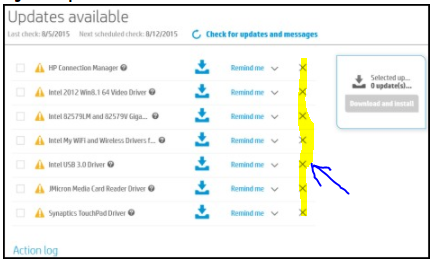
If can also cancel the update in HP Support Assistant by clicking on the X towards the right of the update in HP Support Assistant. 


Click on the X next to the update will not prompt for the current version. 

When a newer version is released, it would prompt for the update again. 


Let me know if this helped. 

Chimney_83
I am an HP Employee

View solution in original post

1 REPLY 1
HP Recommended

Greetings @geoff_s65


Welcome to HP Forums and Thanks for the post. 


I understand that you are unable to install the wireless adapter driver on your computer, is that right?

Kudos to you for trying to troubleshoot the issue on your own.

Not to worry, I will be glad to assist you. 

Have you checked the version of the driver installed on your computer?


Recommend you open device manager by doing a right-click on the Windows button. 

Expand network adapters and right-click on the wireless adapter listed in device manager and select properties. 

On the properties window that comes up click on the drivers tab and you will get to know the version of the driver installed on your computer. 

If the version installed on your computer is newer than the one you are trying to install using the update, it might fail. 

If the version of the update is newer than the one on your computer, uinstall the current driver from device manager. 

Restart your computer and install the downloaded update driver. 

This should resolve the issue you are facing. 

If can also cancel the update in HP Support Assistant by clicking on the X towards the right of the update in HP Support Assistant. 


Click on the X next to the update will not prompt for the current version. 

When a newer version is released, it would prompt for the update again. 


Let me know if this helped. 

Chimney_83
I am an HP Employee

† The opinions expressed above are the personal opinions of the authors, not of HP. By using this site, you accept the <a href="https://www8.hp.com/us/en/terms-of-use.html" class="udrlinesmall">Terms of Use</a> and <a href="/t5/custom/page/page-id/hp.rulespage" class="udrlinesmall"> Rules of Participation</a>.