
-
×InformationNeed Windows 11 help?Check documents on compatibility, FAQs, upgrade information and available fixes.
Windows 11 Support Center. -
-
×InformationNeed Windows 11 help?Check documents on compatibility, FAQs, upgrade information and available fixes.
Windows 11 Support Center. -
- HP Community
- Notebooks
- Notebook Hardware and Upgrade Questions
- Re: M.2 SSD Upgrade

Create an account on the HP Community to personalize your profile and ask a question
Your account also allows you to connect with HP support faster, access a personal dashboard to manage all of your devices in one place, view warranty information, case status and more.
Common problems for Battery
We would like to share some of the most frequently asked questions about: Battery Reports, Hold a charge, Test and Calibrating Battery . Check out this link: Is your notebook plugged in and not charging?

It has been a while since anyone has replied. Simply ask a new question if you would like to start the discussion again.

02-03-2016 08:35 AM - edited 02-03-2016 08:36 AM
 HP Recommended
From what I can find, the M.2 should be a SATA model and not a PCI-E model.
Know what the return policy is before you buy.
The BIOS level on your laptop is old. Perhaps if you run the HP Support Assistant (HPSA) you will pickup some updates. Before installing any BIOS update, install any diagnostic updates and then run a full set to ensure that your new Pc is stable before applying the BIOS update.
HP ENVY 6055, >Custom PC - Z690, i9-12900K, 32GB DDR5 5600, quad NVMe drives 4K screen, NVIDIA 3080 10GB

02-03-2016 12:42 PM
HP Recommended
Yeah, I see there's a bunch of updates available from HP for my new laptop, including 2 newer BIOS versions. I just haven't had a chance to install them, yet (I'm not really using the laptop yet, until I buy and install the SSD's I want).
I also found this SanDisk 1TB M.2 SATA SSD on Amazon I'm going to pick up & try:
https://www.amazon.com/gp/aw/d/B0195B30KG/ref=aw_wl_ov_dp_1_8?colid=2BMQNLMT4ZB1U&coliid=I3II0ULZ72S...
I also found this SanDisk 1TB M.2 SATA SSD on Amazon I'm going to pick up & try:
https://www.amazon.com/gp/aw/d/B0195B30KG/ref=aw_wl_ov_dp_1_8?colid=2BMQNLMT4ZB1U&coliid=I3II0ULZ72S...


02-03-2016 12:59 PM
HP Recommended
@Huffer wrote:Does anyone know if these new BIOS releases include any attempted fixes for the M.2 issues?
Definitely not. The latest release was released on Jan. 8, 2016 (F.25 Rev. A), which has the same fixes and enhancements notes as the release before that (F.24 Rev. A - Nov. 23, 2016).
Same deal as last talked about. Any news on the engineer/development end?
02-03-2016 01:32 PM
HP Recommended
It's taken a lot of effort and years to earn the badges, and we do not need any "Treasure of the Sierra Madre" jokes. Heard them all. However high one's rank gets in the Forum, they do not give you access to BIOS Code, hardware schematics or other serious engineering information, assuming some of us could even understand that lind of information. I do not have one of these laptops with the M.2 port on it to test out and troubleshoot the problem hands on. All I can say (again) is that HP is aware of the issue and is telling us they are working on it. I truly wish there was more to do but trust me, the Forum Experts are doing all that it is possible for them to do.


02-03-2016 02:13 PM
HP Recommended
My comment was not directed at any Forum Experts, and I never thought any kind of badging or ranking in this forum would grant anyone "special access" to BIOS coding, engineering schematics, etc. I'm sure you actually have to work for HP as an engineer to have access to those things. I made my comment simply because it seems EVERY, SINGLE TIME I post something, I get an e-mail from HP telling me I've earned some kind of new badge. It just seems a bit excessive to me.
I haven't tried installing an M.2 SSD in my laptop, yet - for all I know, maybe I won't have any trouble, at all! I'm aware of at least one person in these forums who says he's installed a 500GB Samsung EVO 850 (I believe) M.2 SATA III SSD as his boot drive, with Windows and all his programs on it, and uses his 1TB HDD as storage for music; pictures, and videos. This is in an Envy 17t-n100; mine's an Envy 17t-n000 - I'm not exactly sure what the difference between the two models are, but he said he didn't have any problems at all, doing that.
It's encouraging to hear you say HP is aware of these issues, and are working to solve them.
My apologies if my attempt at humor offended you. That's not what I intended.
I haven't tried installing an M.2 SSD in my laptop, yet - for all I know, maybe I won't have any trouble, at all! I'm aware of at least one person in these forums who says he's installed a 500GB Samsung EVO 850 (I believe) M.2 SATA III SSD as his boot drive, with Windows and all his programs on it, and uses his 1TB HDD as storage for music; pictures, and videos. This is in an Envy 17t-n100; mine's an Envy 17t-n000 - I'm not exactly sure what the difference between the two models are, but he said he didn't have any problems at all, doing that.
It's encouraging to hear you say HP is aware of these issues, and are working to solve them.
My apologies if my attempt at humor offended you. That's not what I intended.
02-03-2016 03:39 PM
HP Recommended
@GT_46L wrote:
Yeah, I see there's a bunch of updates available from HP for my new laptop, including 2 newer BIOS versions. I just haven't had a chance to install them, yet (I'm not really using the laptop yet, until I buy and install the SSD's I want).
I also found this SanDisk 1TB M.2 SATA SSD on Amazon I'm going to pick up & try:
https://www.amazon.com/gp/aw/d/B0195B30KG/ref=aw_wl_ov_dp_1_8?colid=2BMQNLMT4ZB1U&coliid=I3II0ULZ72S...
I would actually advise you to NOT upgrade your BIOS to the latest version unless you're experiencing issues.
The people posting here about M.2 problems are the ones who made the mistake of upgrading their BIOS - which renders the M.2 port unusable. People running the F.2A BIOS seem to be able to use the M.2 port without issue. You might be one of the lucky few who won't have this problem.
If you're able to get an M.2 SSD installed and recognised then you're gold.
02-04-2016 06:17 AM
HP Recommended
Greetings Owners,
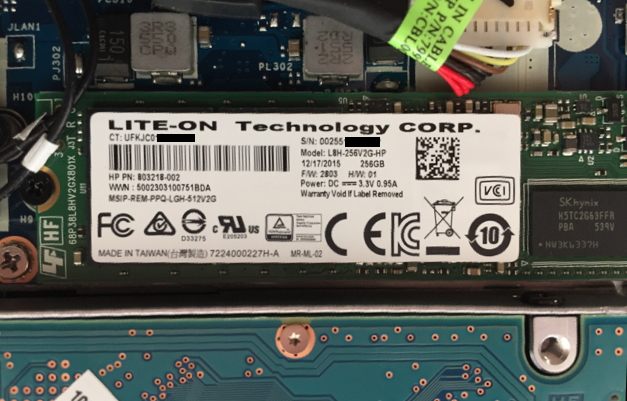
I received laptop #3 yesterday. The Lite-On 256GB m.2 SSD that was shipped inside works. I swaped it out with a 512gb SSD I purchased from HP Parts, it is made by Samsung. It also works great.
As I expected this appears to be an issue with the particular motherboard/BIOS in the original BestBuy laptop. This new laptop does NOT have the exact same motherboard as the first two laptops I tried, but it does look just like it on the outside.
I did upgrade the BIOS to the latest revision to insure that it did not disable the drive. Still works great.
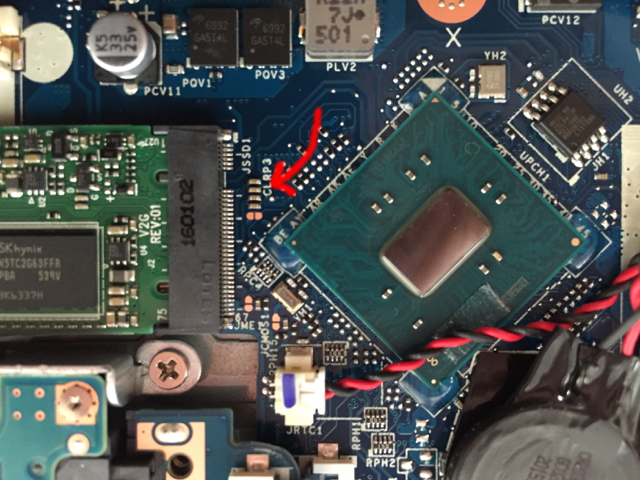
Another thing I noticed was the inclusion of a few resistors right next to the connector for the m.2. I posted pictures a few days ago of my original laptop and I'm pretty sure that these were bare connections in it. It may turn out that these are jumpers, but I can't swear to it.
I now have a working HP ENVY - 17t Touch Laptop
M9X68AV_1
1TB 5400 rpm Hard Drive + 512GB Flash Solid State Drive
jeff
Picture #1 - This is the part that shipped with the new laptop
Picture #2 - This is the area that looks like a jumper block to me.

Be alert for scammers posting fake support phone numbers and/or email addresses on the community.
If you think you have received a fake HP Support message, please report it to us by clicking on "Flag Post".
† The opinions expressed above are the personal opinions of the authors, not of HP. By using this site, you accept the Terms of Use and Rules of Participation.


Didn't find what you were looking for?
Ask the community
† The opinions expressed above are the personal opinions of the authors, not of HP. By using this site, you accept the <a href="https://www8.hp.com/us/en/terms-of-use.html" class="udrlinesmall">Terms of Use</a> and <a href="/t5/custom/page/page-id/hp.rulespage" class="udrlinesmall"> Rules of Participation</a>.