
-
×InformationNeed Windows 11 help?Check documents on compatibility, FAQs, upgrade information and available fixes.
Windows 11 Support Center. -
-
×InformationNeed Windows 11 help?Check documents on compatibility, FAQs, upgrade information and available fixes.
Windows 11 Support Center. -
- HP Community
- Notebooks
- Notebook Hardware and Upgrade Questions
- Re: Pavilion 14-bk063sa RAM and M.2 Questions.

Create an account on the HP Community to personalize your profile and ask a question
Your account also allows you to connect with HP support faster, access a personal dashboard to manage all of your devices in one place, view warranty information, case status and more.
Common problems for Battery
We would like to share some of the most frequently asked questions about: Battery Reports, Hold a charge, Test and Calibrating Battery . Check out this link: Is your notebook plugged in and not charging?

It has been a while since anyone has replied. Simply ask a new question if you would like to start the discussion again.

02-18-2020 11:47 AM
 HP Recommended
Product: Pavilion 14-bk063sa
Operating System: Microsoft Windows 10 (64-bit)
So i recently hit a BSOD on my 14-bk063sa which was discovered to be due to the HDD in my laptop dieing slowly, so i decided to do my first ever motherboard side repair of a laptop. swapped it with a 250GB Samsung SDD since i didn't need 1 TB however once i got the back panel off i saw to my surprise the plethora of hypothetical upgrade possibilities.
this device only has one of two ram slots populated and what looks to be an M.2 slot. however there is no indication on the board what length or type of M.2 slot it is.
so i know i can fit 16GB of SDDR4 at 2133 in a two stick configuration. (need confirmation of that.)
but does anyone know if i can install an m.2? if so, what length as if i was going to do that it would have to be a Samsung
also the RAM can it be Corsair? i much prefer there brand. .
13 REPLIES 13

02-18-2020 12:02 PM
HP Recommended
Hello, in effect you have an m.2 slot on this PC. If you see your maintenance manual, page 2, you can see it:
http://h10032.www1.hp.com/ctg/Manual/c05493089
However it is indicates you can only install an m.2 SATA, not an m.2 PCIe SSD. If you have already bought your 2.5 inch SSD it is not necessary to install an m.2 SSD, but this slot can be used for have 2 drives on your PC (one m.2 SATA and one SATA 2.5).
For the RAM your PC is using SO-DIMM DDR4-2133, so you need to respect this frequency. In your guide page 1 it is written you can in effect install up to 16 Gb, in 2 modules of 8 Gb.
For the brander I am using Crucial personally, for SSD and RAM, but Corsair for RAM and Samsung for SSD are good branders too.
If I have been answer to your question please accept it as a solution 🙂
I am Expert from French Community, and I am doing my best to help you with your question.

I am Expert from French Community, and I am doing my best to help you with your question.
02-18-2020 12:54 PM
HP Recommended
hi, i'm aware it's for an SSD M.2 drive something like this?
Samsung 970 EVO Plus 250 GB NVMe M.2 Internal SSD
i have found that the correct slot size is 2280

Exceptional endurance. The new standard in sustainable performance. The new Samsung 970 EVO Plus delivers breakthrough speeds, best in-class reliability and a broad range of capacity options.
02-18-2020 12:57 PM - edited 02-18-2020 12:57 PM
HP Recommended
It is a PCie NVMe, so maybe not compatible with your PC (same size but not the same protocol). You can check it for more informations:
https://www.crucial.com/usa/en/systemscanner
However you can use an m.2 SATA for be sure, same the 860 EVO if you want a Samsung drive.
If I have been answer to your question please accept it as a solution 🙂
I am Expert from French Community, and I am doing my best to help you with your question.
I am Expert from French Community, and I am doing my best to help you with your question.
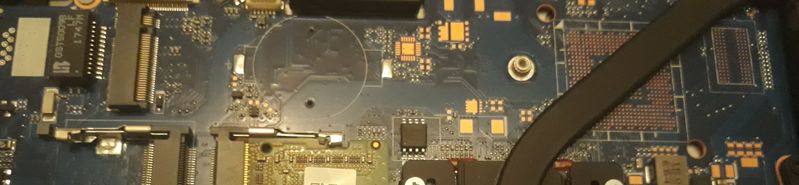
02-19-2020 05:46 AM
HP Recommended
Hello, in effect that is appears to be an m.2 slot for SSD 😉
If I have been answer to your question please accept it as a solution 🙂
I am Expert from French Community, and I am doing my best to help you with your question.
I am Expert from French Community, and I am doing my best to help you with your question.
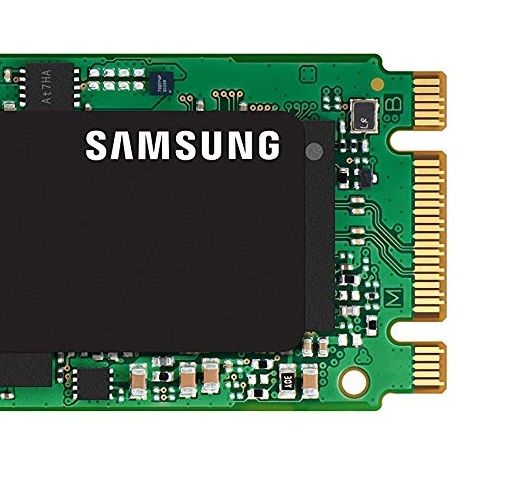
02-19-2020 02:02 PM
HP Recommended
In effect this two format can enter in the same slot, but maybe your BIOS can't recognise an m.2 PCie NVMe SSD.
If I have been answer to your question please accept it as a solution 🙂
I am Expert from French Community, and I am doing my best to help you with your question.
I am Expert from French Community, and I am doing my best to help you with your question.
02-19-2020 02:41 PM
HP Recommended
If it is an m.2 SATA SSD, yes. You just need transfer your Windows files. You can use this software for this for example:
https://www.acronis.com/en-us/personal/computer-backup/
If I have been answer to your question please accept it as a solution 🙂
I am Expert from French Community, and I am doing my best to help you with your question.
I am Expert from French Community, and I am doing my best to help you with your question.

Be alert for scammers posting fake support phone numbers and/or email addresses on the community.
If you think you have received a fake HP Support message, please report it to us by clicking on "Flag Post".
† The opinions expressed above are the personal opinions of the authors, not of HP. By using this site, you accept the Terms of Use and Rules of Participation.


Didn't find what you were looking for?
Ask the community
† The opinions expressed above are the personal opinions of the authors, not of HP. By using this site, you accept the <a href="https://www8.hp.com/us/en/terms-of-use.html" class="udrlinesmall">Terms of Use</a> and <a href="/t5/custom/page/page-id/hp.rulespage" class="udrlinesmall"> Rules of Participation</a>.