-
×InformationNeed Windows 11 help?Check documents on compatibility, FAQs, upgrade information and available fixes.
Windows 11 Support Center. -

-
×InformationNeed Windows 11 help?Check documents on compatibility, FAQs, upgrade information and available fixes.
Windows 11 Support Center. -
- HP Community
- Notebooks
- Notebook Hardware and Upgrade Questions
- Second slot M2 PCIE

Create an account on the HP Community to personalize your profile and ask a question
04-18-2020 06:35 PM
Hello, sorry for my english - google translate. I bought an HP Omen 17-cb0000nw laptop. I wanted to expand the SSD memory in the M2 PCIE free slot. The problem is that there is no access to the second disk. I took a picture of how it looks like m, and how it looks at sample videos from the internet. Please help.
Solved! Go to Solution.
Accepted Solutions
04-22-2020 01:34 PM
@rakieten900 If you purchased the device at the local store, I suggest you check with them on why one of the two slots are missing, if you purchased it from HP, I suggest you talk to HP support and discuss your options, follow the below steps to get started:
1) Click on this link - http://www.hp.com/contacthp/
2) Click on Sign-in or select the product using the below step:
3) Enter the serial of your device.
4) Select the country from the drop-down.
5) Click on "Show Options".
Fill the web-form, to populate a case number and phone number for yourself!
Also, if you are having trouble navigating through the above options, it's most likely because the device is out of warranty, if yes? please send me a private message with the region you are contacting us from,
here's how private messages work: Click here for details
If you wish to thank me for my efforts, you could click on "Accept as solution" on my post as the solution should help others too..
Riddle_Decipher
I am an HP Employee
Learning is a journey, not a destination.
Let's keep asking questions and growing together.
04-18-2020 06:58 PM
If attachments didn't work: https://imgur.com/a/vkHboF3
04-21-2020 06:50 PM
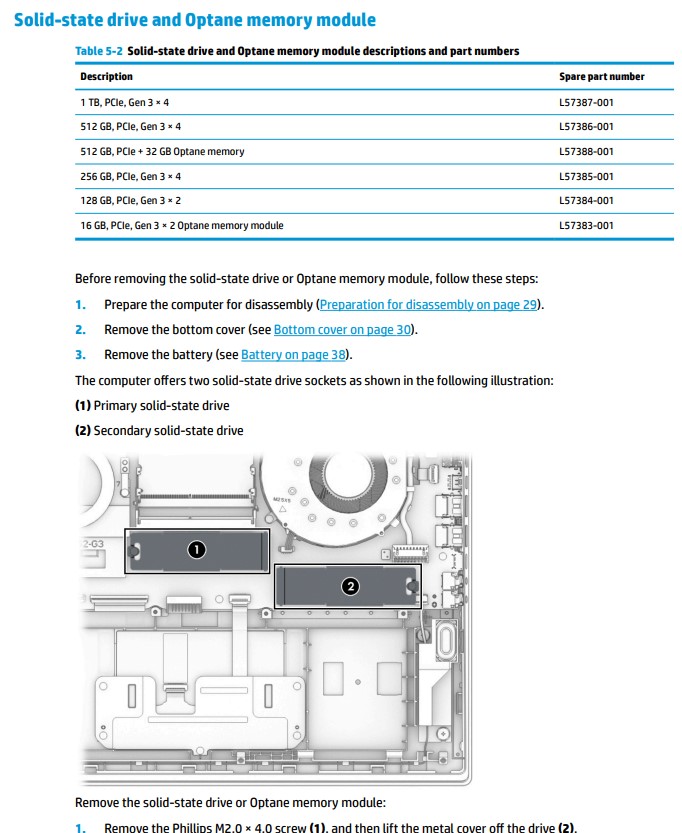
@rakieten900 Here's the HP maintenance and service guide for all your hardware replacement & upgrade queries, click here and access page. 32 Chapter 5 Removal and replacement procedures for Customer Self-Repair parts for details (see screenshot for example)

P.S: Welcome to HP Community 😉
I hope that answers your query,
If it did, simply select "Accept as solution", to help the community grow,
And if you wish to thank us for our efforts, click on the thumbs up for kudos.
Have a great day ahead.
Riddle_Decipher
I am an HP Employee
Learning is a journey, not a destination.
Let's keep asking questions and growing together.
04-22-2020 01:34 PM
@rakieten900 If you purchased the device at the local store, I suggest you check with them on why one of the two slots are missing, if you purchased it from HP, I suggest you talk to HP support and discuss your options, follow the below steps to get started:
1) Click on this link - http://www.hp.com/contacthp/
2) Click on Sign-in or select the product using the below step:
3) Enter the serial of your device.
4) Select the country from the drop-down.
5) Click on "Show Options".
Fill the web-form, to populate a case number and phone number for yourself!
Also, if you are having trouble navigating through the above options, it's most likely because the device is out of warranty, if yes? please send me a private message with the region you are contacting us from,
here's how private messages work: Click here for details
If you wish to thank me for my efforts, you could click on "Accept as solution" on my post as the solution should help others too..
Riddle_Decipher
I am an HP Employee
Learning is a journey, not a destination.
Let's keep asking questions and growing together.