• ×
    Information
    Need Windows 11 help?
    Check documents on compatibility, FAQs, upgrade information and available fixes.
    Windows 11 Support Center.
  • post a message
  • ×
    Information
    Need Windows 11 help?
    Check documents on compatibility, FAQs, upgrade information and available fixes.
    Windows 11 Support Center.
  • post a message
Guidelines
Webcam Not Working? Advanced Fixes for HP Notebooks! Click here to view the instructions!
Common problems for Battery
We would like to share some of the most frequently asked questions about: Battery Reports, Hold a charge, Test and Calibrating Battery . Check out this link: Is your notebook plugged in and not charging?
HP Recommended
hp stream notebook 11-r050sa
Microsoft Windows 10 (64-bit)

hi everyone.please can someone help me.someone has been messing with my computer and they have turned my card readers off and i dont know how to turn them back on as i dont know how.thankyou world.shaun.

1 ACCEPTED SOLUTION

Accepted Solutions
HP Recommended

@SEan2578


Thanks for taking the time post on the HP Support Forums Page. We meet again 🙂


I read that the someone has disabled the memory card reader on your HP Stream Notebook - 11-r050sa laptop and you need assistance to enable them. I'll surely do my best to help.


I would like to know the following information to assist you better:

  • How did you come to know the card reader is disabled? Is it not able to read any of the memory cards?

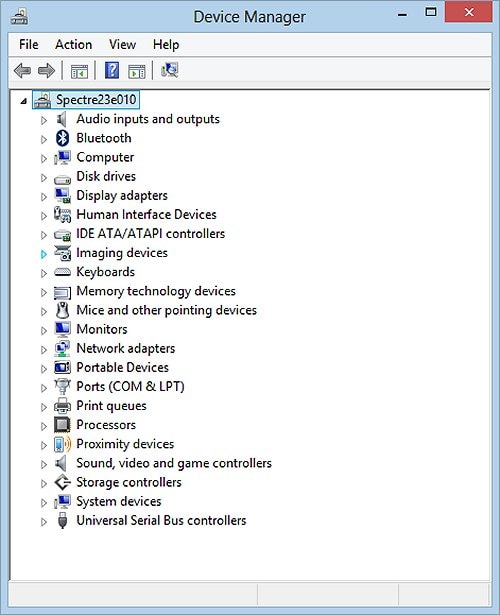
I suggest you to open the device manager.

  • Look for "memory technology devices."
  • If it is present then expand it and check if there is a yellow mark next to it.

Device Manager


  • If the card reader is present and still does not read any media then right click on the memory card reader drivers and select uninstall. 
  • Restart the laptop and Windows should automatically install the drivers.
  • If the drivers are missing or do not get added after Windows starts then you may download and install them from this link

I hope this does the trick. Let me know the results. Good luck! 

View solution in original post

1 REPLY 1
HP Recommended

@SEan2578


Thanks for taking the time post on the HP Support Forums Page. We meet again 🙂


I read that the someone has disabled the memory card reader on your HP Stream Notebook - 11-r050sa laptop and you need assistance to enable them. I'll surely do my best to help.


I would like to know the following information to assist you better:

  • How did you come to know the card reader is disabled? Is it not able to read any of the memory cards?

I suggest you to open the device manager.

  • Look for "memory technology devices."
  • If it is present then expand it and check if there is a yellow mark next to it.

Device Manager


  • If the card reader is present and still does not read any media then right click on the memory card reader drivers and select uninstall. 
  • Restart the laptop and Windows should automatically install the drivers.
  • If the drivers are missing or do not get added after Windows starts then you may download and install them from this link

I hope this does the trick. Let me know the results. Good luck! 

† The opinions expressed above are the personal opinions of the authors, not of HP. By using this site, you accept the <a href="https://www8.hp.com/us/en/terms-of-use.html" class="udrlinesmall">Terms of Use</a> and <a href="/t5/custom/page/page-id/hp.rulespage" class="udrlinesmall"> Rules of Participation</a>.