-
×InformationNeed Windows 11 help?Check documents on compatibility, FAQs, upgrade information and available fixes.
Windows 11 Support Center. -

-
×InformationNeed Windows 11 help?Check documents on compatibility, FAQs, upgrade information and available fixes.
Windows 11 Support Center. -
- HP Community
- Notebooks
- Notebook Hardware and Upgrade Questions
- hp strem notebook-model(11-r050sa)-system not reading usb-or...

Create an account on the HP Community to personalize your profile and ask a question
06-02-2017 10:36 AM
hi everyone.please can someone help me.someone has been messing with my computer and they have turned my card readers off and i dont know how to turn them back on as i dont know how.thankyou world.shaun.
Solved! Go to Solution.
Accepted Solutions
06-03-2017 01:48 PM
Thanks for taking the time post on the HP Support Forums Page. We meet again 🙂
I read that the someone has disabled the memory card reader on your HP Stream Notebook - 11-r050sa laptop and you need assistance to enable them. I'll surely do my best to help.
I would like to know the following information to assist you better:
- How did you come to know the card reader is disabled? Is it not able to read any of the memory cards?
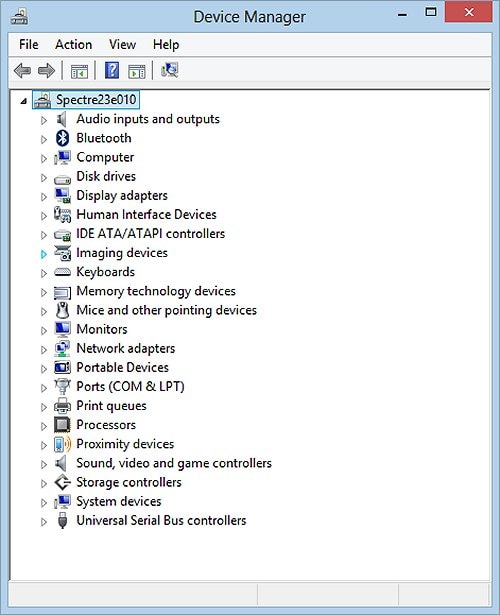
I suggest you to open the device manager.
- Look for "memory technology devices."
- If it is present then expand it and check if there is a yellow mark next to it.

- If the card reader is present and still does not read any media then right click on the memory card reader drivers and select uninstall.
- Restart the laptop and Windows should automatically install the drivers.
- If the drivers are missing or do not get added after Windows starts then you may download and install them from this link.
I hope this does the trick. Let me know the results. Good luck!
06-03-2017 01:48 PM
Thanks for taking the time post on the HP Support Forums Page. We meet again 🙂
I read that the someone has disabled the memory card reader on your HP Stream Notebook - 11-r050sa laptop and you need assistance to enable them. I'll surely do my best to help.
I would like to know the following information to assist you better:
- How did you come to know the card reader is disabled? Is it not able to read any of the memory cards?
I suggest you to open the device manager.
- Look for "memory technology devices."
- If it is present then expand it and check if there is a yellow mark next to it.

- If the card reader is present and still does not read any media then right click on the memory card reader drivers and select uninstall.
- Restart the laptop and Windows should automatically install the drivers.
- If the drivers are missing or do not get added after Windows starts then you may download and install them from this link.
I hope this does the trick. Let me know the results. Good luck!