• ×
    Information
    Need Windows 11 help?
    Check documents on compatibility, FAQs, upgrade information and available fixes.
    Windows 11 Support Center.
  • post a message
  • ×
    Information
    Need Windows 11 help?
    Check documents on compatibility, FAQs, upgrade information and available fixes.
    Windows 11 Support Center.
  • post a message
Guidelines
Webcam Not Working? Advanced Fixes for HP Notebooks! Click here to view the instructions!
Common problems for Battery
We would like to share some of the most frequently asked questions about: Battery Reports, Hold a charge, Test and Calibrating Battery . Check out this link: Is your notebook plugged in and not charging?
HP Recommended
HP Pavilion Gaming - 15-dk0056wm
Microsoft Windows 11

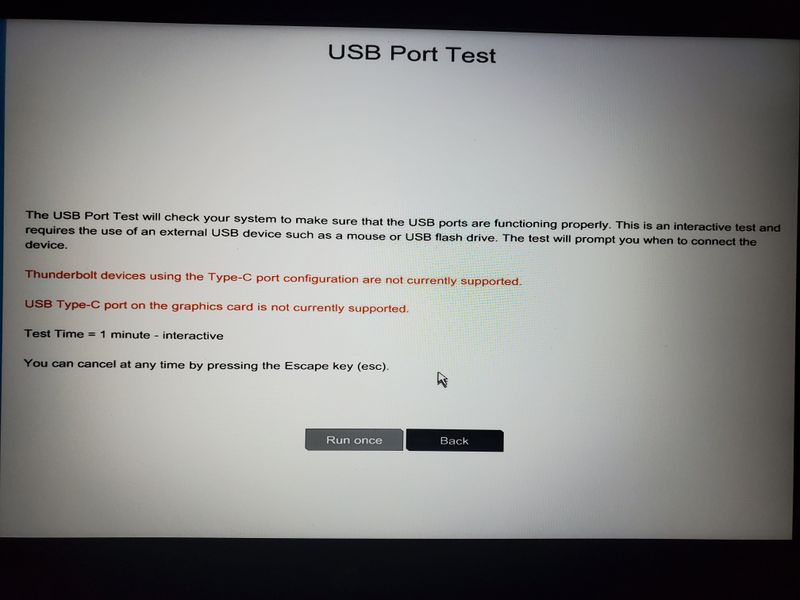
So this laptop came with the description stating that I could charge it via type-c but obviously didn't initiate a connection. When I went to check the BIOS, I was given a notice that the type c was unavailable and was possibly not supported. Any ideas to fix this issue?20211101_042651.jpg

1 ACCEPTED SOLUTION

Accepted Solutions
HP Recommended

@JPlup05 


The specs of your machine is


           https://support.hp.com/au-en/document/c06655486


  1. It is NOT a  Thunderbolt™ 3  port therefore the first red light is true
  2. Its USB-C should support external monitor or monitors with a right adapter/hob/dock. I don't know what their finding (the second red line) means.

Back on your subject: You should be able to use a compatible USB-C charger rating 150W and above to charge your machine. I read a news last week, vendors now have 240W USB-C chargers. I have no plan to test them, my current planis to test another HP dock when I save enough money.


Regards.

BH
***
**Click the KUDOS thumb up on the left to say 'Thanks'**
Make it easier for other people to find solutions by marking a Reply 'Accept as Solution' if it solves your problem.


View solution in original post

2 REPLIES 2
HP Recommended

@JPlup05 


The specs of your machine is


           https://support.hp.com/au-en/document/c06655486


  1. It is NOT a  Thunderbolt™ 3  port therefore the first red light is true
  2. Its USB-C should support external monitor or monitors with a right adapter/hob/dock. I don't know what their finding (the second red line) means.

Back on your subject: You should be able to use a compatible USB-C charger rating 150W and above to charge your machine. I read a news last week, vendors now have 240W USB-C chargers. I have no plan to test them, my current planis to test another HP dock when I save enough money.


Regards.

BH
***
**Click the KUDOS thumb up on the left to say 'Thanks'**
Make it easier for other people to find solutions by marking a Reply 'Accept as Solution' if it solves your problem.


HP Recommended

Thank you for your response. The info was perfect for my concerns 🙏🏿👌🏿

† The opinions expressed above are the personal opinions of the authors, not of HP. By using this site, you accept the <a href="https://www8.hp.com/us/en/terms-of-use.html" class="udrlinesmall">Terms of Use</a> and <a href="/t5/custom/page/page-id/hp.rulespage" class="udrlinesmall"> Rules of Participation</a>.