
-
×InformationNeed Windows 11 help?Check documents on compatibility, FAQs, upgrade information and available fixes.
Windows 11 Support Center. -
-
×InformationNeed Windows 11 help?Check documents on compatibility, FAQs, upgrade information and available fixes.
Windows 11 Support Center. -
- HP Community
- Printers
- Printer Ink Cartridges & Print Quality
- Re: Instant Ink

Create an account on the HP Community to personalize your profile and ask a question
Your account also allows you to connect with HP support faster, access a personal dashboard to manage all of your devices in one place, view warranty information, case status and more.
Check some of the most frequent questions about Instant Ink: HP INSTANT INK, HP+ PLANS: INK AND TONER.
Check out our Black or Color Ink Not Printing, Other Print Quality Issues info about: Print quality and Cartridge Issues.

It has been a while since anyone has replied. Simply ask a new question if you would like to start the discussion again.

05-08-2021 07:07 AM
 HP Recommended
Product: HP Officejet Pro 8600 Plus
Operating System: macOS 10.15 Catalina
At the end of setting up the Instant Ink process I get the message "Printer claimed on another account". Yes, this printer belonged to a friend that gave it to me. Any ideas on how to proceed?
9 REPLIES 9


05-09-2021 05:47 AM
HP Recommended
@Ste-vun, Welcome to the HP Support Community!
As the printer was owned by someone else before, we have to perform a factory reset on the printer for you to use it with your credentials.
Also, the previous owner should delete the printer on his Instant Ink account.
I have sent you a private message with a set of instructions to perform a reset. Kindly check the same, this might help you to resolve this issue. Check next to your profile name, you should see a little blue envelope, please click on it.
Hope this helps! Keep me posted.
Please click “Accept as Solution” if you feel my post solved your issue, it will help others find the solution.
Click the “Kudos, Thumbs Up" on the bottom right to say “Thanks” for helping!
Have a great day!
KUMAR0307
I am an HP Employee
05-11-2021 09:41 AM
HP Recommended
I have successfully performed the factory reset and successfully entered the printer claim code. However HP Smart has stated the "Printer status unknown" message. I also cannot access the administrator functions from HP Smart or the printers web page. I can print successfully from my computer. Also, cannot complete the Instant Ink procedure.
05-11-2021 11:47 AM
HP Recommended
He does not remember his account name and password. He purchased this printer 9 years ago when they lived in Washington. What can be done? Original owner was Robert Tudor. Fortunately he and his wife live in the same community as I so I can reach him easily.
05-12-2021 03:42 AM
HP Recommended
Use your HP Instant Ink account to cancel your HP Instant Ink service.
-
Sign in to hpinstantink.com/signin.
Your HP Instant Ink account page opens.
-
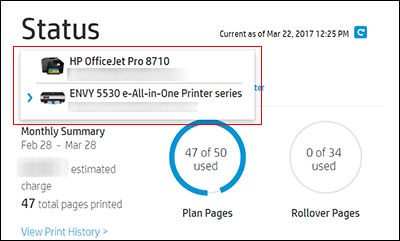
In the Status area of your HP Instant Ink account page, a printer drop-down menu is available when there are multiple printers enrolled. Click the drop-down menu, and then select the printer you want to cancel.
-
Check the Print History or the HP ePrint address of the printer to confirm you have selected the correct printer.
-
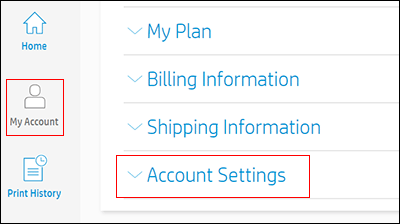
Click My Account, and then click Account Settings.
-
Click Cancel my HP Instant Ink Subscription.
You receive an email confirmation of the cancellation. The cancellation finalizes at the end of the current billing cycle when the final charge processes successfully.
If the previous owner has an HP Smart account setup, remove the printer from this account too.
Watch - How to Remove a Printer from Your HP Smart Account
Please send me a private message with the previous owner's Instant Ink account details or you may also respond to the private message I've sent out and I'll help you out, accordingly. Check next to your profile name, you should see a little blue envelope, please click on it.
Let me know how it goes.
KUMAR0307
I am an HP Employee

Be alert for scammers posting fake support phone numbers and/or email addresses on the community.
If you think you have received a fake HP Support message, please report it to us by clicking on "Flag Post".
† The opinions expressed above are the personal opinions of the authors, not of HP. By using this site, you accept the Terms of Use and Rules of Participation.


Didn't find what you were looking for?
Ask the community
† The opinions expressed above are the personal opinions of the authors, not of HP. By using this site, you accept the <a href="https://www8.hp.com/us/en/terms-of-use.html" class="udrlinesmall">Terms of Use</a> and <a href="/t5/custom/page/page-id/hp.rulespage" class="udrlinesmall"> Rules of Participation</a>.