• ×
    Information
    Need Windows 11 help?
    Check documents on compatibility, FAQs, upgrade information and available fixes.
    Windows 11 Support Center.
  • post a message
  • ×
    Information
    Need Windows 11 help?
    Check documents on compatibility, FAQs, upgrade information and available fixes.
    Windows 11 Support Center.
  • post a message
Guidelines
Join the HP Community Solve‑a‑thon | Help Others & Share Your Solutions | Live on Zoom | 2:30 PM to 2:30 AM IST | Every Wednesday Click here to know more
Check some of the most frequent questions about Instant Ink: HP INSTANT INK, HP+ PLANS: INK AND TONER.


Check out our Black or Color Ink Not Printing, Other Print Quality Issues info about: Print quality and Cartridge Issues.
HP Recommended
HP ENVY 5032
Microsoft Windows 10 (32-bit)

Not printing return mail tracking labels for the Royal Mail. Please help. 

1 REPLY 1
HP Recommended

@Nev25 


Forgive the questions - it is not intended as sarcasm:

  • Is the fact that these are Royal Mail labels significant to the process of printing labels?
  • That is, are there known issues printing this type of content?
  • Are there odd (or any) logos, images, artwork that could be failing to translate?


In general, 

Assuming the printer hardware is operating as expected (within specifications),

The printer is completely unaware of what it is printing.


There are translation routines that process content into printer language - these are applied when the document is prepared for printing - even so, the printer is not aware of the process and prints what it is given.


Where to look


Look for the solution in the software / application you are using to create / view / submit the job to the printer.


For example,

If the issue is one of translating the content,

If the content type is a PDF file,

If you are using PDF viewer / printing software,

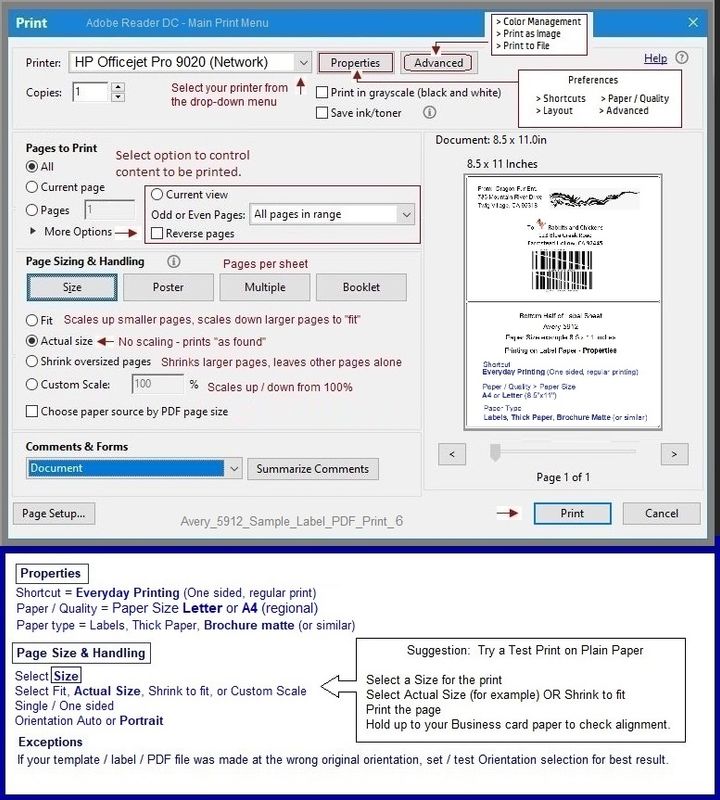
Print the file as an image to eliminate translation issues - images need not be translated.


If you are using Word and creating a document to be printed,

Consider placing the offending content inside a Text box

OR

Create an image of the non-printing content, Insert that image into the document in the location designated for the Return Address.


Additionally, Word documents can, in turn, be saved / exported as PDF documents.

These may print without problems OR use the method to print the file as an image.


Example - Adobe Reader DC - Label Printing - Avery 5912

Avery_5912_Sample_Label_PDF_Print_6Avery_5912_Sample_Label_PDF_Print_6


Adobe Reader DC – Install Whether You Use It or Not

If you have not done so,

Reinstall / Update your PDF Reader (Adobe Reader DC /Optional  Foxit Reader)

HINT:  Watch out for and UNCHECK unwanted extra software


NOTE:  Adobe Reader DC software can be installed even if you do not normally open / view / print PDF files directly from the Adobe Reader DC software.


HP Printer Home Page - References and Resources – Learn about your Printer  - Solve Problems

 “Things that are your printer”

NOTE:  Content depends on device type and Operating System

Categories:  Alerts, Access to the Print and Scan Doctor (Windows), Warranty Check, HP Drivers / Software / Firmware Updates, How-to Videos, Bulletins/Notices, Lots of How-to Documents, Troubleshooting, Manuals > User Guides, Product Information (Specifications), more

When the website support page opens, Select (as available) a Category > Topic > Subtopic

HP ENVY 5032 All-in-One Printer 


Thank you for participating in the HP Community.

The Community is a separate wing of the HP website - We are not an HP business group.

Our Community is comprised of volunteers - people who own and use HP devices.

Click Thumbs Up to say Thank You.

Question / Concern Answered, Click "Accept as Solution"

Dragon-Fur

† The opinions expressed above are the personal opinions of the authors, not of HP. By using this site, you accept the <a href="https://www8.hp.com/us/en/terms-of-use.html" class="udrlinesmall">Terms of Use</a> and <a href="/t5/custom/page/page-id/hp.rulespage" class="udrlinesmall"> Rules of Participation</a>.