• ×
    Information
    Need Windows 11 help?
    Check documents on compatibility, FAQs, upgrade information and available fixes.
    Windows 11 Support Center.
  • post a message
  • ×
    Information
    Need Windows 11 help?
    Check documents on compatibility, FAQs, upgrade information and available fixes.
    Windows 11 Support Center.
  • post a message
Guidelines
Join the HP Community Solve‑a‑thon | Help Others & Share Your Solutions | Live on Zoom | 2:30 PM to 2:30 AM IST | Every Wednesday Click here to know more
Check some of the most frequent questions about Instant Ink: HP INSTANT INK, HP+ PLANS: INK AND TONER.


Check out our Black or Color Ink Not Printing, Other Print Quality Issues info about: Print quality and Cartridge Issues.
HP Recommended

My officejet pro 8620 continues to display error messages for the 950XL z10 black and 951XL z10 magenta ink cartridges I've put into the printer. However, on the boxes of these cartridges it has officejet pro 8620 as a compatible printer. I've downloaded all updates and firmware for the printer. Any ideas to troubleshoot this issue?

3 REPLIES 3
HP Recommended

@Spencer520


Welcome to the HP support community.


Clean the cartridge contacts

  1. Turn the printer on.

  2. Open the door to access to the cartridges.

  3. Wait until the carriage stops moving before you continue.

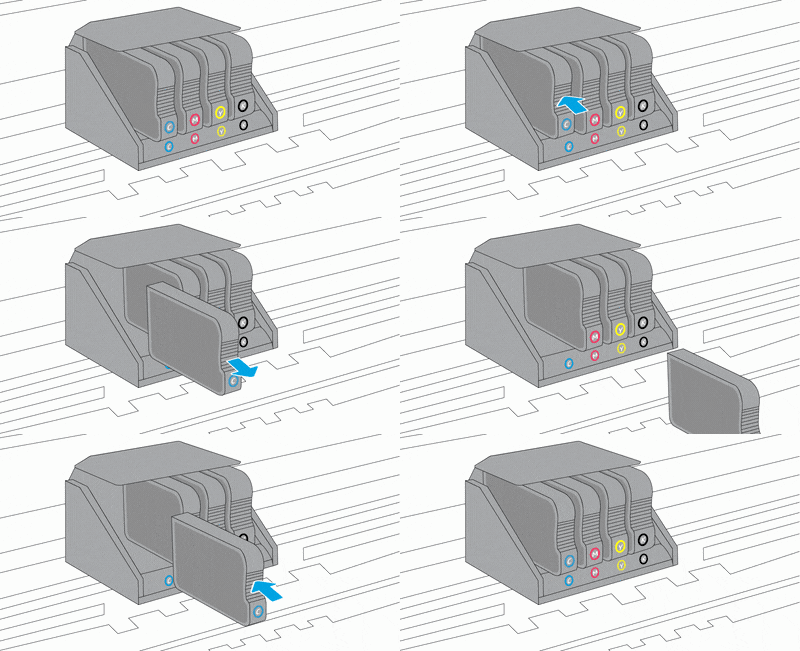
  4. Push in on the front of the cartridge indicated in the error message, and then remove it.

    Animation of replacing the cartridges

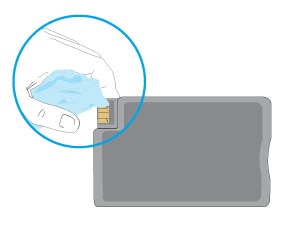
  5. Wipe the electrical contact on the cartridge with a lint-free cloth.

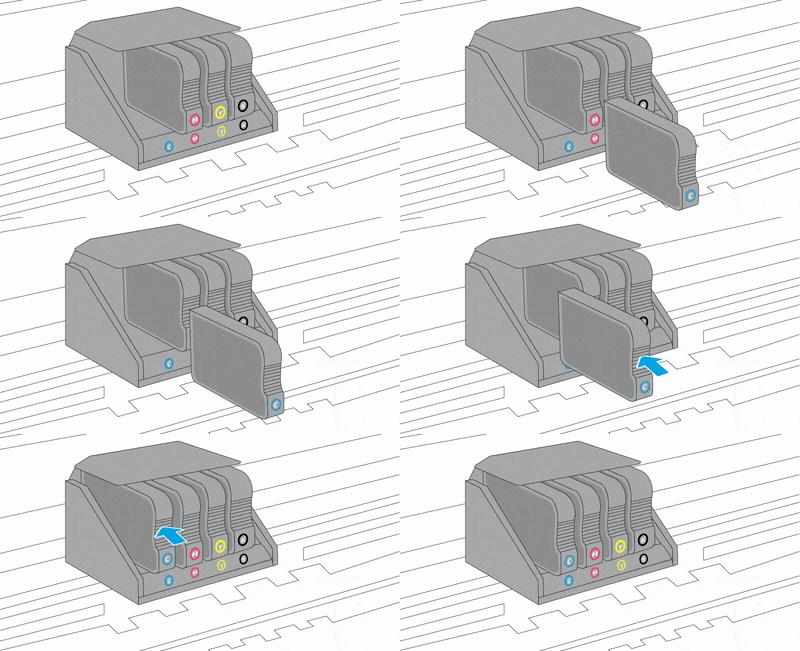
  6. Insert the cartridge into its color-coded slot until it snaps into place.

  7. Repeat these steps for any other cartridges indicated in the error message.

  8. Close the cartridge access door.

You can refer this HP document for more assistance:- Click here


I hope that helps.

To thank me for my efforts to help you, please mark my post as an accepted solution so that it benefits several others.

Cheers.

Sandytechy20
I am an HP Employee

HP Recommended

I think I need a regionalization reset. I have tried to install Z10 cartridges but I keep getting error messages for incompatibility. I currently have Z20 cartridges in the printer. Is there anything you could send me to help facilitate this reset?

HP Recommended

@Spencer520


Did you move the printer to a different country or region?

Sandytechy20
I am an HP Employee

† The opinions expressed above are the personal opinions of the authors, not of HP. By using this site, you accept the <a href="https://www8.hp.com/us/en/terms-of-use.html" class="udrlinesmall">Terms of Use</a> and <a href="/t5/custom/page/page-id/hp.rulespage" class="udrlinesmall"> Rules of Participation</a>.