• ×
    Information
    Need Windows 11 help?
    Check documents on compatibility, FAQs, upgrade information and available fixes.
    Windows 11 Support Center.
  • post a message
  • ×
    Information
    Need Windows 11 help?
    Check documents on compatibility, FAQs, upgrade information and available fixes.
    Windows 11 Support Center.
  • post a message
Guidelines
Seize the moment! nominate yourself or a tech enthusiast you admire & join the HP Community Experts!
Check some of the most frequent questions about Instant Ink: HP INSTANT INK, HP+ PLANS: INK AND TONER.


Check out our WINDOWS 11 Support Center info about: OPTIMIZATION, KNOWN ISSUES, FAQs AND MORE.
HP Recommended
HP Pro P1102W
Microsoft Windows XP

The to and from addresses are shifted to the left when I print an envelope.


I have uninstalled the printer and re-installed - no change.


The preview for the envelopes look good - but shifts to the left when printing.

1 ACCEPTED SOLUTION

Accepted Solutions
HP Recommended

@LSAEngineering


Welcome to the HP Forums, this is a great location to get assistance! I read your post and see that you are getting issues while printing envelops. I would like to help you resolve this issue. 


Tray adjustment for short media.

  1. Remove the short media extender tool from the storage slot on the left side of the media input area.

    Figure : Remove Short Media Extender

    Image: Remove Short Media Extender
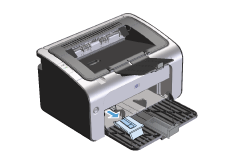
  2. Attach the tool to the adjustable media guide.

    Figure : Attach Short Media Extender

    Image: Attach Short Media Extender
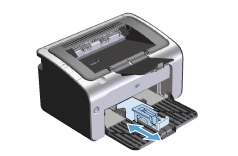
  3. Insert the media into the product until it stops, and then slide the adjustable media guide, with the tool attached to support the media.

    Figure : Adjust Short Media Extender

    Image: Adjust Short Media Extender
  4. When finished printing with short media, remove the short media extender tool, and then place it back in the storage slot.

Let me know if that helps.

Cheers.


Sandytechy20
I am an HP Employee

View solution in original post

1 REPLY 1
HP Recommended

@LSAEngineering


Welcome to the HP Forums, this is a great location to get assistance! I read your post and see that you are getting issues while printing envelops. I would like to help you resolve this issue. 


Tray adjustment for short media.

  1. Remove the short media extender tool from the storage slot on the left side of the media input area.

    Figure : Remove Short Media Extender

    Image: Remove Short Media Extender
  2. Attach the tool to the adjustable media guide.

    Figure : Attach Short Media Extender

    Image: Attach Short Media Extender
  3. Insert the media into the product until it stops, and then slide the adjustable media guide, with the tool attached to support the media.

    Figure : Adjust Short Media Extender

    Image: Adjust Short Media Extender
  4. When finished printing with short media, remove the short media extender tool, and then place it back in the storage slot.

Let me know if that helps.

Cheers.


Sandytechy20
I am an HP Employee

† The opinions expressed above are the personal opinions of the authors, not of HP. By using this site, you accept the <a href="https://www8.hp.com/us/en/terms-of-use.html" class="udrlinesmall">Terms of Use</a> and <a href="/t5/custom/page/page-id/hp.rulespage" class="udrlinesmall"> Rules of Participation</a>.