• ×
    Information
    Need Windows 11 help?
    Check documents on compatibility, FAQs, upgrade information and available fixes.
    Windows 11 Support Center.
  • post a message
  • ×
    Information
    Need Windows 11 help?
    Check documents on compatibility, FAQs, upgrade information and available fixes.
    Windows 11 Support Center.
  • post a message
Guidelines
Join the HP Community Solve‑a‑thon | Help Others & Share Your Solutions | Live on Zoom | 2:30 PM to 2:30 AM IST | Every Wednesday Click here to know more
Check some of the most frequent questions about Instant Ink: HP INSTANT INK, HP+ PLANS: INK AND TONER.


Check out our WINDOWS 11 Support Center info about: OPTIMIZATION, KNOWN ISSUES, FAQs AND MORE.
HP Recommended
HP Photosmart Printer C5100

Printer HP Photosmart C5100 will not print message  configuration problem 0x8000ffff  please can anyone advise how to fix this . Thanks

1 ACCEPTED SOLUTION

Accepted Solutions
HP Recommended

@Zebedee48 or on the printer or the computer you've connected the printer to?

If it's the printer, here's what you'll need to do:


Step 1: Check the error

In addition to the alphanumeric code, look for an error message that describes the problem.

NOTE: 

Not all alphanumeric codes begin with 0x; some begin with B or C.

  • If the message contains a description and an alphanumeric error code, the steps in this document do not apply. Search HP Customer Support for a troubleshooting document that matches the description you see.

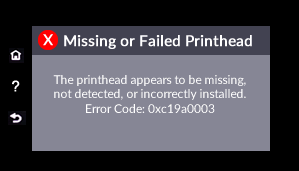
    Example of an error message with additional text that describes the problem

  • If the message contains only the error code, continue to the next step.

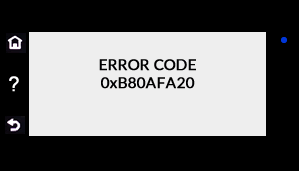
    Example of an error code without a description

FOR DETAILS & FURTHER INSTRUCTIONS, USE THIS LINK: CLICK HERE & SKIP TO STEP 2 ONWARD

(By the end of this article all the issues should be resolved)


P.S: Welcome to HP Community 😉


Let me know how that pans out,

If you feel I was helpful, simply click on Accept as Solution to help the community grow,

That said, I will have someone follow-up on this to ensure you've been helped,

Just in case you don't get back to us within 24 - 48hrs, and have a good day, ahead.

Riddle_Decipher
I am an HP Employee


Learning is a journey, not a destination.
Let's keep asking questions and growing together.

View solution in original post

1 REPLY 1
HP Recommended

@Zebedee48 or on the printer or the computer you've connected the printer to?

If it's the printer, here's what you'll need to do:


Step 1: Check the error

In addition to the alphanumeric code, look for an error message that describes the problem.

NOTE: 

Not all alphanumeric codes begin with 0x; some begin with B or C.

  • If the message contains a description and an alphanumeric error code, the steps in this document do not apply. Search HP Customer Support for a troubleshooting document that matches the description you see.

    Example of an error message with additional text that describes the problem

  • If the message contains only the error code, continue to the next step.

    Example of an error code without a description

FOR DETAILS & FURTHER INSTRUCTIONS, USE THIS LINK: CLICK HERE & SKIP TO STEP 2 ONWARD

(By the end of this article all the issues should be resolved)


P.S: Welcome to HP Community 😉


Let me know how that pans out,

If you feel I was helpful, simply click on Accept as Solution to help the community grow,

That said, I will have someone follow-up on this to ensure you've been helped,

Just in case you don't get back to us within 24 - 48hrs, and have a good day, ahead.

Riddle_Decipher
I am an HP Employee


Learning is a journey, not a destination.
Let's keep asking questions and growing together.
† The opinions expressed above are the personal opinions of the authors, not of HP. By using this site, you accept the <a href="https://www8.hp.com/us/en/terms-of-use.html" class="udrlinesmall">Terms of Use</a> and <a href="/t5/custom/page/page-id/hp.rulespage" class="udrlinesmall"> Rules of Participation</a>.