-
×InformationNeed Windows 11 help?Check documents on compatibility, FAQs, upgrade information and available fixes.
Windows 11 Support Center. -

-
×InformationNeed Windows 11 help?Check documents on compatibility, FAQs, upgrade information and available fixes.
Windows 11 Support Center. -
- HP Community
- Printers
- Printer Setup, Software & Drivers
- Re: Printer not working

Create an account on the HP Community to personalize your profile and ask a question
11-10-2019 04:19 AM
Printer HP Photosmart C5100 will not print message configuration problem 0x8000ffff please can anyone advise how to fix this . Thanks
Solved! Go to Solution.
Accepted Solutions
11-12-2019 05:09 PM - edited 11-12-2019 05:09 PM
@Zebedee48 or on the printer or the computer you've connected the printer to?
If it's the printer, here's what you'll need to do:
Step 1: Check the error
In addition to the alphanumeric code, look for an error message that describes the problem.
NOTE:Not all alphanumeric codes begin with 0x; some begin with B or C.
If the message contains a description and an alphanumeric error code, the steps in this document do not apply. Search HP Customer Support for a troubleshooting document that matches the description you see.
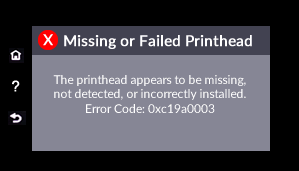
Example of an error message with additional text that describes the problem

If the message contains only the error code, continue to the next step.
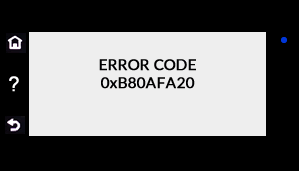
Example of an error code without a description

FOR DETAILS & FURTHER INSTRUCTIONS, USE THIS LINK: CLICK HERE & SKIP TO STEP 2 ONWARD
(By the end of this article all the issues should be resolved)
P.S: Welcome to HP Community 😉
Let me know how that pans out,
If you feel I was helpful, simply click on Accept as Solution to help the community grow,
That said, I will have someone follow-up on this to ensure you've been helped,
Just in case you don't get back to us within 24 - 48hrs, and have a good day, ahead.
Riddle_Decipher
I am an HP Employee
Learning is a journey, not a destination.
Let's keep asking questions and growing together.
11-12-2019 05:09 PM - edited 11-12-2019 05:09 PM
@Zebedee48 or on the printer or the computer you've connected the printer to?
If it's the printer, here's what you'll need to do:
Step 1: Check the error
In addition to the alphanumeric code, look for an error message that describes the problem.
NOTE:Not all alphanumeric codes begin with 0x; some begin with B or C.
If the message contains a description and an alphanumeric error code, the steps in this document do not apply. Search HP Customer Support for a troubleshooting document that matches the description you see.
Example of an error message with additional text that describes the problem

If the message contains only the error code, continue to the next step.
Example of an error code without a description

FOR DETAILS & FURTHER INSTRUCTIONS, USE THIS LINK: CLICK HERE & SKIP TO STEP 2 ONWARD
(By the end of this article all the issues should be resolved)
P.S: Welcome to HP Community 😉
Let me know how that pans out,
If you feel I was helpful, simply click on Accept as Solution to help the community grow,
That said, I will have someone follow-up on this to ensure you've been helped,
Just in case you don't get back to us within 24 - 48hrs, and have a good day, ahead.
Riddle_Decipher
I am an HP Employee
Learning is a journey, not a destination.
Let's keep asking questions and growing together.