• ×
    Information
    Need Windows 11 help?
    Check documents on compatibility, FAQs, upgrade information and available fixes.
    Windows 11 Support Center.
  • post a message
  • ×
    Information
    Need Windows 11 help?
    Check documents on compatibility, FAQs, upgrade information and available fixes.
    Windows 11 Support Center.
  • post a message
Guidelines
Here is the solution for Blue screen error 83C0000B on HP OfficeJet Pro 8010e, 9020e Printer Series: Click here to view.
Check some of the most frequent questions about Instant Ink: HP INSTANT INK, HP+ PLANS: INK AND TONER.


Check out our Black or Color Ink Not Printing, Other Print Quality Issues info about: Print quality and Cartridge Issues.
HP Recommended
Photosmart 7510
Other

Suffered a brand new MacBook Pro crash due to logic problems.  Got a new one, just yesterday updated to Catalina, OS 10.15.  Now trying to enable wireless scanning from my Photosmart 7510 all in one to my laptop.  Cannot find a driver on line.

1 REPLY 1
HP Recommended

Hi @polychaete


Welcome to the HP Support Community. 


Try adding the printer using the AirPrint driver - 


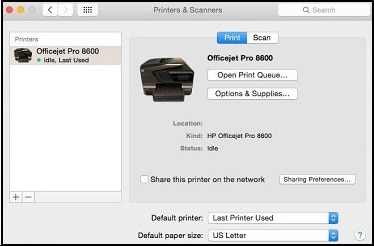
1.) Click the Apple menu, click System Preferences, and then click Print & Scan or Printers & Scanners. 


 Example of the Printers & Scanners window


2.) Check if your printer name displays in the Printers list, If your printer is listed, click the printer name, click the minus sign to delete the printer. 

3.) If you see multiple printer queues for the same printer, remove all extra printers by selecting them one at a time, and then clicking the minus button at the bottom of the list. 

4.) Click the plus sign, click Add Printer or Scanner, click the printer name. 

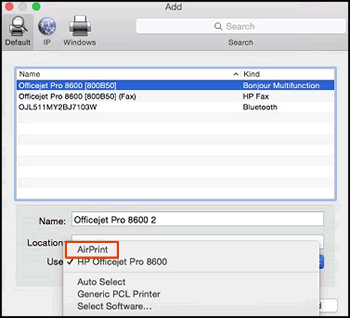
5.) Click the Use or Print Using menu, select AirPrint in the pop-up menu. Then click Add. Select AirPrint from the Use menu.


Select AirPrint from the Use menu


6.) Try to print. 


Try scanning using the Apple Image Capture, refer to "Scan with Apple Image Capture" from this document - HP Printers - How to Scan (Mac)


Hope this helps! Keep me posted. 


Please click “Accept as Solution” if you feel my post solved your issue, it will help others find the solution.

Click the “Kudos, Thumbs Up" on the bottom right to say “Thanks” for helping!


Have a great day! 

Asmita
I am an HP Employee

† The opinions expressed above are the personal opinions of the authors, not of HP. By using this site, you accept the <a href="https://www8.hp.com/us/en/terms-of-use.html" class="udrlinesmall">Terms of Use</a> and <a href="/t5/custom/page/page-id/hp.rulespage" class="udrlinesmall"> Rules of Participation</a>.