• ×
    Information
    Need Windows 11 help?
    Check documents on compatibility, FAQs, upgrade information and available fixes.
    Windows 11 Support Center.
  • post a message
  • ×
    Information
    Need Windows 11 help?
    Check documents on compatibility, FAQs, upgrade information and available fixes.
    Windows 11 Support Center.
  • post a message
Guidelines
To resolve issues with 0xb90c05a4 error on your OfficeJet series: Click here to view.
Check some of the most frequent questions about Instant Ink: HP INSTANT INK, HP+ PLANS: INK AND TONER.


Check out our Black or Color Ink Not Printing, Other Print Quality Issues info about: Print quality and Cartridge Issues.
HP Recommended

When I print something the yellow light on the feed paper button lights up and I have to press that in order to feed the paper and get anything to print.  It's rather annoying.  Any ideas how to fix this issue? 

1 REPLY 1
HP Recommended

@MeMyselfandI123 


Welcome to the HP Community Forum.


According to the Troubleshooting document, the printer is perhaps not detecting the (correct) paper loaded in the input tray.


HP DeskJet 2700, 4100, 4800 Printers - Blinking Lights

Section  Error, Paper Error icons, Resume light are on


==============================

Printer - (Re)Load Paper


Remove and then reload the paper into the printer input tray.

User Guide - HP DeskJet Plus 4100e All-in-One Series

Starting on Page 10


==============================

Printer - Tray and Paper


Next,

Adjust / Re-adjust the Tray and Paper settings.


User Guide - HP DeskJet Plus 4100e All-in-One Series

Page 17


The printer lacks a text-input capable Printer Control Panel -

Use the Embedded Web Server (EWS) to adjust Tray and Paper


Reminder:

HP Smart Mobile requires that the paper size & type be adjusted before opening the content to be printed.


Example - Tray and Paper

Retain_Printing_Preferences_19Retain_Printing_Preferences_19


==============================

Printer - Software / Application -

Printing Preferences


Next,

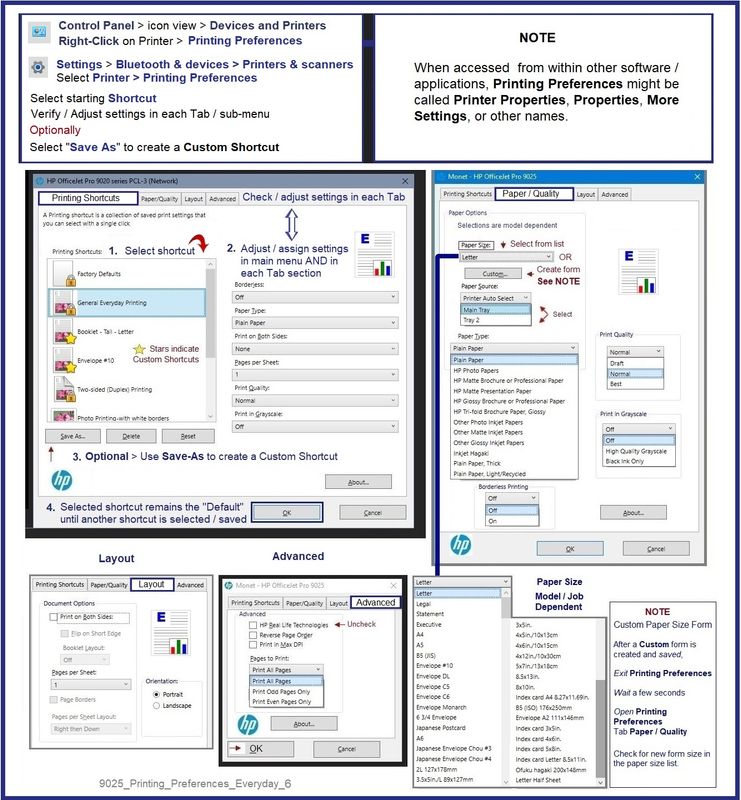
Check / Correct the paper size and type in your printer software / application settings.


General Example - Windows - Printing Preferences


  • When called from within printing software / applications, Printing Preferences might be called "Printer Properties" / "Shortcuts" / “More Settings” / “Properties” / "Printer Setup" / "Presets" or similar.


9025_Printing_Preferences_Everyday_69025_Printing_Preferences_Everyday_6


HP Printer Home Page - References and Resources

Learn about your Printer  - Solve Problems

“Things that are your printer”

When the website support page opens, Select (as available) a Category > Topic Subtopic

NOTE:  Content depends on device type and Operating System

Categories:  Alerts, Access to the Print and Scan Doctor (Windows), Warranty Check, HP Drivers / Software / Firmware Updates, How-to Videos, Bulletins/Notices, Lots of How-to Documents, Troubleshooting, Manuals > User Guides, Product Information (Specifications), Supplies, and more

Open

HP DeskJet 4155e All-in-One Printer 


Thank you for participating in the HP Community --

People who own, use, and support HP devices.

Click Yes to say Thank You

Question / Concern Answered, Click "Accept as Solution"


Dragon-Fur

† The opinions expressed above are the personal opinions of the authors, not of HP. By using this site, you accept the <a href="https://www8.hp.com/us/en/terms-of-use.html" class="udrlinesmall">Terms of Use</a> and <a href="/t5/custom/page/page-id/hp.rulespage" class="udrlinesmall"> Rules of Participation</a>.