• ×
    Information
    Need Windows 11 help?
    Check documents on compatibility, FAQs, upgrade information and available fixes.
    Windows 11 Support Center.
  • post a message
  • ×
    Information
    Need Windows 11 help?
    Check documents on compatibility, FAQs, upgrade information and available fixes.
    Windows 11 Support Center.
  • post a message
Guidelines
Join the HP Community Solve‑a‑thon | Help Others & Share Your Solutions | Live on Zoom | 2:30 PM to 2:30 AM IST | Every Wednesday Click here to know more
Check some of the most frequent questions about Instant Ink: HP INSTANT INK, HP+ PLANS: INK AND TONER.


Check out our Black or Color Ink Not Printing, Other Print Quality Issues info about: Print quality and Cartridge Issues.
HP Recommended
Hi.

Got a well known problem.
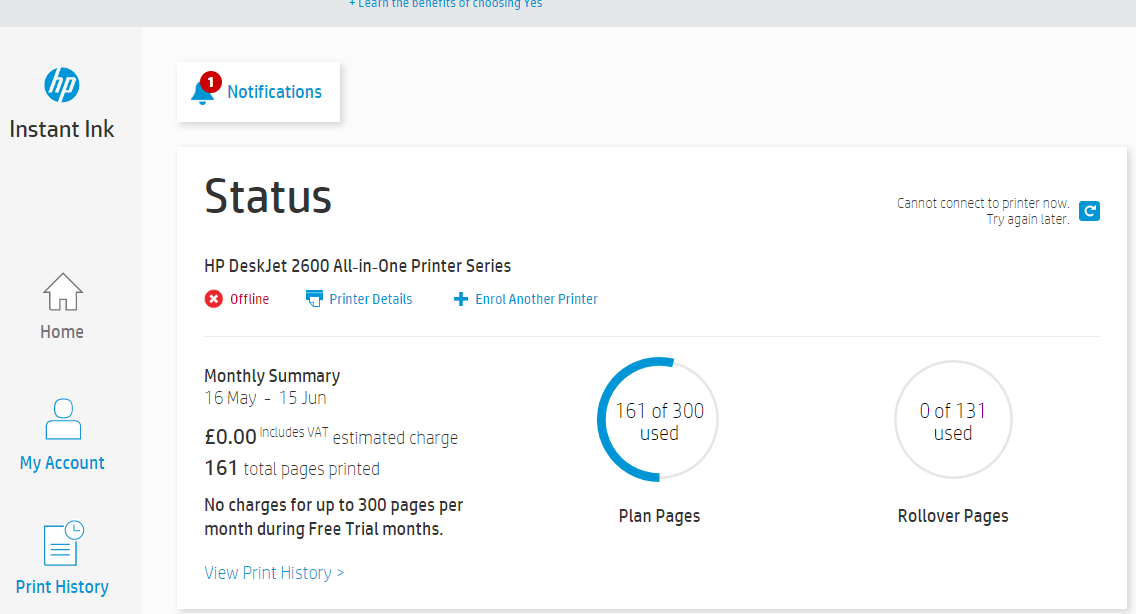
Roll Pages should have around 130 pages, says pending.

Turn off and on printer, change the e-mail associated to it, log off and on. Nothing worked.

Need assistance to solve this.

Thanks
1 ACCEPTED SOLUTION

Accepted Solutions
HP Recommended

@Markopse


I have check the Account and it seems to be resolved now. The Account does show 131 Roll over pages. You can check the same in your Customer Account Screen.


Thank you 🙂


If the information I've provided was helpful, give us some reinforcement by clicking the "Solution Accepted" 


KrazyToad
I Am An HP Employee

View solution in original post

4 REPLIES 4
HP Recommended

@Markopse


Welcome to HP Support Forums. A really great platform for posting all your questions and finding solutions.
 

I see that you have some concerns regarding the Roll over pages of your Instant Ink Account.


I will send you a Private Message, please reply back with your Instant Ink Account Number or Email Address and I'll look into it


Please check your private message icon in the upper right corner of your HP Forums profile.


Next to your profile Name, you should see a little blue envelope, please click on it


Thank you 🙂

KrazyToad
I Am An HP Employee

HP Recommended

@Markopse


I have check the Account and it seems to be resolved now. The Account does show 131 Roll over pages. You can check the same in your Customer Account Screen.


Thank you 🙂


If the information I've provided was helpful, give us some reinforcement by clicking the "Solution Accepted" 


KrazyToad
I Am An HP Employee

HP Recommended

I have been trying to get support for an instant ink cartridge problem for months, with no resolution.  I've spent over an hour tonight trying to navigate the website with no help, talked to a "Virtual Agent" that was only more frustrating, then tried to send an email to HP Support (assuming that the email was something simple like support@hp.com) but it was bounced back...  


For some reason I keep getting defective Tricolor ink cartridges, and they'll work for a few pages before the computer/printer tells me the cartridge is "damaged".  When I open the printer and remove it, then put it right back where it belongs, it will print a few pages again before saying it's "damaged".  This is no way for me to work, and I don't think I should be paying for this convenient service when I keep having problems and I can't get any support from HP!


So, how important is my business to HP???  I've seen other posts on here where people have tried for days/weeks/months and gotten no help.  I realize HP is a huge company, but COME ON!!!  And, please don't try the old "Have you checked out our website?", because the website has been no help in this department either.  My only option appears to be: Call / Chat with a support person Monday-Friday 9am-9pm.  How can there be no way to even submit a message after-hours???!!!

HP Recommended

@Liz_G


Welcome to HP Forums, 

This is a great place to get support, find answers and tips, 

Thank you for posting your query, I'll be more than glad to help you out. 🙂


As I understand you are facing issues with the instant ink cartridges.

Don't worry as I'll be glad to help, however, to provide an accurate resolution, I need a few more details: 


Please reply to me in a private message with the following information:


Your full name.

Your HP instant ink account no.

Is your shipping address correctly updated in the HP instant ink account page?


I'll watch out for your reply. 😉

Barachiel
I am an HP Employee

† The opinions expressed above are the personal opinions of the authors, not of HP. By using this site, you accept the <a href="https://www8.hp.com/us/en/terms-of-use.html" class="udrlinesmall">Terms of Use</a> and <a href="/t5/custom/page/page-id/hp.rulespage" class="udrlinesmall"> Rules of Participation</a>.