• ×
    Information
    Need Windows 11 help?
    Check documents on compatibility, FAQs, upgrade information and available fixes.
    Windows 11 Support Center.
  • post a message
  • ×
    Information
    Need Windows 11 help?
    Check documents on compatibility, FAQs, upgrade information and available fixes.
    Windows 11 Support Center.
  • post a message
Guidelines
Here is the solution for Blue screen error 83C0000B on HP OfficeJet Pro 8010e, 9020e Printer Series: Click here to view.
Check some of the most frequent questions about Instant Ink: HP INSTANT INK, HP+ PLANS: INK AND TONER.


Check out our Black or Color Ink Not Printing, Other Print Quality Issues info about: Print quality and Cartridge Issues.
HP Recommended
HP OfficeJet Pro 8715 All-in-One Printer
Microsoft Windows 11

Gold Padlocks on my Printing Shortcuts on my HP Deskjet 8710 (sometimes shown as Deskjet 8715).  How do I get them unlocked.  Also, when I print an envelope A10, it will show several things, like File Name, Directory, Template and on and on,

rather than the From and To information.

1 REPLY 1
HP Recommended

@JT195 


Welcome to the HP Community --


Unlikely this is a DeskJet printer model.

More likely:  HP OfficeJet Pro 8715 All-in-One Printer  


Locked Templates are  normal.


Templates are available for use as is or after modifications to the template settings.


Depending on the printer model and the printer software, the templates might -- or might NOT - allow changes to the actual template.


Select a template / shortcut > make changes > use immediately and / or create a custom shortcut to save for later use.


Example - Windows - Printing Preferences

9025_Printing_Preferences_Everyday_79025_Printing_Preferences_Everyday_7


What else?

When called from within printing programs / software / applications, Printing Preferences might be called "Printer Properties" / "Shortcuts" / “More Settings” / “Properties” / "Printer Setup" / "Presets" or similar.


General Example - HP Smart - Windows - Simple Photo Print

HP_Smart_Win_Print_Photo_A4_All_5HP_Smart_Win_Print_Photo_A4_All_5


=+=+=+=+=+=+=+=+=+=+=+=+=+=

References / Resources


Full range of printer features are available having installed the Full Feature Software


Details Page - Driver - For your Printer

>>> Full Feature Software - Web Pack Installation Package - Information - Download / Save / Install <<<

HP OfficeJet Pro 8710 All-in-One Print and Scan Driver and Accessories 

After the software is installed, Restart the computer and log in


=== --- === --- === --- === --- ===

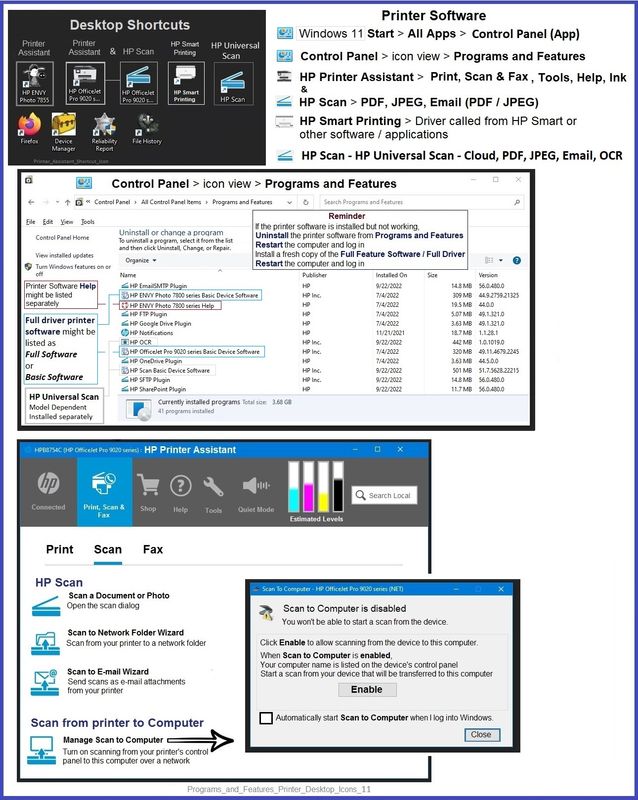
Printer Assistant - Manage Scan to Computer


The installation of the full driver adds at least two shortcuts to the Desktop:  

Printer Assistant 

HP Scan


When needed / wanted, enable "Scan to Computer" using the Printer Assistant


Open the Printer Assistant > Tab Scan > Manage Scan to Computer > Enable


Example - Full Feature Software - Installed - Programs and Features

Word_Test_3X5_card_Portrait_3Word_Test_3X5_card_Portrait_3Programs_and_Features_Printer_Desktop_Icons_11Programs_and_Features_Printer_Desktop_Icons_11


HP Printer Home Page - References and Resources

Learn about your Printer - Solve Problems

“Things that are your printer”

When the website support page opens, Select (as available) a Category > Topic > Subtopic

NOTE: Content depends on device type and Operating System

Categories: Alerts, Troubleshooting, Ink & Paper, HP Software / Drivers / Firmware Updates , Setup & User Guides, Product Specifications, Account & Registration, Warranty & Repair

Open

HP OfficeJet Pro 8715 All-in-One Printer  


Thank you for participating in the HP Community --

People who own, use, and support HP devices.

Click Yes to say Thank You

Question / Concern Answered, Click my Post "Accept as Solution"


Dragon-Fur

† The opinions expressed above are the personal opinions of the authors, not of HP. By using this site, you accept the <a href="https://www8.hp.com/us/en/terms-of-use.html" class="udrlinesmall">Terms of Use</a> and <a href="/t5/custom/page/page-id/hp.rulespage" class="udrlinesmall"> Rules of Participation</a>.