
-
×InformationNeed Windows 11 help?Check documents on compatibility, FAQs, upgrade information and available fixes.
Windows 11 Support Center. -
-
×InformationNeed Windows 11 help?Check documents on compatibility, FAQs, upgrade information and available fixes.
Windows 11 Support Center. -
- HP Community
- Printers
- Printing Errors or Lights & Stuck Print Jobs
- Re: PRINT PROBLEM

Create an account on the HP Community to personalize your profile and ask a question
Your account also allows you to connect with HP support faster, access a personal dashboard to manage all of your devices in one place, view warranty information, case status and more.
Check some of the most frequent questions about Instant Ink: HP INSTANT INK, HP+ PLANS: INK AND TONER.
Check out our Black or Color Ink Not Printing, Other Print Quality Issues info about: Print quality and Cartridge Issues.

It has been a while since anyone has replied. Simply ask a new question if you would like to start the discussion again.

16 REPLIES 16

07-20-2020 11:07 AM
 HP Recommended
Hi @AnnickP ,
Welcome to the HP Support-Community.
Please do this test with both cartridges:
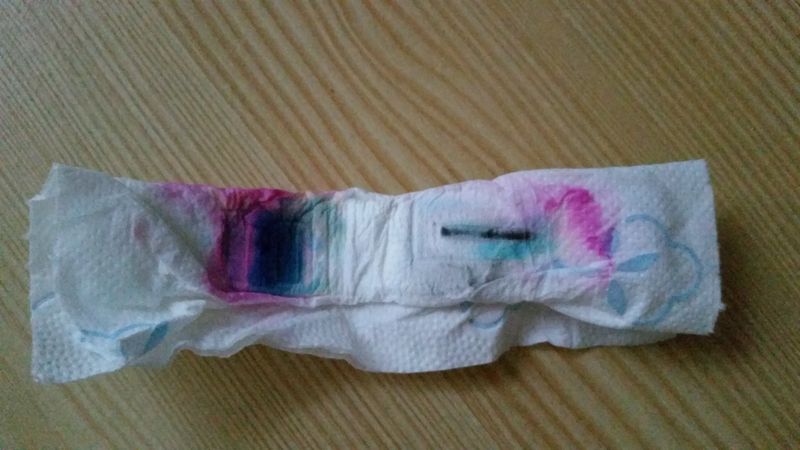
Take a handkerchief and the cartridge. Now press the cartridge like a stamp on the handkerchief for about 2-3 seconds. You should see a strong, colored strip, consisting of black / magenta, blue and yellow. Is this the case?
If there is no or very little ink on the handkerchief, moisten the handkerchief slightly and press the cartridge again, this time for about 30 seconds on it, until more ink comes out.
Afterwards, re-insert the cartridge and run a cartridge clean, if necessary.
What is the result?
Cheers!
Nils
Did you get a solution to your question? Please mark it as solved.
Did a post help you? Please click on the "thumbs up", to show this and actively help others.
I don't work on behalf of HP. | HP Expert program
07-22-2020 09:28 AM
HP Recommended
Hi,
was there ink on the handkerchief?
Cheers!
Nils_K
Did you get a solution to your question? Please mark it as solved.
Did a post help you? Please click on the "thumbs up", to show this and actively help others.
I don't work on behalf of HP. | HP Expert program
07-23-2020 01:58 PM
HP Recommended
Hi,
@AnnickP wrote:Hi Nils,
Yes there was ink when I moistened the handkerchief, on the two cartridges.
Can you take a photo from the handkerchief and upload it here to the community? I would like to see it.
Cheers!
Nils
Did you get a solution to your question? Please mark it as solved.
Did a post help you? Please click on the "thumbs up", to show this and actively help others.
I don't work on behalf of HP. | HP Expert program
07-25-2020 06:14 AM
HP Recommended
Hi Annick,
I think both cartridges are empty. The black strip should be much stronger than on the handkerchief.
What are the estimated ink-levels?
Cheers!
Nils
Did you get a solution to your question? Please mark it as solved.
Did a post help you? Please click on the "thumbs up", to show this and actively help others.
I don't work on behalf of HP. | HP Expert program
07-25-2020 06:36 AM
HP Recommended
Hi Nils,
The color ink level is correct, black and white indicates an exclamation point !
The color printing did not work anymore , why?
I can try to change both cartridges but I would like to be sure that this will solve the problem!
when I use the HP troubleshooter it indicates there is no problem, yet I only print blank pages.
Thank you very much for your answer,
Annick
07-26-2020 12:33 PM
HP Recommended
Hi Annick,
@AnnickP wrote:The color printing did not work anymore , why?
I think the tri-color cartridge is empty as well as the black one. The color strips on the picture you uploaded should look stronger.
@AnnickP wrote:when I use the HP troubleshooter it indicates there is no problem, yet I only print blank pages.
It is normal that problems with the print quality are not displayed, but I am interested in the estimated ink levels. When did you change the cartridges the last time?
Cheers!
Nils
Did you get a solution to your question? Please mark it as solved.
Did a post help you? Please click on the "thumbs up", to show this and actively help others.
I don't work on behalf of HP. | HP Expert program

Be alert for scammers posting fake support phone numbers and/or email addresses on the community.
If you think you have received a fake HP Support message, please report it to us by clicking on "Flag Post".
† The opinions expressed above are the personal opinions of the authors, not of HP. By using this site, you accept the Terms of Use and Rules of Participation.


Didn't find what you were looking for?
Ask the community
† The opinions expressed above are the personal opinions of the authors, not of HP. By using this site, you accept the <a href="https://www8.hp.com/us/en/terms-of-use.html" class="udrlinesmall">Terms of Use</a> and <a href="/t5/custom/page/page-id/hp.rulespage" class="udrlinesmall"> Rules of Participation</a>.