-
×InformationNeed Windows 11 help?Check documents on compatibility, FAQs, upgrade information and available fixes.
Windows 11 Support Center. -

-
×InformationNeed Windows 11 help?Check documents on compatibility, FAQs, upgrade information and available fixes.
Windows 11 Support Center. -
- HP Community
- Printers
- Printing Errors or Lights & Stuck Print Jobs
- Printing Blank Pages

Create an account on the HP Community to personalize your profile and ask a question
03-07-2020 08:39 AM
My HP Envy 4500 series printer recently stopped printing.
The printer is operating normally otherwise (examples: turns on, connects to wifi, even scans images to my computer), but when I try to copy or print, the page is blank.
I've followed the troubleshooting steps indicated here (https://support.hp.com/us-en/product/HP-ENVY-4500-e-All-in-One-Printer-series/5304875/model/5304876/...), including:
- Turning the printer off and back on
- Cleaning the print head and ink smear via the "Tools" option on the printers digital screen
- Printing (a) diagnostic, (b) test and (c) alignment pages which all print blank pages
- Printing with black cartridge only
- Replacing both black and color ink cartridges with HP ink
The ink in both cartridges are not dry as I can see moist ink around the ink nozzle.
Please advise,
04-08-2020 06:46 PM
Welcome to HP support community.
If you have tried all the steps mentioned in this HP document:- Click here
And if the issue still persists, this could be a hardware issue.
I request you to talk to HP support.
They might have multiple options to help you with this.
- Click on this link - https://support.hp.com/us-en/contact-hp?openCLC=true
- Select the country.
- Enter the serial of your device.
- Select the country from the drop-down.
- Click on "Show Options".
- Fill the web-form.
- A case number and phone number will now populate for you.
I hope that helps.
To thank me for my efforts to help you, please mark my post as an accepted solution so that it benefits several others.
Cheers.
Sandytechy20
I am an HP Employee
04-13-2020 03:53 PM
@Sandytechy20, thank you for the follow-up.
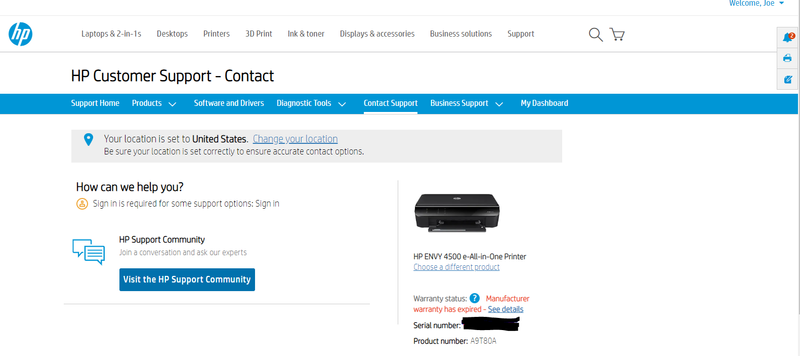
I followed your step by step directions, yet when I get to step 5 I have no options other than "community support" (see picture below):
I am signed in (as you can see in upper right) and the sign in link under "How can we help you" is inactive.
Please advise on how to start a case number given this issue.