
-
×InformationNeed Windows 11 help?Check documents on compatibility, FAQs, upgrade information and available fixes.
Windows 11 Support Center. -
-
×InformationNeed Windows 11 help?Check documents on compatibility, FAQs, upgrade information and available fixes.
Windows 11 Support Center. -
- HP Community
- Printers
- Printing Errors or Lights & Stuck Print Jobs
- Regionalization Reset

Create an account on the HP Community to personalize your profile and ask a question
Your account also allows you to connect with HP support faster, access a personal dashboard to manage all of your devices in one place, view warranty information, case status and more.
Check some of the most frequent questions about Instant Ink: HP INSTANT INK, HP+ PLANS: INK AND TONER.
Check out our Black or Color Ink Not Printing, Other Print Quality Issues info about: Print quality and Cartridge Issues.

It has been a while since anyone has replied. Simply ask a new question if you would like to start the discussion again.

01-10-2019 10:16 AM
 HP Recommended
Product: Officejet Pro 8600 plus
Operating System: Microsoft Windows 10 (64-bit)
Requested data from my office Pro 8600 plus.
The printer status report indicates the country / region: 35/9 Never had a problem with the cartridge I can buy here. Now suddenly there is z30 code on this cartridge with the indication (Only use in Latin America). My Question How can I change this country / region.
Greeting,
Marinus Boom
6 REPLIES 6


01-11-2019 12:58 PM
HP Recommended
Welcome to HP Forums, this is a great place to get support, find answers and tips, Thank you for posting your query, I'll be more than glad to help you out 🙂
I'm going to send you a private message with the information required to get this issue sorted. The only reason why we are utilizing the instructions over the private message as these instructions are specific to your printer model.
Please check your Private message icon on the upper right corner of your HP Forums profile.
Next, to your profile Name, you should see a little blue envelope, please click on it.
Eagerly waiting for your response!
Roopa-S
I am an HP Employee

01-20-2019 03:41 PM - edited 01-20-2019 04:21 PM
HP Recommended
Good afternoon. I have the same issue with my HP OfficeJet Pro 8600 needing to have a regionalization reset. I read another post where I was told to locate my hardware, check the warranty (printer warranty is expired), but completed the steps to dispute the warranty based on my cartridges being in warranty. Received a reply from HP Warranty this afternoon requesting me to contact to HP Support as printer warranty is expired.
So I'm back to square 1 and need a reset. I can see from my printer's webpage that it believes I'm in zone z40, and I need the printer reset to z10 (US and Canada).
Would you be able to help me, too?
Thank you.
01-22-2019 02:23 PM
HP Recommended
Welcome to HP Forums,
This is a great place to get support, find answers and tips. Thank you for posting your query. I'll be more than glad to help you out 🙂
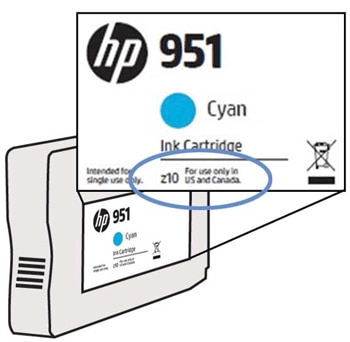
Effective January 2017, HP 950 and 951 ink cartridges have new markings on the packaging and cartridge label. The cartridges are marked with a Z10, Z20, Z30, or Z40.
Figure : Markings on cartridge packaging
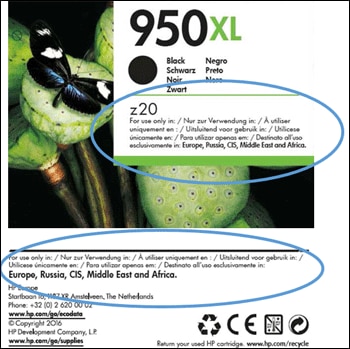
Figure : Markings on cartridge
The new cartridges are genuine HP products. They provide the same high quality prints as earlier cartridges. The new cartridges are regionalized, which means your printer only accepts cartridges intended for use in your area.
The new regionalized ink cartridges help protect you from HP ink cartridges sourced through non-official distribution channels, for which HP cannot control transportation and storage conditions. This helps ensure quality and decreases the chances of an ink cartridge being counterfeit.
Performing regionalization is a complex process and needs exchange of data and pictures that cannot be done on this platform.
To resolve this issue, please contact our Facebook/Twitter support.
https://www.facebook.com/HPSupport/
Keep me posted,
If the information I've provided was helpful,
Give us some reinforcement by clicking the solution and kudos buttons, that'll help us and others see that we've got the answers!
Good Luck.
Roopa-S
I am an HP Employee
01-30-2019 02:05 PM
HP Recommended
Good afternoon,
I also just sent you a private message from the HP support forum page.
Your recent email suggested that I connect with the HP Facebook or Twitter page for help. I don't use or have accounts for those platforms, and I'm not able to find anything about regionalization resets on the HP Facebook page nor can I send a message. Please help!
Thanks.
01-31-2019 07:26 AM - edited 01-31-2019 08:41 AM
HP Recommended
@CAR101
We have limited support boundaries in the support community as of now. In order to resolve this issue we have to elevate the case to next level, I will share you few details through a private message.
Roopa-S
I am an HP Employee

Be alert for scammers posting fake support phone numbers and/or email addresses on the community.
If you think you have received a fake HP Support message, please report it to us by clicking on "Flag Post".
† The opinions expressed above are the personal opinions of the authors, not of HP. By using this site, you accept the Terms of Use and Rules of Participation.


Didn't find what you were looking for?
Ask the community
† The opinions expressed above are the personal opinions of the authors, not of HP. By using this site, you accept the <a href="https://www8.hp.com/us/en/terms-of-use.html" class="udrlinesmall">Terms of Use</a> and <a href="/t5/custom/page/page-id/hp.rulespage" class="udrlinesmall"> Rules of Participation</a>.