• ×
    Information
    Need Windows 11 help?
    Check documents on compatibility, FAQs, upgrade information and available fixes.
    Windows 11 Support Center.
  • post a message
  • ×
    Information
    Need Windows 11 help?
    Check documents on compatibility, FAQs, upgrade information and available fixes.
    Windows 11 Support Center.
  • post a message
Guidelines
Here is the solution for Blue screen error 83C0000B on HP OfficeJet Pro 8010e, 9020e Printer Series: Click here to view.
Check some of the most frequent questions about Instant Ink: HP INSTANT INK, HP+ PLANS: INK AND TONER.


Check out our Black or Color Ink Not Printing, Other Print Quality Issues info about: Print quality and Cartridge Issues.
HP Recommended
Microsoft Windows 10 (64-bit)

I purchased a new printer yesterday and after setting it up I signed up for instant ink. However, now I'm confues about when it starts...the printer came with the small ink cartridges so I bought a set of full size cartridges when I bought the printer. Do I use these first or should I return them? When does my page count start? Becasue I shouldn't have a page count with cartridges I purchased, right?  And when does my free 2 month subscription start? My home page shows it started when I registered yesterday.


You know, there is not a lot of helpful info available on the sign page!


Thanks!

3 REPLIES 3
HP Recommended

Hey there! @joycesg, Thanks for stopping by the HP Support Forums!


I understand you would like to know when does the instant ink program start and you need to know how page count works on instant ink.


Don't worry I'll try to help you out.


Did you make any changes to your printer?


Are you using all regular ink cartridges on your printer?


The instant ink program starts when you install the instant ink cartridges shipped from HP.


When you sign up for an HP Instant Ink plan, you pay a monthly fee to print a defined number of pages per month. The plans are based on the number of pages that you print, not on how many ink cartridges you use. Your monthly fee pays for ink, shipping, and recycling. If you do not print all of your plan pages in a month, you can roll over up to two times the number of pages per month in your plan. If you print more pages, there is an additional charge but you are still paying the same price per page as your base plan.


When you are enrolled in HP Instant Ink, you do not need to purchase replacement ink cartridges from retail stores. Review the following:

  • HP monitors the ink levels when your printer is connected to the Internet and Web Services is turned on.

  • Replacement ink cartridges are automatically shipped when your ink cartridges have enough ink to print twice the number of pages included in your monthly plan. You do not receive replacement ink cartridges every month, but they should arrive before you run out of ink.

  • Replacement ink cartridges can take up to 10 days to arrive, which should be sufficient for customers with regular usage.


Also, refer the details below to know how instant ink page count works.


HP Instant Ink page counts are not recorded in real time. As long as your printer is connected to the Internet and has Web Services turned on, printed pages are automatically recorded approximately once per day and display in your Print History on the date they were recorded. Any pages you print when the printer is not connected to the Internet are recorded on the date the printer is reconnected to the Internet. Sign in to your HP Instant Ink account to update your page count.

   NOTE:

Only pages printed using HP Instant Ink cartridges are recorded in your printing history.

  1. Go to hpinstantink.com/signin (the HP Connected website) to sign in to your HP Instant Ink account, if you are not signed in already.

    Your HP Instant Ink account page opens.

  2. At the top of the Status area on your HP Instant Ink account page, click the refresh icon  to obtain the most current information about your monthly fees. Look for a green checkmark and Online to make sure your printer is connected to the HP Instant Ink service.
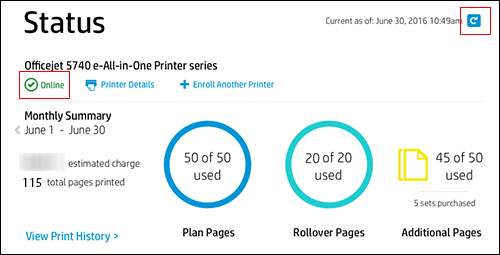
    If the printer status is not online, make sure your printer is turned on and connected to the network, then click the refresh icon again.

    Figure : Clicking the refresh icon and making sure the printer is online

    Clicking the refresh icon and making sure the printer is online
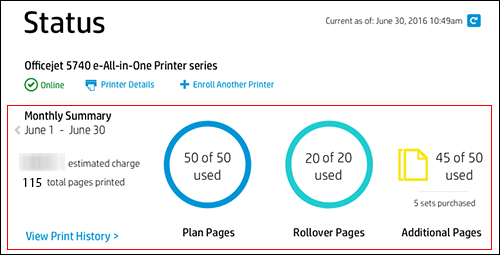
  3. Note the Plan, Rollover, and any Additional pages printed. If no Additional pages have been printed, that icon does not appear.

    Figure : Reviewing Plan, Rollover, and Additional pages

    Reviewing Plan, Rollover, and Additional pages
  4. Click View Print History in the Status area for more information about each print job, such as the date and number of pages printed.

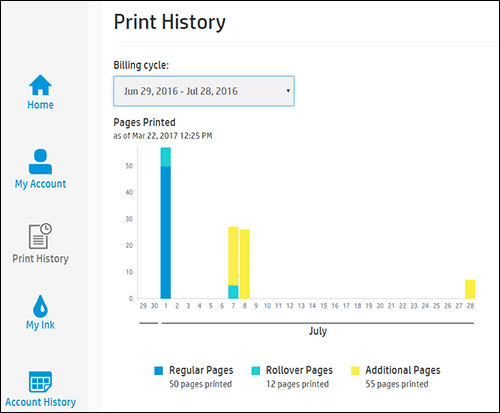
    The printing history for the current billing cycle displays. To view a previous billing cycle, click the Billing Cycle drop-down menu, and then select a billing cycle.

    Figure : Viewing Print History

    Viewing Print History

    If you want to make sure your print jobs have been recorded, you can send a print job to the printer, and then repeat the steps.


Refer this article to know more information about instant ink page count issues. Click Here


Hope this answers your query!


I hope you have a great day! 🙂


Please click “Accept as Solution” if you feel my post solved your issue, it will help others find the solution.

Click the “Kudos, Thumbs Up" on the bottom right to say “Thanks” for helping!

A4Apollo
I am an HP Employee

HP Recommended

what you have told me is not true evidently, Today I received an email from HP saying I have gone over my 100 pages of printing but it's no problem because I am in the trial period. The problem is I am NOT using instant print cartridges because I have not received a shipment yet. So the count is being doneon cartridges I purchased!


I did a chat with customer service and she insisted that I had instant ink cartridges. Again, I purchased this cartridg! So she said well it didn't matter because I'm in the trail period. Well it does matter! If HP is counting pages on a cartridge I purchased then what is the point of this sytem????


HP Recommended

Hi @joycesg


I will take this forward.

I need some information about your Instant Ink Subscription.


Since the instant ink account details are confidential, please send me the required information via private message.
 

I am sending you a private message with the information required. Please check the mailbox icon at the top-right corner of this screen.


Please check your Private message icon on the upper right corner of your HP Forums profile.

Next, to your profile Name, you should see a little blue envelope, please click on it.


Cheers

MathewT
I am an HP Employee 

† The opinions expressed above are the personal opinions of the authors, not of HP. By using this site, you accept the <a href="https://www8.hp.com/us/en/terms-of-use.html" class="udrlinesmall">Terms of Use</a> and <a href="/t5/custom/page/page-id/hp.rulespage" class="udrlinesmall"> Rules of Participation</a>.