
-
×InformationNeed Windows 11 help?Check documents on compatibility, FAQs, upgrade information and available fixes.
Windows 11 Support Center. -
-
×InformationNeed Windows 11 help?Check documents on compatibility, FAQs, upgrade information and available fixes.
Windows 11 Support Center. -
- HP Community
- Printers
- Printing Errors or Lights & Stuck Print Jobs
- Will not print envelopes

Create an account on the HP Community to personalize your profile and ask a question
Your account also allows you to connect with HP support faster, access a personal dashboard to manage all of your devices in one place, view warranty information, case status and more.
Check some of the most frequent questions about Instant Ink: HP INSTANT INK, HP+ PLANS: INK AND TONER.
Check out our Black or Color Ink Not Printing, Other Print Quality Issues info about: Print quality and Cartridge Issues.

It has been a while since anyone has replied. Simply ask a new question if you would like to start the discussion again.

06-20-2024 06:45 AM
 HP Recommended
Product: HP OfficeJet Pro 9025 All-in-One Printer
Operating System: Ubuntu LTS
My printer (Officejet 9025) suddenly decided to not print envelopes. It prints letters on letter paper from the bottom tray OK. But when I put an envelope in the top tray and set the guides it feeds the envelope but does not print. I reports a paper jam . There is no jam but the envelope has stopped just before it reaches the print head. Envelope size is correctly set to #10. This is a new problem - a few days ago it printed envelopes fine. What is wrong???
6 REPLIES 6


06-20-2024 09:22 AM
HP Recommended
Welcome to the HP English Community --
What, if anything, have you tried so far to resolve the issue?
For example,
Restart the printer - When the printer is idle (not printing) simply switch off - wait a few seconds - switch on
If not enough, kick it again, this time ---
Reset the printer - unplug - wait at least a minute - plug in to standard wall outlet - wait a while for the printer to fully boot
Just before checking EWS,
Reload the paper in both trays - close trays
AND
Check that EWS is still aware of the Tray and Paper Settings
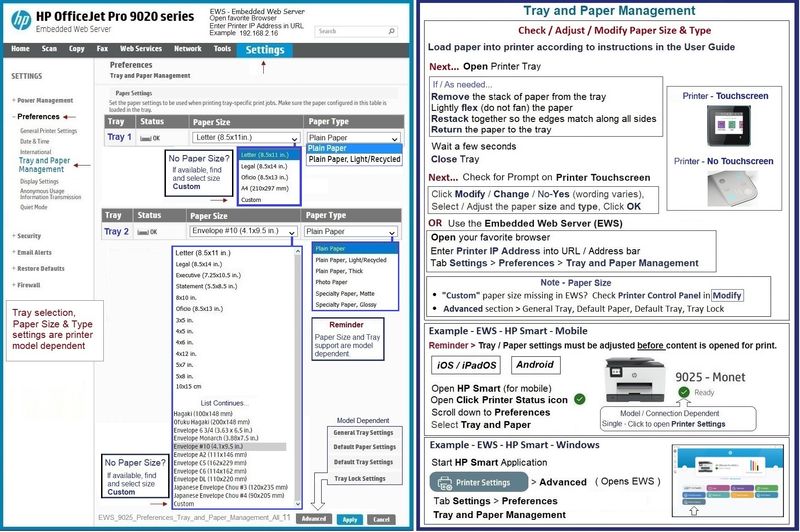

Finally,
In your job configuration,
If there is a setting for it,
If the Source is set to Auto, try selecting the Tray #
=--=--=--=--=--=--=--=--=--=--=--=--=--=--=--=--=--=
References / Resources
HP Printer Home Page - References and Resources
Learn about your Printer - Solve Problems
“Things that are your printer”
When the website support page opens, Select (as available) a Category > Topic > Subtopic
NOTE: Content depends on device type and Operating System
Categories: Warranty Check, Alerts, Troubleshooting, Ink & Paper, HP Software & Drivers / Firmware Updates, Setup & User Guides, Product Specifications, Account & Registration, Warranty & Repair
Open
Enter the device type and model name of your HP product
OR
Select a saved product from HP Account Dashboard
OR
HP OfficeJet Pro 9025 All-in-One Printer
Thank you for participating in the HP Community --
People who own, use, and support HP devices.
Click Yes to say Thank You
Question / Concern Answered, Click my Post "Accept as Solution"
Dragon-Fur


06-20-2024 11:57 AM
HP Recommended
Thank you for the suggestions, BUT:
I tried recycling the power and unplugging several times (even overnight) - no help.
Checked the tray settings on both the printer display screen and on EWS - both correct - plain paper in lower tray, #10 envelope in upper.
Set tray to Alternate.
The envelope feeds without jamming, but stops just short of the print heads and reports a paper jam. Letters printed on letter paper on the bottom tray print OK.
06-20-2024 12:18 PM
HP Recommended
You are welcome.
I don't have any way to check Ubuntu print job setup -
I suspect, since you were able to print before, that the issue is not the print job configuration.
You could try cleaning the printer -- I recently retired a nice OfficeJet Pro 9025 -
The printer did most anything I wanted from it as long as it was kept clean, clean, clean.
Princess level clean. Fussy printer.
Check the back of the tray for any obstacles -- remove the tray if possible and check.
Trouble Shooting Document
HP OfficeJet Pro 9010, 9020 printers - Paper Jam error
Yeah, "BUT..."
Should I think of anything else, I will post back.
Thank you for participating in the HP Community --
People who own, use, and support HP devices.
Click Yes to say Thank You
Question / Concern Answered, Click my Post "Accept as Solution"
Dragon-Fur
06-20-2024 01:00 PM
HP Recommended
Might need a harder kick.
?
"Not-HP people" are not permitted to post anything that might harm the printer.
Too, there is the chance that I've missed something.
What else?
There is a deeper reset available --
Most of the time, it's great.
Once in a while, even having done everything right, not-so-much.
An agent can offer such guidance.
I've notified the Moderators that additional help would be appreciated.
Should there be a response look for a message here before the agent uses other means to contact you.
Thank you for participating in the HP Community --
People who own, use, and support HP devices.
Click Yes to say Thank You
Question / Concern Answered, Click my Post "Accept as Solution"
Dragon-Fur

Be alert for scammers posting fake support phone numbers and/or email addresses on the community.
If you think you have received a fake HP Support message, please report it to us by clicking on "Flag Post".
† The opinions expressed above are the personal opinions of the authors, not of HP. By using this site, you accept the Terms of Use and Rules of Participation.


Didn't find what you were looking for?
Ask the community
† The opinions expressed above are the personal opinions of the authors, not of HP. By using this site, you accept the <a href="https://www8.hp.com/us/en/terms-of-use.html" class="udrlinesmall">Terms of Use</a> and <a href="/t5/custom/page/page-id/hp.rulespage" class="udrlinesmall"> Rules of Participation</a>.