• ×
    Information
    Need Windows 11 help?
    Check documents on compatibility, FAQs, upgrade information and available fixes.
    Windows 11 Support Center.
  • post a message
  • ×
    Information
    Need Windows 11 help?
    Check documents on compatibility, FAQs, upgrade information and available fixes.
    Windows 11 Support Center.
  • post a message
Guidelines
Here is the solution for Blue screen error 83C0000B on HP OfficeJet Pro 8010e, 9020e Printer Series: Click here to view.
Check some of the most frequent questions about Instant Ink: HP INSTANT INK, HP+ PLANS: INK AND TONER.


Check out our Black or Color Ink Not Printing, Other Print Quality Issues info about: Print quality and Cartridge Issues.
HP Recommended
HP Officejet pro 8500A plus
Microsoft Windows 10 (64-bit)

How do I delete email addresses that are in the HP printers address book when I don't want them anymore. I can add email addresses, just don't know how to delete them.

Please and thanks

Suzanne

1 REPLY 1
HP Recommended

@Suzi16 


The first place to look for help is your User Guide.  Search for the keyword(s) for which you are seeking information.


If you want to remove email addresses used with ePrint, log into your HP Connected account to find the "allowed senders" list.  You can remove the address(es) you no longer need.


If the feature is supported on your printer...

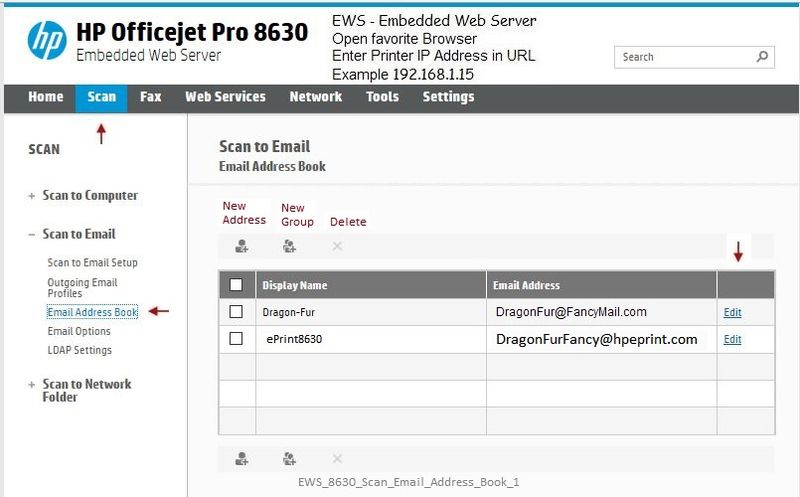
If the Embedded Web Server (EWS) is aware of the address, for example, if the address is in a profile, these can be edited / removed from the appropriate tab / setting.  For example, you might have one or more profiles in Scan to Email > Email Address Book


Select / HIghlight the address > click the X to remove


Example

Open your favorite browser > type / enter Printer IP address into URL / Address bar


EWS_8630_Scan_Email_Address_Book_1EWS_8630_Scan_Email_Address_Book_1 


Reference and Resources – Places to find help and learn about your Printer

Printer Homepage – “Things that are your printer”

Drivers / Software / Firmware Updates, Videos, Bulletins/Notices, How-to, Troubleshooting, User Guides, Product Information, more

HP Officejet Pro 8500A Plus e-All-in-One Printer - A910g


Thank you for participating in the HP Community Forum.

We are a world community of HP enthusiasts dedicated to supporting HP technology.

Click Thumbs Up on a post to say Thank You!

Answered? Click post "Accept as Solution" to help others find it.


Dragon-Fur

† The opinions expressed above are the personal opinions of the authors, not of HP. By using this site, you accept the <a href="https://www8.hp.com/us/en/terms-of-use.html" class="udrlinesmall">Terms of Use</a> and <a href="/t5/custom/page/page-id/hp.rulespage" class="udrlinesmall"> Rules of Participation</a>.