• ×
    Information
    Need Windows 11 help?
    Check documents on compatibility, FAQs, upgrade information and available fixes.
    Windows 11 Support Center.
  • post a message
  • ×
    Information
    Need Windows 11 help?
    Check documents on compatibility, FAQs, upgrade information and available fixes.
    Windows 11 Support Center.
  • post a message
Guidelines
Here is the solution for Blue screen error 83C0000B on HP OfficeJet Pro 8010e, 9020e Printer Series: Click here to view.
Check some of the most frequent questions about Instant Ink: HP INSTANT INK, HP+ PLANS: INK AND TONER.


Check out our Black or Color Ink Not Printing, Other Print Quality Issues info about: Print quality and Cartridge Issues.
HP Recommended
officejet pro 6968
Microsoft Windows 10 (64-bit)

Cannot find how to reset my printer date and time that shows on faxes...no instructions in manual at all.

1 REPLY 1
HP Recommended

@mcoffin 


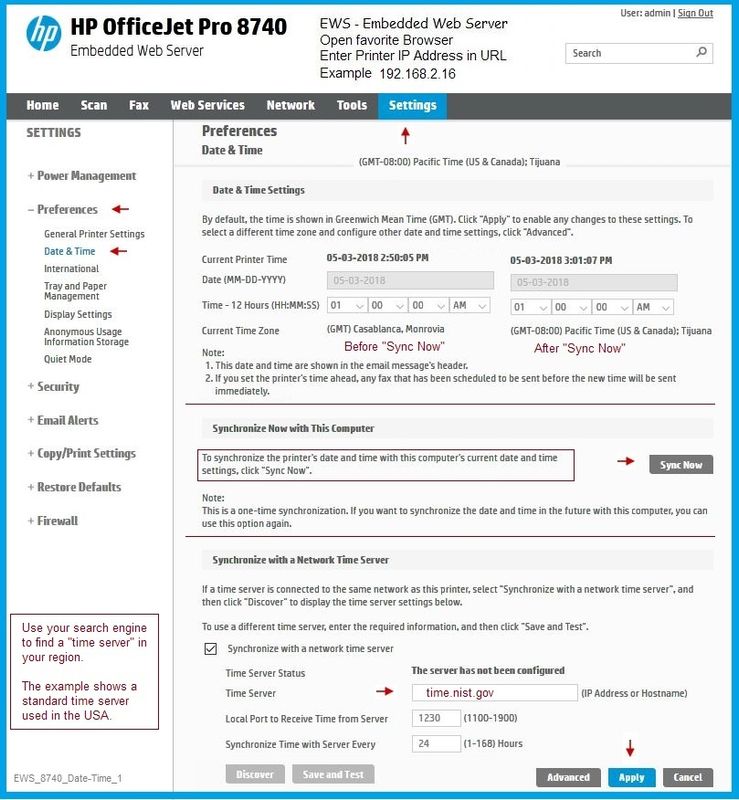
You may find the Date / Time settings in the Embedded Web Server (EWS).

I would guess that if the Date / Time is incorrect on the printer, this also impacts the fax results.


Example

Open your favorite browser > type / enter Printer IP address into URL / Address bar

Tab Settings > Preferences > Date & Time


Example (based on two printers, including the example below - your EWS setup / behavior may be different)

Officejet Pro 8740 > EWS > Date & Time

EWS_8740_Date-Time_1EWS_8740_Date-Time_1


Reference and Resources – Places to find (more) help and learn about your Printer

Clarification of terms and "what the printer can do" (Specifications)

Printer Homepage – “Things that are your printer”

NOTE:  Content depends on device type and Operating System

HP Drivers / Software / Firmware Updates, How-to Videos, Bulletins/Notices, Lots of How-to Documents, Troubleshooting, Access to the Print and Scan Doctor (Windows), User Guides, Product Information, more

HP OfficeJet Pro 6968 All-in-One Printer

When the website support page opens, Select (as available) a Category > Topic > Subtopic


Thank you for participating in the HP Community Forum.

We are a world community of HP enthusiasts dedicated to supporting HP technology.

Click Thumbs Up on a post to say Thank You!

Answered? Select the relevant post "Accept as Solution" to help others find it.


Dragon-Fur

† The opinions expressed above are the personal opinions of the authors, not of HP. By using this site, you accept the <a href="https://www8.hp.com/us/en/terms-of-use.html" class="udrlinesmall">Terms of Use</a> and <a href="/t5/custom/page/page-id/hp.rulespage" class="udrlinesmall"> Rules of Participation</a>.