• ×
    Information
    Need Windows 11 help?
    Check documents on compatibility, FAQs, upgrade information and available fixes.
    Windows 11 Support Center.
  • post a message
  • ×
    Information
    Need Windows 11 help?
    Check documents on compatibility, FAQs, upgrade information and available fixes.
    Windows 11 Support Center.
  • post a message
Guidelines
Here is the solution for Blue screen error 83C0000B on HP OfficeJet Pro 8010e, 9020e Printer Series: Click here to view.
Check some of the most frequent questions about Instant Ink: HP INSTANT INK, HP+ PLANS: INK AND TONER.


Check out our Black or Color Ink Not Printing, Other Print Quality Issues info about: Print quality and Cartridge Issues.
HP Recommended
HP envy 5541

my printer wont print in colour from my lap top

1 REPLY 1
HP Recommended

@SuzyQ1959

Welcome to HP Forums, 
This is a great place to get support, find answers and tips. Thank you for posting your query. I'll be more than glad to help you out 🙂 


If you are able to print in color from another device but not your laptop, check the print settings.

For instruction, refer to steps 5 : Click here


If you are unable to print in color from all the devices, Clean the ink cartridges.


Note: Some print quality issues are caused by clogged printheads. Clean the ink cartridges from the printer control panel.

  1. Make sure you have loaded plain white U.S. letter or A4-sized paper into the paper tray.

  2. On the printer control panel, swipe the display to the left, and then touch Setup.

    The Setup menu displays.

  3. Touch Tools, and then touch Clean Cartridges.

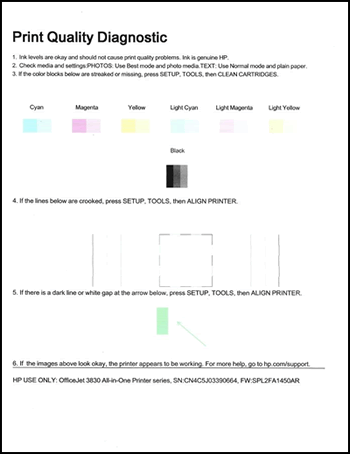
    The printer cleans the ink cartridges, then prints a Print Quality Diagnostic report.

    Figure : Example of the Print Quality Diagnostic report

    Image: Example of the Print Quality Diagnostic report

If you find any defect on the print quality report, try all the steps in the document suggested above.


If the print quality report is good and changing the print setting did not help, this may be a software issue, Please get back to me with the operating system version installed on your PC for further assistance.


Please click “Accept as Solution” if you feel my post solved your issue, it will help others find the solution.

Click the “Kudos, Thumbs Up" on the bottom right to say “Thanks” for helping!

Roopa-S
I am an HP Employee

† The opinions expressed above are the personal opinions of the authors, not of HP. By using this site, you accept the <a href="https://www8.hp.com/us/en/terms-of-use.html" class="udrlinesmall">Terms of Use</a> and <a href="/t5/custom/page/page-id/hp.rulespage" class="udrlinesmall"> Rules of Participation</a>.