
-
×InformationNeed Windows 11 help?Check documents on compatibility, FAQs, upgrade information and available fixes.
Windows 11 Support Center. -
-
×InformationNeed Windows 11 help?Check documents on compatibility, FAQs, upgrade information and available fixes.
Windows 11 Support Center. -
- HP Community
- Printers
- Scanning, Faxing, and Copying
- After the update to macOS 10.14 Mojave the app HP Scan for m...

Create an account on the HP Community to personalize your profile and ask a question
Your account also allows you to connect with HP support faster, access a personal dashboard to manage all of your devices in one place, view warranty information, case status and more.
Common problems HP Solution Center not working : Adobe Flash Player Error and Unable to scan
We would like to share some of the most frequently asked questions about HP Solution Center not working : Adobe Flash Player Error and Unable to Scan.

It has been a while since anyone has replied. Simply ask a new question if you would like to start the discussion again.



05-03-2019 07:10 PM
 HP Recommended
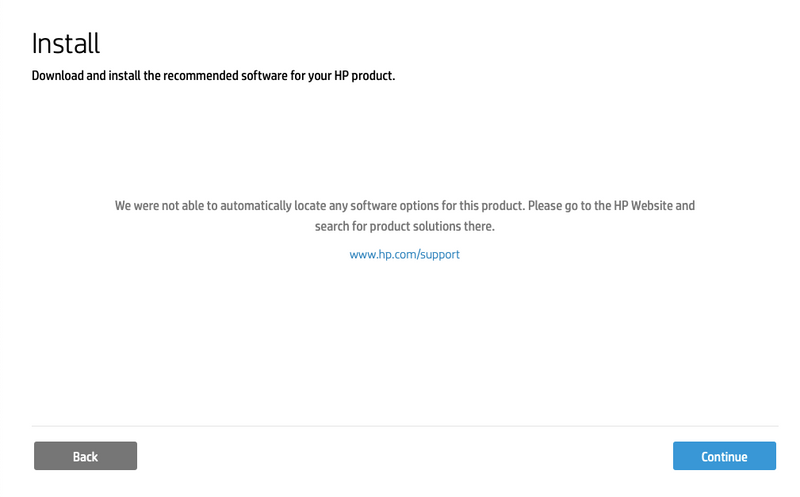
Hi again. Before I uninstall and reinstall the printer driver software I would like some clarification regarding Step 2 (9) where I am insturcted to go to 123.hp.com. My printer, HP Laserjet Professional M1212nf MFP is not listed in the drop down box of printers, so I then click on "My device is not listed" and HP Easy Start is automatically downloaded. when I run the install I get the message in the screenshot below which sends me in an endless loop. Given this, I am reluctant to uninstall the printer since it now prints, but doesn't scan. I don't want to lose the printer entirely.
05-04-2019 12:59 PM
HP Recommended
06-24-2019 08:56 PM
HP Recommended
Hi! I did already all what you suggested (uninstall, download, reboot, etc.), and still unable to scan. The same message appears and appears:
«HP Color LaserJet MFP M377dw is currently unavailable. Please check if it is turned on and connected, or try again later».
I can print without trouble. Your help will be highly appreciated.
Regards,
01-10-2020 02:03 PM
HP Recommended
I followed all the instructions multiple attempts. I have Mojave 10.15 and ever since I upgraded to Mojave the scanner doesn't communicate with my MAC. I just deleted the original HP Easy Scan software, went to HP and got a new driver, downloaded and same problem. The software will open, but when scanning, the scanner performs the scan, but the file never appears in the screen within HP Easy Scan. I again deleted the HP Easy Scan software, went to the link provided in your previous solution, and have the same issue. Then I deleted the software for a 3rd time, went to the Apple App Store app to download again, installed, and same issue. The HP Easy Scan software sees and recognized my computer, the scanner performs the scan (I'm sitting right next to it and hear it scan)...the software gets stuck at preparing to scan...and the file never shows up in the HP Easy Scan window.
01-11-2020 11:18 AM
HP Recommended
I think HP has pretty much abandoned Mac users. Catalina has been out for months (never mind the months of beta in which HP could have done something) and HP Easy Scan still hasn't been upgraded to support it. See the blog post here:

01-11-2020 11:28 AM - edited 01-11-2020 11:30 AM
HP Recommended
Yes, shame on HP. Users like Mabon, above, patiently tried to follow instructions from the HP employee Senan8606 . . . with no success. And Senan8606 appears to have vanished?
Disgraceful, HP!

Be alert for scammers posting fake support phone numbers and/or email addresses on the community.
If you think you have received a fake HP Support message, please report it to us by clicking on "Flag Post".
† The opinions expressed above are the personal opinions of the authors, not of HP. By using this site, you accept the Terms of Use and Rules of Participation.


Didn't find what you were looking for?
Ask the community
† The opinions expressed above are the personal opinions of the authors, not of HP. By using this site, you accept the <a href="https://www8.hp.com/us/en/terms-of-use.html" class="udrlinesmall">Terms of Use</a> and <a href="/t5/custom/page/page-id/hp.rulespage" class="udrlinesmall"> Rules of Participation</a>.