-
×InformationNeed Windows 11 help?Check documents on compatibility, FAQs, upgrade information and available fixes.
Windows 11 Support Center. -

-
×InformationNeed Windows 11 help?Check documents on compatibility, FAQs, upgrade information and available fixes.
Windows 11 Support Center. -
- HP Community
- Printers
- Scanning, Faxing, and Copying
- Digital Fax to Folder - User name or Password Incorrect Err...

Create an account on the HP Community to personalize your profile and ask a question
09-17-2019 09:13 PM
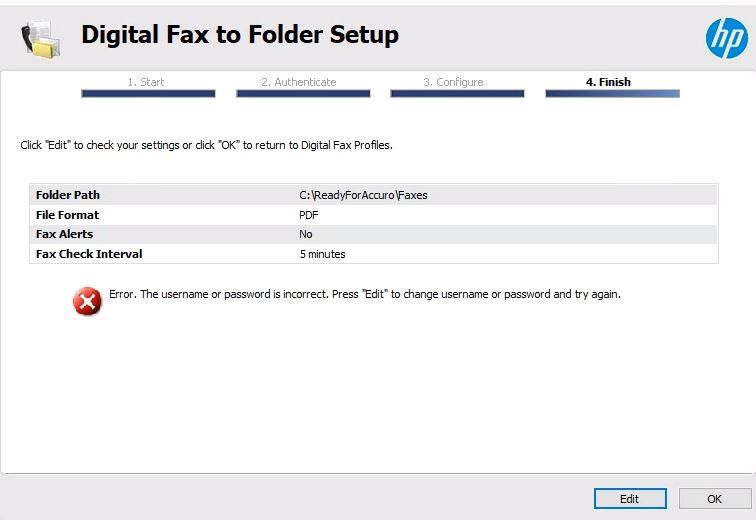
The setup to save faxes in the computer folder worked but something happened and it stopped working. First I tried to run again the Digital fax to Folder setup. The setup asked for password and I eneterd the password that I use for windows login and I got error that user or password is incorrect (during my the first installation I eneterd the same paswword and it worked till something happened that disabled the fax to PC). I tried to reinstall (I tried few times uninstalling and installing software downloadad from HP 123 ) but nothing works. I can Print, scan and fax from PC but cannot receive faxes in PC.
I tried another computer on the network and after installation the software and enetering Windows password (i Use the same password on these two computers) it worked. I can recefe faxes on this computer which means that there is someting wrong in my first computer. Something is preventing to recognize the password and I do not know how to reset it. I need the faxes to be saved on the first computer, the second computer that the faxes are now received is an old computer and I cannot use it for other works.
How to fix it so the Digital Fax to Folder will accept password that I use to log in to my windows
Solved! Go to Solution.
Accepted Solutions
09-21-2019 06:45 PM
This might require remote access of the computer to fix this issue.
As you have already tried these steps and still having the issue, I would personally suggest you contact our HP phone support for further assistance. If your product is Out of warranty then remember to choose the paid options to get the tech support number.
They might have multiple options to help you with this.
1) Click on this link - www.hp.com/contacthp/
2) Click on "Continue as guest".
3) Enter the serial of your device.
4) Select the country from the drop-down.
5) Click on "Show Options".
6)Fill the web-form. A case number and phone number will now populate for you.
To thank me for my efforts to help you, please mark my post as an accepted solution so that it benefits several others.
Cheers.
Sandytechy20
I am an HP Employee
09-20-2019 05:55 PM
Welcome to HP support community.
Which application are you using to setup digital fax?
Meanwhile:
Setup the digital fax again:
Search Windows for your printer model name and number, and then click the name in the search results. Depending on your printer, HP Printer Assistant or HP Solution Center opens.
-
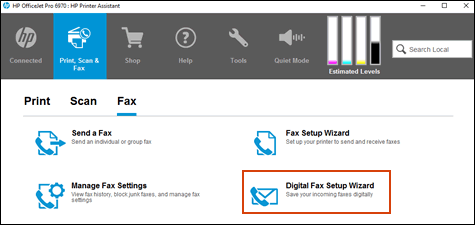
In Printer Assistant, click the Print, Scan & Fax tab, and then click Digital Fax Setup Wizard.
-
In Solution Center, click Settings > Fax Settings > More Fax Settings > Digital Fax Setup.
Follow the on-screen instructions for the selected setup type. To see if your printer supports additional Digital Fax options, look in the Fax or Setup menus on the printer control panel.

I hope that helps.
To thank me for my efforts to help you, please mark my post as an accepted solution so that it benefits several others.
Cheers.
Sandytechy20
I am an HP Employee
09-21-2019 08:24 AM
The screen shot with the error that I included in my first e-mail is from the Printer Assistant. What you suggest I already did fewtimes with installing and uninstalling all the setting and software and it does not work. I always get the message when I do Digital Fax Setup, that my user or password is incorrect. I had no problem do setting this the same way on another computer on the network. I ned however to store the faxes and the computer that is giving me the error.
as a user I tried to use what the Digital Fax Settupautomaticaly diplays (this worked on the other computer) and pasword is the password that I log in to windows when computer is booting. That did not work. therefore I tried to enter the user name exactly what is in the windows login and that also did not work.
There is something that causes that the Digital Fax Setup is not recognizing valid windows user and password. maybe this is in the registry. Do you know hot to resteit and find in the registry
09-21-2019 06:45 PM
This might require remote access of the computer to fix this issue.
As you have already tried these steps and still having the issue, I would personally suggest you contact our HP phone support for further assistance. If your product is Out of warranty then remember to choose the paid options to get the tech support number.
They might have multiple options to help you with this.
1) Click on this link - www.hp.com/contacthp/
2) Click on "Continue as guest".
3) Enter the serial of your device.
4) Select the country from the drop-down.
5) Click on "Show Options".
6)Fill the web-form. A case number and phone number will now populate for you.
To thank me for my efforts to help you, please mark my post as an accepted solution so that it benefits several others.
Cheers.
Sandytechy20
I am an HP Employee