
-
×InformationNeed Windows 11 help?Check documents on compatibility, FAQs, upgrade information and available fixes.
Windows 11 Support Center. -
-
×InformationNeed Windows 11 help?Check documents on compatibility, FAQs, upgrade information and available fixes.
Windows 11 Support Center. -
- HP Community
- Printers
- Scanning, Faxing, and Copying
- HP OfficeJet Pro 9015 scan does not save to searchable PDF

Create an account on the HP Community to personalize your profile and ask a question
Your account also allows you to connect with HP support faster, access a personal dashboard to manage all of your devices in one place, view warranty information, case status and more.
Common problems HP Solution Center not working : Adobe Flash Player Error and Unable to scan
We would like to share some of the most frequently asked questions about HP Solution Center not working : Adobe Flash Player Error and Unable to Scan.

It has been a while since anyone has replied. Simply ask a new question if you would like to start the discussion again.

11-30-2020 12:28 PM
 HP Recommended
Product: HP OfficeJet Pro 9015
Operating System: Microsoft Windows 10 (64-bit)
I have a 5 month old HP OfficeJet Pro 9015 and I cannot scan to a searchable PDF. When I scan via HP Smart, the program gives me two choices only: PDF and JPEG and the PDF is not searchable. My prior HP's gave me a menu to choose from that included scanning to a PDF, searchable PDF, RTF's, and other formats. Is there another HP program that I should download to be able to scan to searchable PDF's?
Jeff Wolfe
Solved! Go to Solution.
1 ACCEPTED SOLUTION
Accepted Solutions


12-01-2020 12:45 AM
HP Recommended
Hi,
Thanks for using the HP Support Community.
Can you download and install the FULL featured printer software from HP for your operating system:
https://support.hp.com/us-en/drivers/selfservice/swdetails/hp-officejet-pro-9010-all-in-one-printer-...
Once you have downloaded and installed the FULL feature software, you will be able to print and scan.
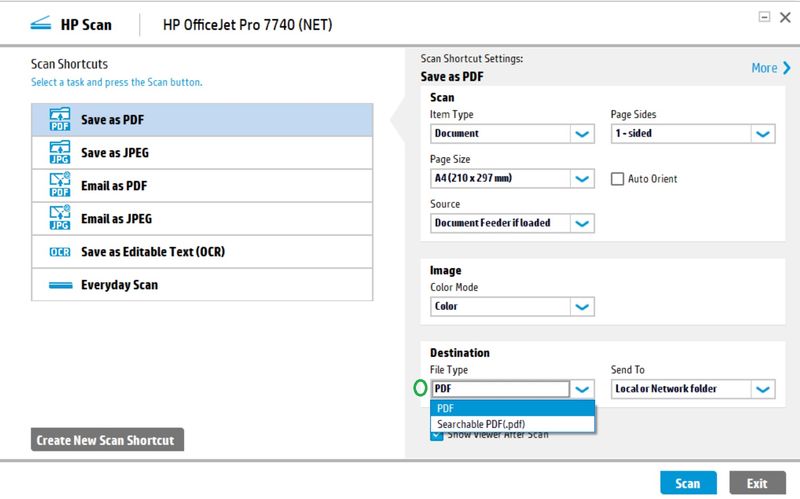
Under the FULL software HP Scan, there is a PDF Searchable option (under File Type).
Example:
Hope that helps.
I am an HP Employee. Although I am speaking for myself and not for HP.
Click Helpful = Yes to say Thank You.
Question / Concern Answered, Click "Accept as Solution"

Click Helpful = Yes to say Thank You.
Question / Concern Answered, Click "Accept as Solution"
6 REPLIES 6
12-01-2020 12:45 AM
HP Recommended
Hi,
Thanks for using the HP Support Community.
Can you download and install the FULL featured printer software from HP for your operating system:
https://support.hp.com/us-en/drivers/selfservice/swdetails/hp-officejet-pro-9010-all-in-one-printer-...
Once you have downloaded and installed the FULL feature software, you will be able to print and scan.
Under the FULL software HP Scan, there is a PDF Searchable option (under File Type).
Example:
Hope that helps.
I am an HP Employee. Although I am speaking for myself and not for HP.
Click Helpful = Yes to say Thank You.
Question / Concern Answered, Click "Accept as Solution"
Click Helpful = Yes to say Thank You.
Question / Concern Answered, Click "Accept as Solution"
12-02-2020 02:18 PM
HP Recommended
Hi
Tried that. I downloaded the update but when I go to install it, for some reason I am unable to choose the printer. I can highlight the printer name and it highlights in blue but when I click on the choice box, it does not select the printer and nothing happens (i.e. a check mark does not appear in the box) and I can go no further. Any suggestions?
Jeff

12-02-2020 10:23 PM
HP Recommended
Hi,
Is the printer connected to the same network as the PC? (e.g. 2.4GHz or 5 GHz).
If it's not, can connect the printer to the same network?
This resource (example) should be useful to guide you through the wireless setup wizard:
https://www.youtube.com/watch?v=x1IOORiEbpQ
Hope that helps!
I am an HP Employee. Although I am speaking for myself and not for HP.
Click Helpful = Yes to say Thank You.
Question / Concern Answered, Click "Accept as Solution"
Click Helpful = Yes to say Thank You.
Question / Concern Answered, Click "Accept as Solution"

Click on the link to subscribe and get the latest video uploads: https://goo.gl/y4Rcn1 This tutorial shows you how to connect your HP Printer to a wireless network using the "Wireless Setup Wizard" Please note that you will still need to download & install the printer software in order to use it ...
12-03-2020 10:50 AM
HP Recommended
Hi
Yes the printer is connected to my PC via the network. When I try proceed to install the downloaded program, I get to a dialog box populated with the printer's name. It says
"Welcome to the HP printer update"
"select the printer you wish to update"
But when I click on the little selection box next to the printer's name, nothing happens. A cannot get a check mark to appear in the box.. The only highlighted options are the <REFRESH> and <CANCEL> buttons which work as expected (they refresh the printer choice or cancel out of the program)
I've had several HP printers before and had no problem loading the drivers in my present computer.
For my uses, the ability to create searchable PDF's are quite important.
I am running WIndows 10
Thanks for your help
Jeff
12-03-2020 07:26 PM
HP Recommended
Hi @JeffWolfe
Not sure why you're getting a "Printer update", it should just install.
How to Uninstall Download & Reinstall a Printer software
https://goo.gl/jeDsAm
Hope that helps!
I am an HP Employee. Although I am speaking for myself and not for HP.
Click Helpful = Yes to say Thank You.
Question / Concern Answered, Click "Accept as Solution"
Click Helpful = Yes to say Thank You.
Question / Concern Answered, Click "Accept as Solution"
12-06-2020 10:28 AM
HP Recommended
Hi
Problem solved
I had downloaded the wrong driver. I installed HP Smart Driver and then the HP OfficeJet Pro 9010 EasyStart Printer Setup Software – Offline Use Only without success. I finally installed the correct driver (HP Easy Start Printer Setup Software 12.1.5139.03) and it works fine. Thanks for your help
Jeff

Be alert for scammers posting fake support phone numbers and/or email addresses on the community.
If you think you have received a fake HP Support message, please report it to us by clicking on "Flag Post".
† The opinions expressed above are the personal opinions of the authors, not of HP. By using this site, you accept the Terms of Use and Rules of Participation.


Didn't find what you were looking for?
Ask the community
† The opinions expressed above are the personal opinions of the authors, not of HP. By using this site, you accept the <a href="https://www8.hp.com/us/en/terms-of-use.html" class="udrlinesmall">Terms of Use</a> and <a href="/t5/custom/page/page-id/hp.rulespage" class="udrlinesmall"> Rules of Participation</a>.