-
×InformationNeed Windows 11 help?Check documents on compatibility, FAQs, upgrade information and available fixes.
Windows 11 Support Center. -

-
×InformationNeed Windows 11 help?Check documents on compatibility, FAQs, upgrade information and available fixes.
Windows 11 Support Center. -
- HP Community
- Printers
- Scanning, Faxing, and Copying
- Re: HP Officejet Scanning error

Create an account on the HP Community to personalize your profile and ask a question
11-10-2020 11:06 AM - edited 11-10-2020 12:22 PM
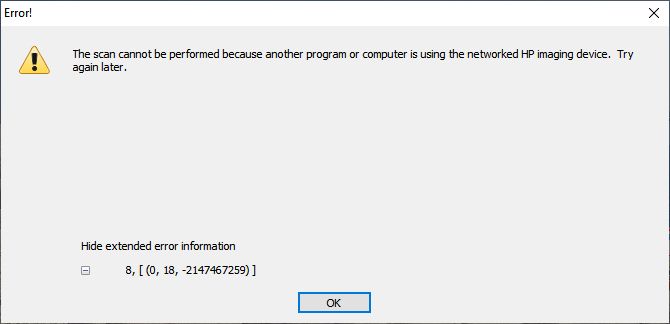
I currently have a HP Officejet 4500 G510n-z printer which works fine in printing, but does not scan at all. There is an error in trying to scan. I have reinstalled the complete driver package 3 times and have installed and ran the HP print and scan doctor with no success. Here is the error screen with the error code I am getting. Please help!!
Solved! Go to Solution.
Accepted Solutions
11-10-2020 02:20 PM
Here is the fix!!!
Piggybacking off of what the closest answer was so far, I opened task manager and went to the services tab, search for "stisvc" and then right click on that and click "Go to details" and in the middle of the list of "svchost.exe" items, one will be highlighted, don't change selection, just click "End task" in the bottom right, and try run your scan shortcut again and see if it works.
11-10-2020 02:20 PM
Here is the fix!!!
Piggybacking off of what the closest answer was so far, I opened task manager and went to the services tab, search for "stisvc" and then right click on that and click "Go to details" and in the middle of the list of "svchost.exe" items, one will be highlighted, don't change selection, just click "End task" in the bottom right, and try run your scan shortcut again and see if it works.
12-21-2020 10:32 AM - edited 12-21-2020 08:29 PM
I have think I have solved the problem. Somebody said before that he dropped the printer by accident and it started to scan and copy. So I banged it and it worked. But that quit working.
My HP service tech service showed me how to power cycle the printer and restart the computer it worked, but that did not always work.
2 days ago I received a message on my printer screen. It said there was a carriage jam. So I carefully moved the carriage over to the left and back and it is still working. We will see how long this works.
HINT: The scanner in the printer will not work. HP installed HP Smart for me. It does more than just scan and it works fine for scanning on the HP 4630 Officejet printer. The copy works by doing it straight from the printer.
I will see how long this works.
Hope it works for you.
Bonnie