
-
×InformationNeed Windows 11 help?Check documents on compatibility, FAQs, upgrade information and available fixes.
Windows 11 Support Center. -
-
×InformationNeed Windows 11 help?Check documents on compatibility, FAQs, upgrade information and available fixes.
Windows 11 Support Center. -
- HP Community
- Printers
- Scanning, Faxing, and Copying
- Photosmart C309g-m unable to scan

Create an account on the HP Community to personalize your profile and ask a question
Your account also allows you to connect with HP support faster, access a personal dashboard to manage all of your devices in one place, view warranty information, case status and more.
Common problems HP Solution Center not working : Adobe Flash Player Error and Unable to scan
We would like to share some of the most frequently asked questions about HP Solution Center not working : Adobe Flash Player Error and Unable to Scan.

It has been a while since anyone has replied. Simply ask a new question if you would like to start the discussion again.

01-22-2021
02:38 PM
- last edited on
07-14-2021
04:36 PM
by
 RodrigoB
 HP Recommended
Product: HP Photosmart Premium C309g
Operating System: Other
We own a HP Photosmart Premium C309g - yes I know it's old and printers don't last forever, but the device itself is in perfect working order.
After updating to MAC OS X, I lost all connectivity functionality (I could still copy or print a quick sheet, but nothing from my computer).
After troubleshooting and updating to macOS 11.1, I was able to regain printer functionality, but I still cannot scan (or access any utility features, or use the hardware from any device other than my profile on our computer).
I can access the hardware via IP, and can access Webscan. If I click 'preview', the scanner will initiate and an image will preview, however, the scan functionality is inoperative.
The mac Image Capture app does not locate any installed devices.
I can connect to the printer though the mac print and scan utility, but I can only print, not scan.
I installed the HP uninstaller and followed all steps.
I uninstalled and reinstalled HP easy scan (with updates to support 11.1) but HP easy scan will not locate a scanner (currently online, working, and directly connected to my computer via USB).
I uninstalled that and installed HP Easy Start. It promptly detected my printer/scanner, but when I try to access it, it displays 'Printer Offline' (once again currently online, working, and directly connected to my computer via USB).
I removed the printer from printers & scanners and added it choosing Generic PCL Printer, HP DeskJet Series and HP LaserJet Series printer software... This had no noticeable impact.
I've shutdown and restarted, directly connected, over network and tried wi-fi... no impact.
Solved! Go to Solution.
1 ACCEPTED SOLUTION
Accepted Solutions


01-23-2021 09:21 AM
HP Recommended
Hi,
Please try following below steps and let me know how it goes:
If that fails too, uninstall the software again:
Next, try downloading below drivers to your Mac, but be sure to carefully go through the next steps and install it as follows:
https://ftp.hp.com/pub/softlib/software12/HP_Quick_Start/osx/Installations/Essentials/ASU/HewlettPac...
While holding the CTRL key, right-click HewlettPackardPrinterDrivers.pkg and select Open, then follow the steps on screen to complete the installation.
From System Preferences select Security & Privacy and click the unlock button, then provide your user information and click the Allow button to allow the HP Software installation.
Power on the printer and ensure it is connected, open System Preferences > Printers & scanners and press the Plus sign.
Select your printer, then be sure to select your printer model within the Use drop-down menu and press on Add, then try printing.
now check for any difference.
Shlomi


Click the Yes button to reply that the response was helpful or to say thanks.
If my post resolve your problem please mark it as an Accepted Solution 🙂
3 REPLIES 3
01-23-2021 09:21 AM
HP Recommended
Hi,
Please try following below steps and let me know how it goes:
If that fails too, uninstall the software again:
Next, try downloading below drivers to your Mac, but be sure to carefully go through the next steps and install it as follows:
https://ftp.hp.com/pub/softlib/software12/HP_Quick_Start/osx/Installations/Essentials/ASU/HewlettPac...
While holding the CTRL key, right-click HewlettPackardPrinterDrivers.pkg and select Open, then follow the steps on screen to complete the installation.
From System Preferences select Security & Privacy and click the unlock button, then provide your user information and click the Allow button to allow the HP Software installation.
Power on the printer and ensure it is connected, open System Preferences > Printers & scanners and press the Plus sign.
Select your printer, then be sure to select your printer model within the Use drop-down menu and press on Add, then try printing.
now check for any difference.
Shlomi
Click the Yes button to reply that the response was helpful or to say thanks.
If my post resolve your problem please mark it as an Accepted Solution 🙂
01-25-2021 02:04 PM
HP Recommended
Hi ShlomiL,
thank you for your quick reply!
I followed all the steps outlined in https://h30434.www3.hp.com/t5/Printers-Knowledge-Base/Having-problems-installing-older-HP-Printers-o....
My printer, HP Photosmart Premium C309g-m was on the list.
I installed the driver https://support.apple.com/kb/DL1888?locale=en_US successfully. (I would like to point out that I searched the hp site (and Google) for hours looking for an updated driver to resolve my issue...)
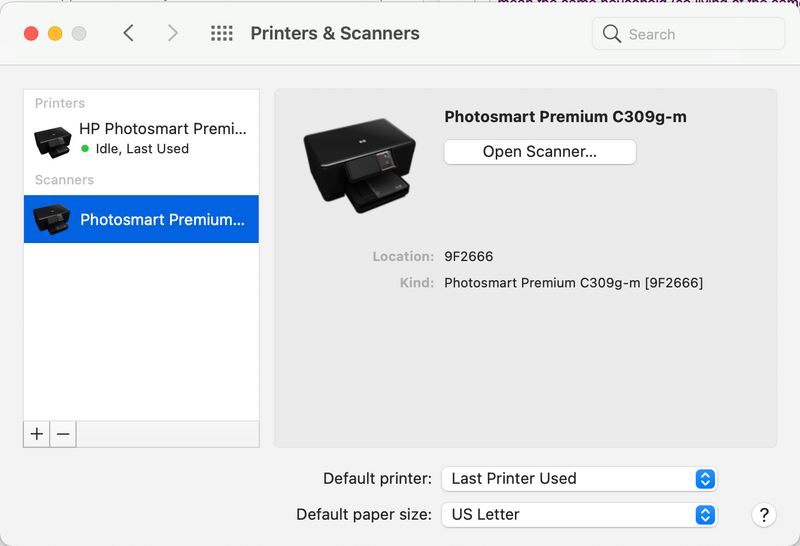
After installing the new driver and adding the printer, Printer & scanners did recognize my HP Photosmart Premium C309g-m as a scanner!
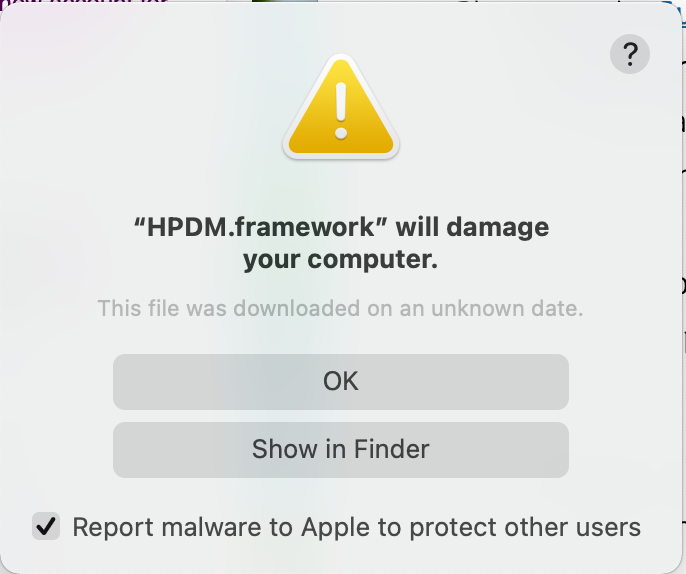
However, and error message “HPDM.framework” will damage your computer. continuously populates and the I try to open the scanner, an error message of "the operation couldn't bear completed. (com.apple.imagecapture error 704.) (704)) and I am still unable to scan.

01-25-2021 02:43 PM
HP Recommended
Hi ShlomiL,
I uninstalled the software again, the followed the second avenue to try.
I downloaded and installed https://ftp.hp.com/pub/softlib/software12/HP_Quick_Start/osx/Installations/Essentials/ASU/HewlettPac...
and received and error message: HewlettePackardPrinterDrivers.pkg can't be opened because Apple cannot check it for malicious software.
I clicked open and installed the driver.
The main difference between this and any other HP driver install was this time my printer was detected as a "multifunction printer" instead of just a printer.
I opened the scanner and was able to utilize the full functionality of the scanner and I was able to print (connected via USB). I could also access the supply levels from the printer and scanner utility, which I've never been able to access prior.
I haven't attempted wireless printing or printing from a device, but I am simply thrilled to be able to scan again.
THANK YOU SO MUCH!!!
Alicia

Be alert for scammers posting fake support phone numbers and/or email addresses on the community.
If you think you have received a fake HP Support message, please report it to us by clicking on "Flag Post".
† The opinions expressed above are the personal opinions of the authors, not of HP. By using this site, you accept the Terms of Use and Rules of Participation.


Didn't find what you were looking for?
Ask the community
† The opinions expressed above are the personal opinions of the authors, not of HP. By using this site, you accept the <a href="https://www8.hp.com/us/en/terms-of-use.html" class="udrlinesmall">Terms of Use</a> and <a href="/t5/custom/page/page-id/hp.rulespage" class="udrlinesmall"> Rules of Participation</a>.